> ## Documentation Index
> Fetch the complete documentation index at: https://docs.autosend.com/llms.txt
> Use this file to discover all available pages before exploring further.
# Changelog
> The latest updates, new features, improvements, and fixes shipped to AutoSend.
export const APP_PATHS = {
home: '/',
quickstart: '/quickstart',
domainConfiguration: '/domain',
apiReference: '/api-reference',
sendEmail: '/api-reference/mails/send',
bulkSendEmail: '/api-reference/mails/bulk',
upsertContactApiRef: '/api-reference/contacts/upsert-contact',
transactional: '/transactional-emails',
emailActivity: '/transactional-emails/email-activity',
emailTemplates: '/transactional-emails/email-templates',
sendingEmail: '/quickstart/email-using-api',
transactionalTroubleshooting: '/transactional-emails/troubleshooting',
marketing: '/marketing-emails',
campaigns: '/marketing-emails/campaigns',
contacts: '/marketing-emails/contacts',
contactsIntroduction: '/marketing-emails/contacts/introduction',
contactsImportCsv: '/marketing-emails/contacts/import-csv',
contactsLists: '/marketing-emails/contacts/lists',
contactsSegments: '/marketing-emails/contacts/segments',
contactsCustomFields: '/marketing-emails/contacts/contact-properties',
contactsContactProperties: '/marketing-emails/contacts/contact-properties',
createContactPropertyApiRef: '/api-reference/contact-properties/create',
listContactPropertiesApiRef: '/api-reference/contact-properties/list',
getContactPropertyApiRef: '/api-reference/contact-properties/get-by-name',
deleteContactPropertyApiRef: '/api-reference/contact-properties/delete',
sender: '/marketing-emails/sender',
unsubscribeGroups: '/others/unsubscribe-groups',
webhookIntroduction: '/others/webhooks/introduction',
webhookEventType: '/others/webhooks/event-type',
webhookRetries: '/others/webhooks/retries',
webhookVerifyRequests: '/others/webhooks/verify-requests',
dynamicTemplates: '/dynamic-templates',
guides: '/guides',
sitemap: '/sitemap.xml',
team: '/others/team',
automations: '/automations',
events: '/automations/events',
sendEventApi: '/api-reference/events/send-event',
smtpIntroduction: '/quickstart/smtp',
betterAuth: '/guides/better-auth',
convexGuide: '/guides/convex',
templateVariables: '/transactional-emails/variables',
suppressions: '/others/suppressions',
rateLimit: '/api-reference/rate-limit',
nodejsSdk: '/sdk/nodejs',
smtpIntegrationGuides: '/guides/smtp',
apiKeys: '/api-keys',
encryptedPayloads: '/others/encrypted-payloads',
apiReferenceIntroduction: '/api-reference/introduction',
lovableGuide: '/ai/integrations/lovable',
aiIntroduction: '/ai/introduction',
aiSkills: '/ai/skills',
aiMcpServer: '/ai/mcp-server',
aiLovable: '/ai/integrations/lovable',
aiBolt: '/ai/integrations/bolt',
aiV0: '/ai/integrations/v0',
aiReplit: '/ai/integrations/replit',
mcpClaude: '/ai/mcp-clients/claude',
mcpCursor: '/ai/mcp-clients/cursor',
mcpCopilot: '/ai/mcp-clients/copilot',
mcpWindsurf: '/ai/mcp-clients/windsurf',
mcpCodex: '/ai/mcp-clients/codex',
mcpAntigravity: '/ai/mcp-clients/antigravity',
mcpChatgpt: '/ai/mcp-clients/chatgpt',
mcpRaycast: '/ai/mcp-clients/raycast',
domainWarmup: '/marketing-emails/domain-warmup',
projects: '/projects',
createAutomationApi: '/api-reference/automations/create-automation',
migrationSendgrid: '/migration/sendgrid',
migrationResend: '/migration/resend',
auth0CustomAction: '/guides/auth0-custom-action',
accountBilling: '/others/account/billing',
accountUsage: '/others/account/usage',
inboundIntroduction: '/inbound/introduction',
listInboundMessagesApi: '/api-reference/inbound-emails/list-messages',
getInboundMessageApi: '/api-reference/inbound-emails/get-message',
downloadInboundAttachmentApi: '/api-reference/inbound-emails/download-attachment',
replyToInboundMessageApi: '/api-reference/inbound-emails/reply-to-message',
wikiDailySendingLimit: '/wiki/daily-sending-limit'
};
## Inbound Email API
 AutoSend now lets your application receive incoming emails. When a message lands on one of your receiving domains, AutoSend fires an `email.received` webhook with the message metadata, and your app calls a structured REST endpoint to fetch the full message including headers, plain text and HTML bodies, attachments, and verdicts.
Every project is provisioned with a default receiving domain in the form `{prefix}@{uniquesubdomain}.autosend.email`, so you can start receiving email immediately without any DNS setup. You can also enable Inbound on a verified custom domain.
Use it to give your AI agents a fully two-way email address, route customer replies into a support portal, log incoming emails into your CRM, attach candidate replies to your ATS, or build a custom email client.
Read how to setup and use the Inbound Email API and browse the API reference to learn more.
## Revamped Billing and Usage with Email Credits
The Billing and Usage pages have been redesigned, and we've replaced overage billing (additional emails) with **email credits**.
From **Billing**, you can manage your subscription, update payment methods, edit billing details, and download past invoices, all in one place. From **Usage**, you can track your sending for the current billing period, see usage broken down per project, purchase email credits, and configure auto-reload.
Previously, going over your plan limit was billed on your next invoice as additional emails. That's been replaced by email credits, which you purchase upfront. Credits roll over, never expire, and stack on top of your plan limit. Enable auto-reload to top up automatically when your balance drops to a threshold you set.
Read the Billing and Usage docs to learn more.
## Project-Specific SMTP Keys
The SMTP password is no longer your API key. Each project now has its own SMTP key that you create from the SMTP tab in Project Settings. API keys continue to work for REST API requests, but SMTP integrations need to be updated to use the new key.
Read the SMTP quickstart to learn more.
#### Other changes:
* \[feat] New billing page is now live with more detailed plan options
* \[feat] New integrations section on the Transactional Email landing page
* \[fix] Logged-out users are now redirected to the login page when hitting protected pages
## Official Convex component
AutoSend now lets your application receive incoming emails. When a message lands on one of your receiving domains, AutoSend fires an `email.received` webhook with the message metadata, and your app calls a structured REST endpoint to fetch the full message including headers, plain text and HTML bodies, attachments, and verdicts.
Every project is provisioned with a default receiving domain in the form `{prefix}@{uniquesubdomain}.autosend.email`, so you can start receiving email immediately without any DNS setup. You can also enable Inbound on a verified custom domain.
Use it to give your AI agents a fully two-way email address, route customer replies into a support portal, log incoming emails into your CRM, attach candidate replies to your ATS, or build a custom email client.
Read how to setup and use the Inbound Email API and browse the API reference to learn more.
## Revamped Billing and Usage with Email Credits
The Billing and Usage pages have been redesigned, and we've replaced overage billing (additional emails) with **email credits**.
From **Billing**, you can manage your subscription, update payment methods, edit billing details, and download past invoices, all in one place. From **Usage**, you can track your sending for the current billing period, see usage broken down per project, purchase email credits, and configure auto-reload.
Previously, going over your plan limit was billed on your next invoice as additional emails. That's been replaced by email credits, which you purchase upfront. Credits roll over, never expire, and stack on top of your plan limit. Enable auto-reload to top up automatically when your balance drops to a threshold you set.
Read the Billing and Usage docs to learn more.
## Project-Specific SMTP Keys
The SMTP password is no longer your API key. Each project now has its own SMTP key that you create from the SMTP tab in Project Settings. API keys continue to work for REST API requests, but SMTP integrations need to be updated to use the new key.
Read the SMTP quickstart to learn more.
#### Other changes:
* \[feat] New billing page is now live with more detailed plan options
* \[feat] New integrations section on the Transactional Email landing page
* \[fix] Logged-out users are now redirected to the login page when hitting protected pages
## Official Convex component
 We just shipped the official AutoSend Convex component, a drop-in integration for sending transactional email straight from your Convex backend. Call `sendEmail` from any mutation and the component handles queueing, idempotency, retries with backoff, webhook signature verification, and the full delivery lifecycle (`queued`, `sending`, `retrying`, `sent`, `failed`, `canceled`) for you.
It also supports templates, CC/BCC, attachments (base64 or URL), bulk sends with per-recipient merge fields, suppression groups, multi-project setups via Account API Keys, and a test sandbox that rewrites recipients while you're wiring things up.
The package is open source on [GitHub](https://github.com/autosendhq/autosend-convex) and published on [npm](https://www.npmjs.com/package/@autosend/convex) as `@autosend/convex`. The guide includes a paste-ready prompt so any AI coding assistant (Cursor, Claude Code, Copilot, Codex) can wire it up for you in one shot.
Read the Convex integration guide for setup, sending variants, status tracking, and configuration.
## Event-Triggered Automations and EU Region
Two big additions: a new trigger type that fires on events from your app, and a new sending region for EU customers.
We just shipped the official AutoSend Convex component, a drop-in integration for sending transactional email straight from your Convex backend. Call `sendEmail` from any mutation and the component handles queueing, idempotency, retries with backoff, webhook signature verification, and the full delivery lifecycle (`queued`, `sending`, `retrying`, `sent`, `failed`, `canceled`) for you.
It also supports templates, CC/BCC, attachments (base64 or URL), bulk sends with per-recipient merge fields, suppression groups, multi-project setups via Account API Keys, and a test sandbox that rewrites recipients while you're wiring things up.
The package is open source on [GitHub](https://github.com/autosendhq/autosend-convex) and published on [npm](https://www.npmjs.com/package/@autosend/convex) as `@autosend/convex`. The guide includes a paste-ready prompt so any AI coding assistant (Cursor, Claude Code, Copilot, Codex) can wire it up for you in one shot.
Read the Convex integration guide for setup, sending variants, status tracking, and configuration.
## Event-Triggered Automations and EU Region
Two big additions: a new trigger type that fires on events from your app, and a new sending region for EU customers.
 #### Events in Email Automations
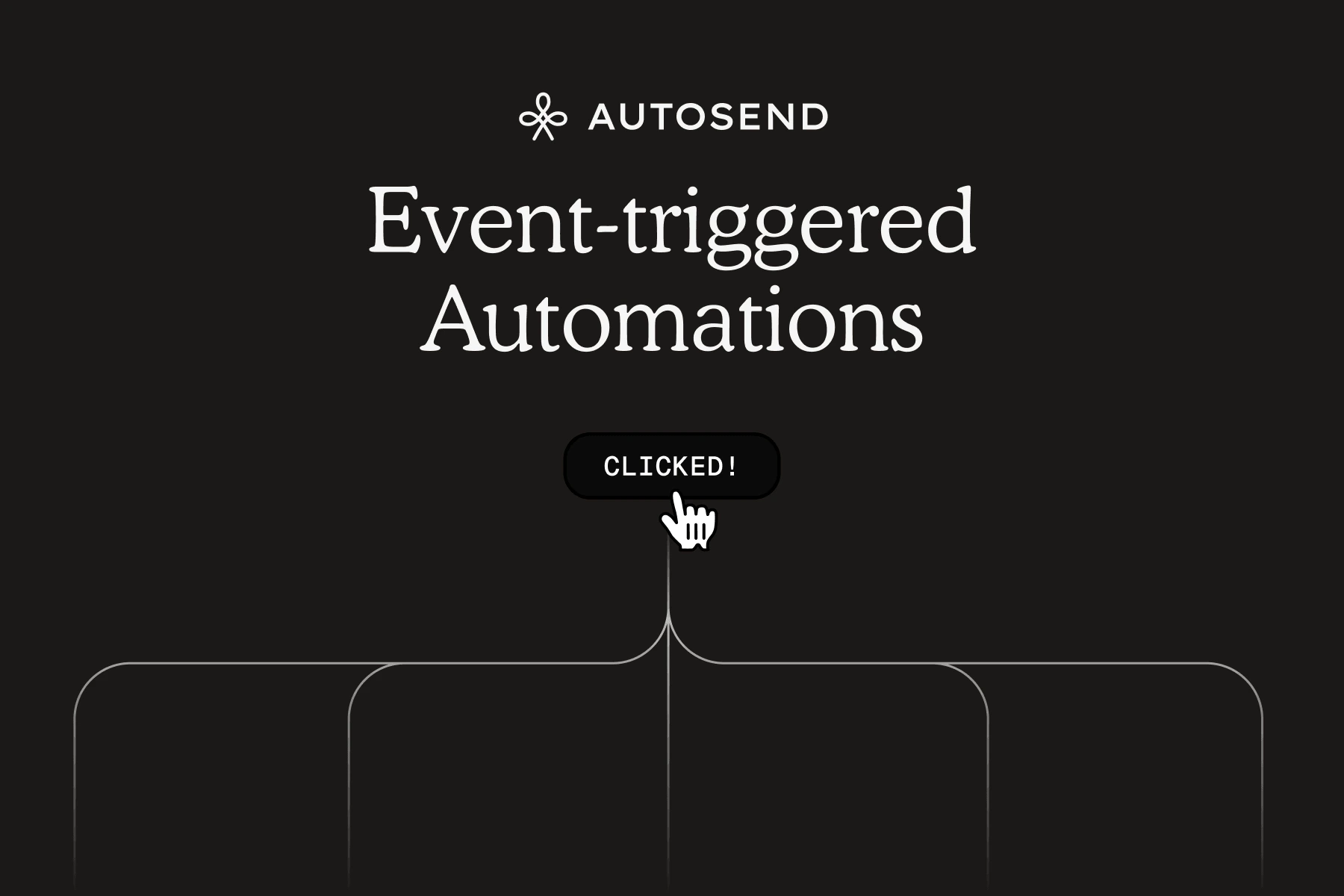
Until now, automations could only trigger based on contact properties or list membership. That works for things like "plan changed to pro" or "contact added to waitlist," but it can't react to something that just happened in your app.
Events fix that. You can now define custom events (like `signup_completed`, `project_published`, `team_member_invited`) with typed properties, send them from your backend via API, and use them to trigger automations the moment they fire.
The real power comes from combining events with branching. A single `signup_completed` event can branch contacts based on `plan` or `team_size`. Solo users get a self-serve onboarding sequence, teams get collaboration tips, and enterprise gets a white-glove welcome. One automation, multiple paths.
Read the Events in Automations documentation to learn more, and check the Send Event API reference to start firing events from your backend.
#### EU Region
You can now choose EU as your sending region. Select it when adding a new domain. For existing verified domains, you'll need to update your DNS records if you decide to switch the region.
Read the Domain documentation to learn more.
## Automation Branching
If you've been creating separate automations just to send different emails to different segments, that's no longer necessary. Branching is now live in AutoSend. One automation, multiple paths.
#### Events in Email Automations
Until now, automations could only trigger based on contact properties or list membership. That works for things like "plan changed to pro" or "contact added to waitlist," but it can't react to something that just happened in your app.
Events fix that. You can now define custom events (like `signup_completed`, `project_published`, `team_member_invited`) with typed properties, send them from your backend via API, and use them to trigger automations the moment they fire.
The real power comes from combining events with branching. A single `signup_completed` event can branch contacts based on `plan` or `team_size`. Solo users get a self-serve onboarding sequence, teams get collaboration tips, and enterprise gets a white-glove welcome. One automation, multiple paths.
Read the Events in Automations documentation to learn more, and check the Send Event API reference to start firing events from your backend.
#### EU Region
You can now choose EU as your sending region. Select it when adding a new domain. For existing verified domains, you'll need to update your DNS records if you decide to switch the region.
Read the Domain documentation to learn more.
## Automation Branching
If you've been creating separate automations just to send different emails to different segments, that's no longer necessary. Branching is now live in AutoSend. One automation, multiple paths.
 #### Branch by contact property
Split any automation into branches based on contact properties. Each branch gets its own filters, wait times, and email sequence.
For example, a new contact gets added to your list. Instead of sending everyone the same onboarding sequence, you branch based on their plan:
* Trial users get a sequence focused on activation and conversion
* Pro users get tips on getting the most out of their plan
* Business users get a white-glove onboarding with dedicated support info
#### Automations API
We also opened up API endpoints for Automations, so you can create and manage automations programmatically. List, create, get, update, pause, resume, and delete automations directly from your code.
Read the Email Automations documentation to learn more about branching, and check the Automations API reference to start managing automations programmatically.
## RBAC and Projects API
Two big additions to multi-project support: role-based access control for your team and a full Projects API.
#### Branch by contact property
Split any automation into branches based on contact properties. Each branch gets its own filters, wait times, and email sequence.
For example, a new contact gets added to your list. Instead of sending everyone the same onboarding sequence, you branch based on their plan:
* Trial users get a sequence focused on activation and conversion
* Pro users get tips on getting the most out of their plan
* Business users get a white-glove onboarding with dedicated support info
#### Automations API
We also opened up API endpoints for Automations, so you can create and manage automations programmatically. List, create, get, update, pause, resume, and delete automations directly from your code.
Read the Email Automations documentation to learn more about branching, and check the Automations API reference to start managing automations programmatically.
## RBAC and Projects API
Two big additions to multi-project support: role-based access control for your team and a full Projects API.
 #### Role-Based Access Control
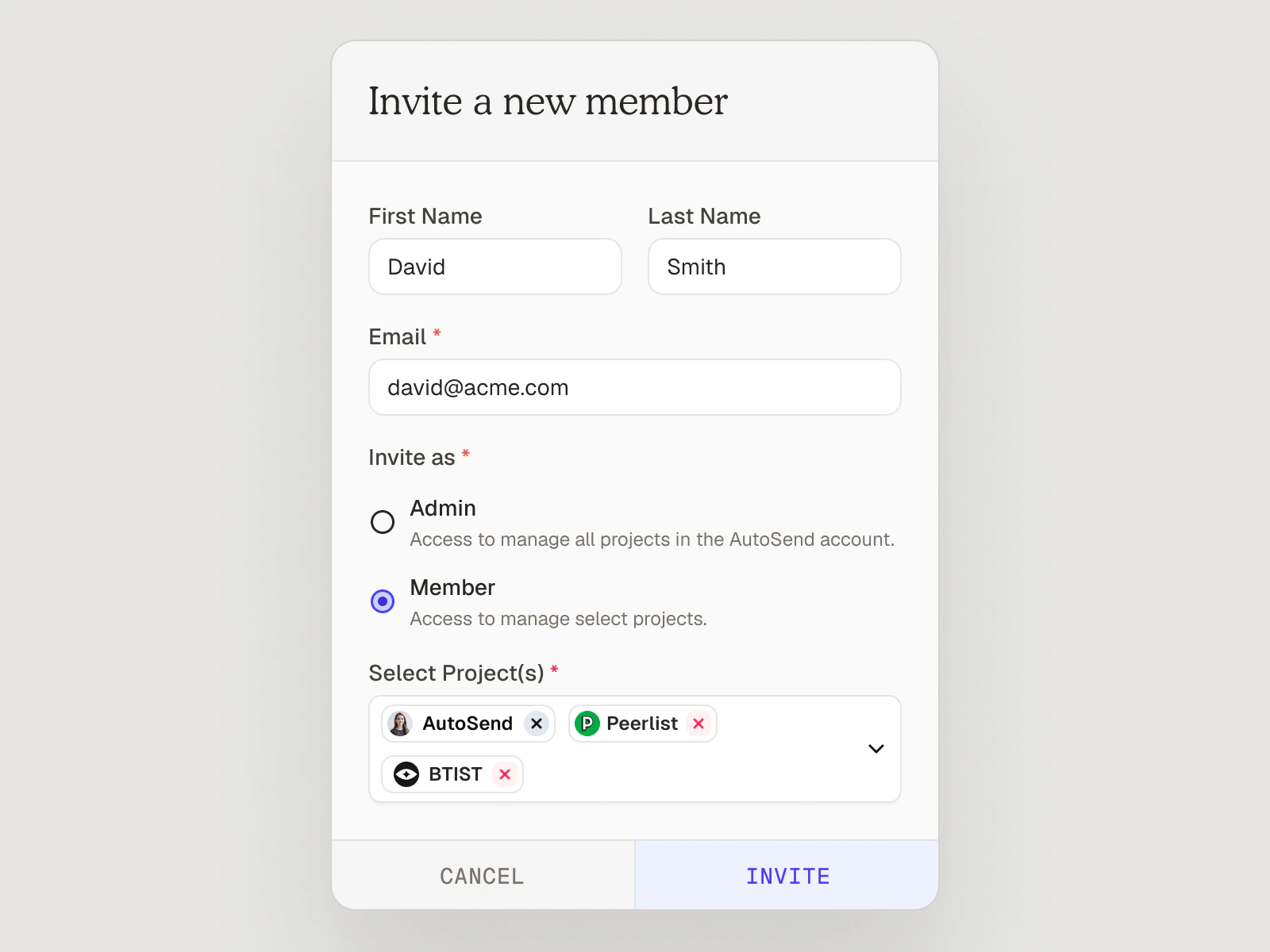
Team permissions now have two distinct roles: **Admin** and **Member**.
* **Admins** have full access to the entire workspace, including all projects, domains, billing, and member management.
* **Members** have scoped access. Admins assign them to specific projects, and they can only see and operate within those projects. Members can also add or remove other members within their assigned projects.
Read the Team documentation for the full invite flow and FAQ.
#### Projects API
You can now manage projects programmatically using the Account Admin API key (`ASA_` prefix). Three endpoints are available:
* **List Projects** - Retrieve all projects in your organization.
* **Create Project** - Create a new project with a name. The project is ready to use immediately.
* **Delete Project** - Permanently delete a project and all its associated resources. This cannot be undone.
Check out the Projects API reference to get started.
## Introducing Projects
You can now create multiple Projects under a single AutoSend account. Each project is a fully isolated workspace with its own API keys, contacts, senders, templates, campaigns, automations, and webhooks. Your subscription and monthly email quota are shared across all projects.
#### Role-Based Access Control
Team permissions now have two distinct roles: **Admin** and **Member**.
* **Admins** have full access to the entire workspace, including all projects, domains, billing, and member management.
* **Members** have scoped access. Admins assign them to specific projects, and they can only see and operate within those projects. Members can also add or remove other members within their assigned projects.
Read the Team documentation for the full invite flow and FAQ.
#### Projects API
You can now manage projects programmatically using the Account Admin API key (`ASA_` prefix). Three endpoints are available:
* **List Projects** - Retrieve all projects in your organization.
* **Create Project** - Create a new project with a name. The project is ready to use immediately.
* **Delete Project** - Permanently delete a project and all its associated resources. This cannot be undone.
Check out the Projects API reference to get started.
## Introducing Projects
You can now create multiple Projects under a single AutoSend account. Each project is a fully isolated workspace with its own API keys, contacts, senders, templates, campaigns, automations, and webhooks. Your subscription and monthly email quota are shared across all projects.
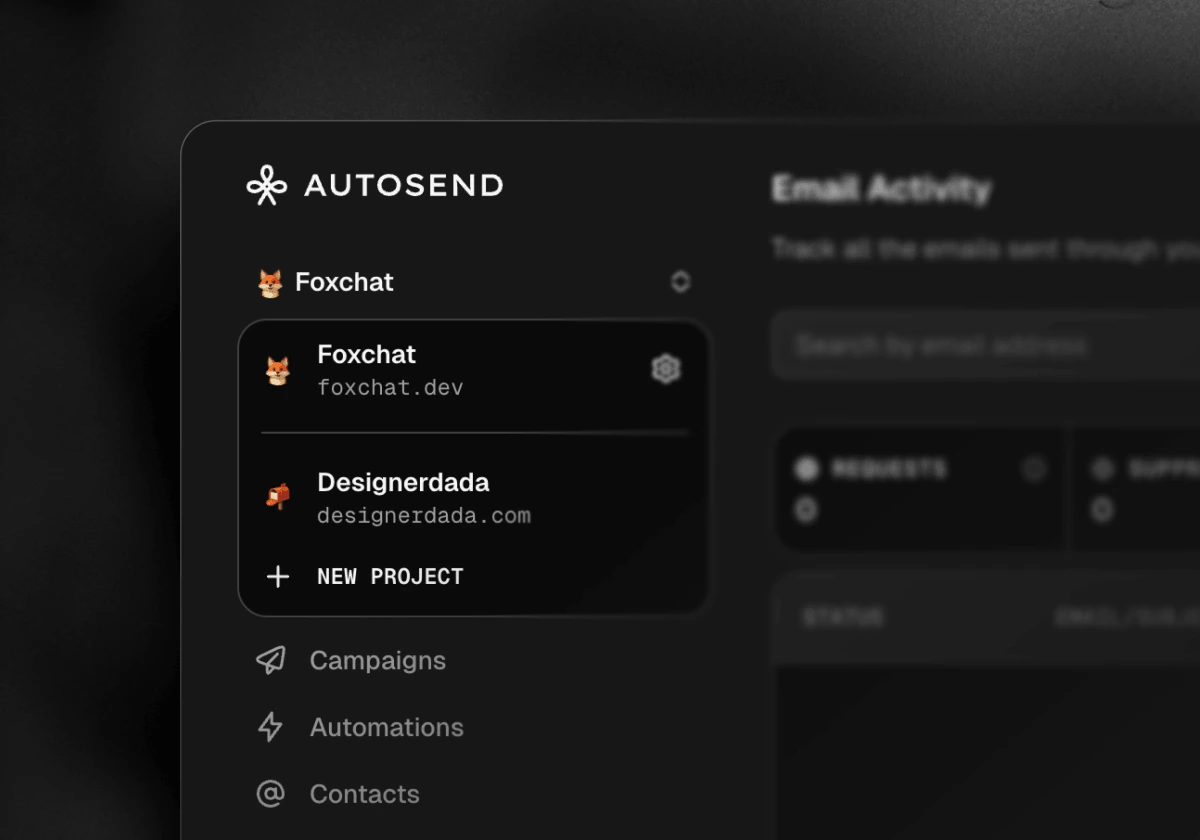 #### Why Projects?
* Keep Production, Staging, and Development environments completely separate
* Run multiple independent products under one subscription and billing
* Build multi-tenant platforms (CRMs, Shopify apps, marketing tools) where each customer gets their own isolated project
* Manage multiple clients as an agency without any data mixing
#### Two types of API Keys:
Along with Projects, we're introducing a second API key type:
* **Project API Key** (`AS_...`): Scoped to a single project. Use this for sending emails, managing contacts, templates, and campaigns. The right key for most integrations.
* **Account API Key** (`ASA_...`): Cross-project scope. Use this to programmatically create, update, or delete projects. All requests with an Account API Key require an `x-project-id` header to specify the target project, except when creating a new project.
Read the Projects documentation to learn more, and the API Keys documentation for details on key types and authentication.
## NEW: 41 API Endpoints Added to API Reference
The API reference just got a major expansion. Seven new endpoint groups are now fully documented, covering everything from campaign management to domain configuration.
#### Why Projects?
* Keep Production, Staging, and Development environments completely separate
* Run multiple independent products under one subscription and billing
* Build multi-tenant platforms (CRMs, Shopify apps, marketing tools) where each customer gets their own isolated project
* Manage multiple clients as an agency without any data mixing
#### Two types of API Keys:
Along with Projects, we're introducing a second API key type:
* **Project API Key** (`AS_...`): Scoped to a single project. Use this for sending emails, managing contacts, templates, and campaigns. The right key for most integrations.
* **Account API Key** (`ASA_...`): Cross-project scope. Use this to programmatically create, update, or delete projects. All requests with an Account API Key require an `x-project-id` header to specify the target project, except when creating a new project.
Read the Projects documentation to learn more, and the API Keys documentation for details on key types and authentication.
## NEW: 41 API Endpoints Added to API Reference
The API reference just got a major expansion. Seven new endpoint groups are now fully documented, covering everything from campaign management to domain configuration.
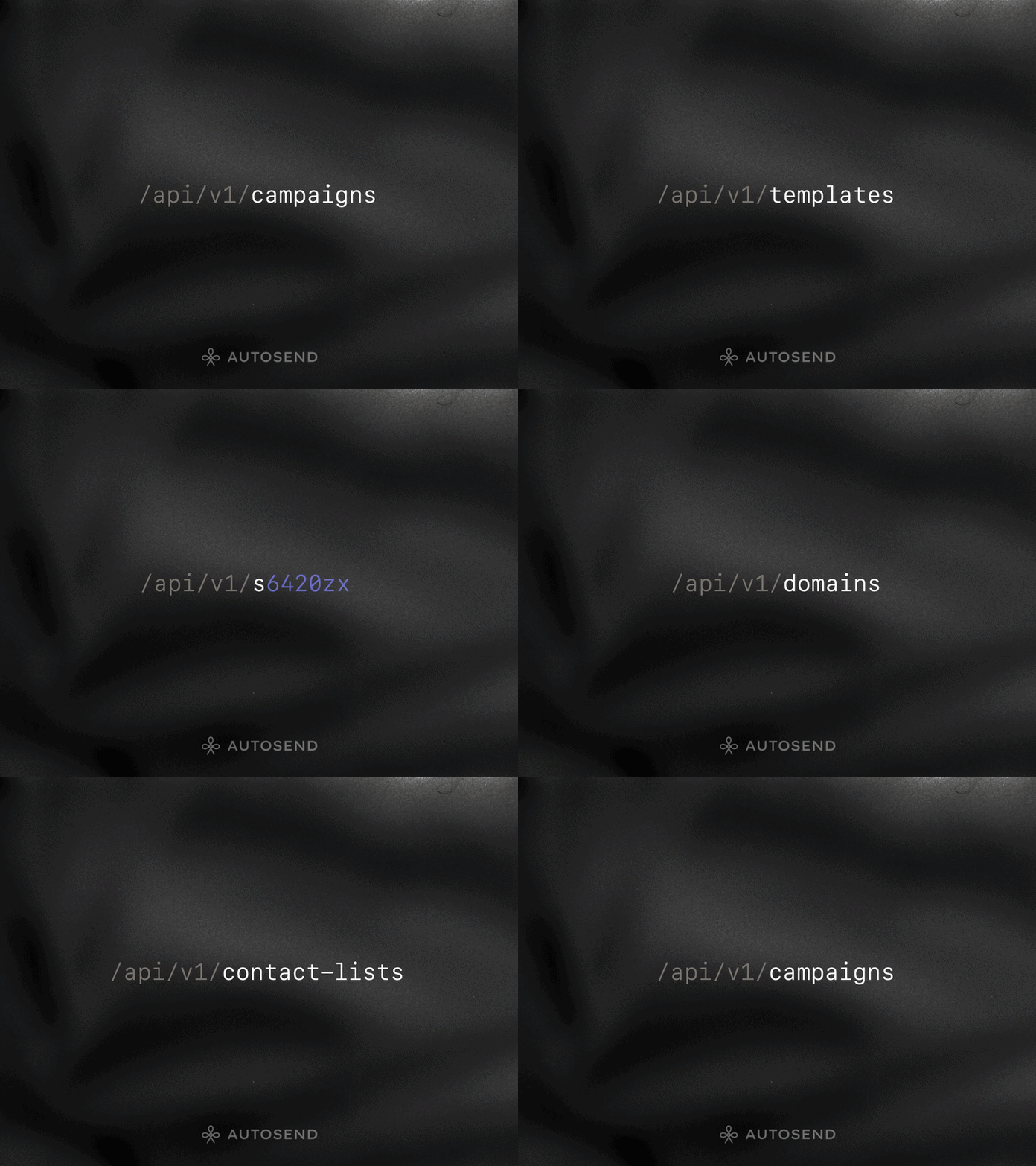 #### Here's what's new:
* **Custom Fields** (4 endpoints) - List, get by name, create, and delete custom contact fields for flexible segmentation.
* **Templates** (5 endpoints) - Get, create, update, delete, and search email templates programmatically.
* **Senders** (4 endpoints) - List, get, create, and delete verified sender identities.
* **Campaigns** (8 endpoints) - Full campaign lifecycle management: list, get, create, update, pause, resume, abort, and delete.
* **Domains** (5 endpoints) - List, get, add, verify, and delete sending domains.
* **Contact Lists** (7 endpoints) - List, get, create, and delete lists, plus get contacts, bulk add, and remove contacts.
* **Suppression Groups** (8 endpoints) - List, get, create, update, and delete groups, plus search entries, bulk suppress, and bulk unsuppress.
All endpoints include request/response examples in multiple languages. Check out the API Reference to get started.
## Email Automations v2.0: New Trigger Types + Visual Builder
Email automations just got a lot more powerful. You can now trigger automations based on contact properties, not just list or segment membership.
#### Here's what's new:
* **Custom Fields** (4 endpoints) - List, get by name, create, and delete custom contact fields for flexible segmentation.
* **Templates** (5 endpoints) - Get, create, update, delete, and search email templates programmatically.
* **Senders** (4 endpoints) - List, get, create, and delete verified sender identities.
* **Campaigns** (8 endpoints) - Full campaign lifecycle management: list, get, create, update, pause, resume, abort, and delete.
* **Domains** (5 endpoints) - List, get, add, verify, and delete sending domains.
* **Contact Lists** (7 endpoints) - List, get, create, and delete lists, plus get contacts, bulk add, and remove contacts.
* **Suppression Groups** (8 endpoints) - List, get, create, update, and delete groups, plus search entries, bulk suppress, and bulk unsuppress.
All endpoints include request/response examples in multiple languages. Check out the API Reference to get started.
## Email Automations v2.0: New Trigger Types + Visual Builder
Email automations just got a lot more powerful. You can now trigger automations based on contact properties, not just list or segment membership.
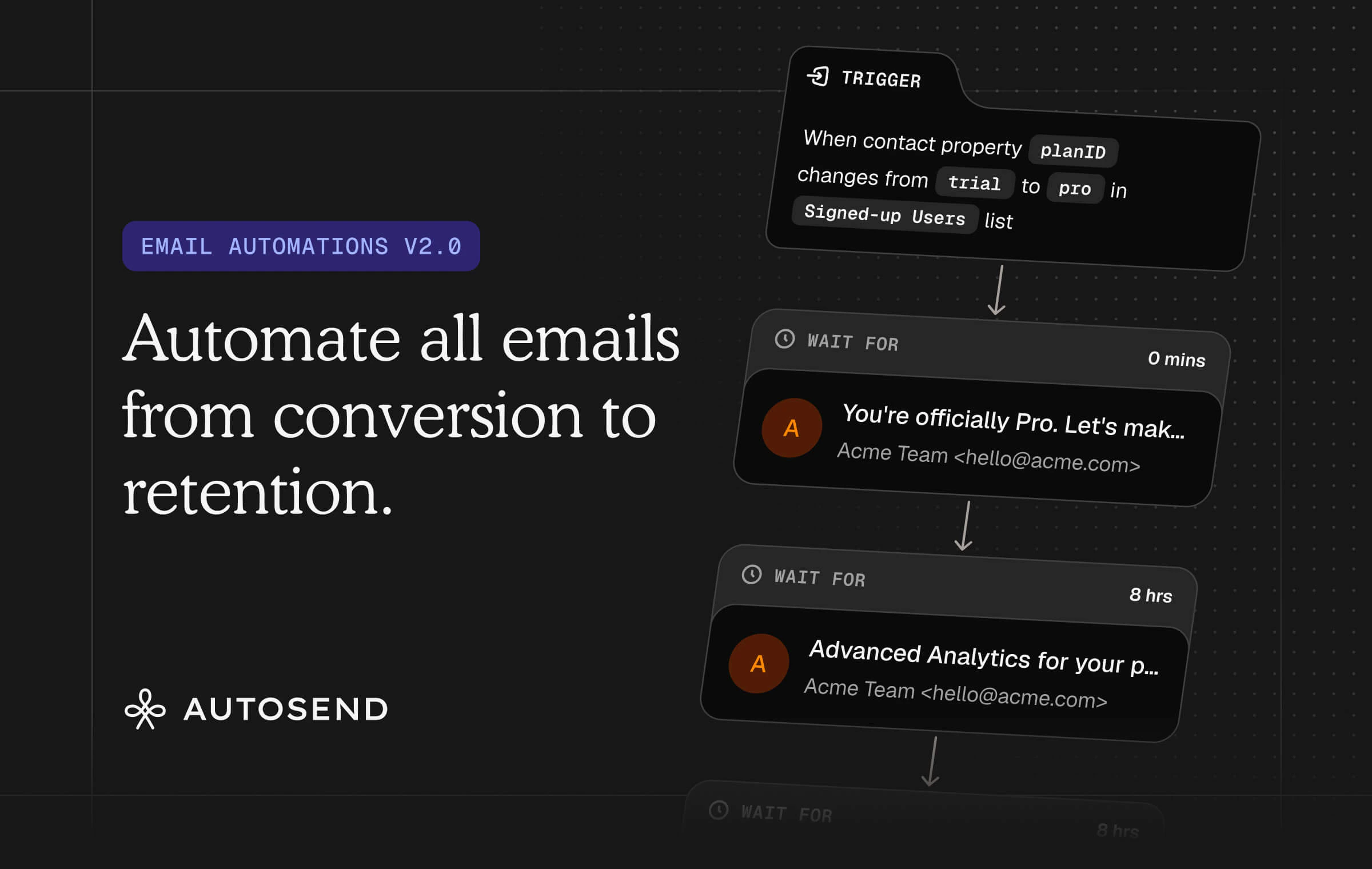 #### Three Trigger Types:
* **New contact is added to**: Trigger when a contact joins a specific list or segment. Same as before.
* **Contact property matches with**: Trigger when a contact's property matches a condition you define (e.g., `verified` equals `true`). Great for targeting contacts based on their current state.
* **Contact property changes from → to**: Trigger when a contact's property transitions from one value to another (e.g., `published` changes from `unpublished` to `published`). Perfect for reacting to real-time changes. Supports multiple conditions with AND/OR logic.
#### Brand new visual workflow builder
Build your automation sequences in a completely redesigned visual workflow builder with a cleaner interface and smoother experience. Do try the email drag-n-drop to rearrange emails in your sequence. That's our favorite part.
Read the updated Email Automations documentation to learn more.
## NEW: AutoSend MCP Server is here.
You can now manage your email campaigns, templates, contacts, and senders directly from AI assistants.
#### Three Trigger Types:
* **New contact is added to**: Trigger when a contact joins a specific list or segment. Same as before.
* **Contact property matches with**: Trigger when a contact's property matches a condition you define (e.g., `verified` equals `true`). Great for targeting contacts based on their current state.
* **Contact property changes from → to**: Trigger when a contact's property transitions from one value to another (e.g., `published` changes from `unpublished` to `published`). Perfect for reacting to real-time changes. Supports multiple conditions with AND/OR logic.
#### Brand new visual workflow builder
Build your automation sequences in a completely redesigned visual workflow builder with a cleaner interface and smoother experience. Do try the email drag-n-drop to rearrange emails in your sequence. That's our favorite part.
Read the updated Email Automations documentation to learn more.
## NEW: AutoSend MCP Server is here.
You can now manage your email campaigns, templates, contacts, and senders directly from AI assistants.
 The **AutoSend MCP Server** connects to AI tools like Claude, Cursor, Codex, Antigravity, etc using the Model Context Protocol. Just authenticate with OAuth (no API keys to manage), and your AI assistant gets secure access to your AutoSend project.
It ships with **17 tools** across 5 categories: Lists & Segments, Templates, Senders, Suppression Groups, and Campaigns. Create drafts, search templates, duplicate campaigns, and more, all through natural language.
Check out the MCP Server documentation to get started.
## NEW: Domain warmup is now built into AutoSend.
If you've ever started sending on a new domain and wondered why your open rates were tanking, this is for you.
The **AutoSend MCP Server** connects to AI tools like Claude, Cursor, Codex, Antigravity, etc using the Model Context Protocol. Just authenticate with OAuth (no API keys to manage), and your AI assistant gets secure access to your AutoSend project.
It ships with **17 tools** across 5 categories: Lists & Segments, Templates, Senders, Suppression Groups, and Campaigns. Create drafts, search templates, duplicate campaigns, and more, all through natural language.
Check out the MCP Server documentation to get started.
## NEW: Domain warmup is now built into AutoSend.
If you've ever started sending on a new domain and wondered why your open rates were tanking, this is for you.
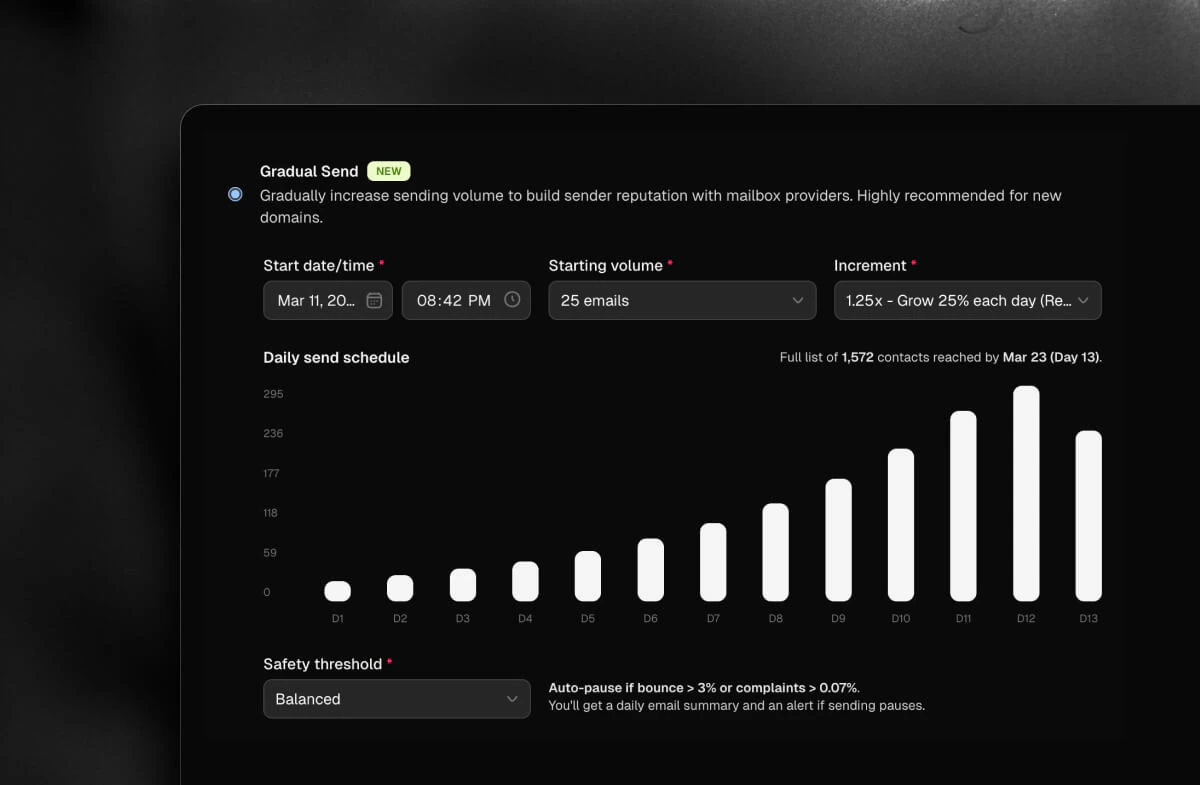 We just shipped **Gradual Send**. It's a new sending mode that automatically ramps up your email volume over time, so mailbox providers get familiar with you before you hit them with your full list.
You pick a starting volume, choose how fast you want to grow, set a start date, and that's it. AutoSend builds out your daily send schedule and shows you a chart of exactly what will go out and when. If your bounce or complaint rate spikes, it pauses automatically.
No manual scheduling. No spreadsheets. No sending five small campaigns just to warm up a domain.
You'll find it under "When to send?" the next time you set up a campaign. Highly recommend it if you're on a new domain or sending to a cold list for the first time.
Read our Domain Warmup guide to learn more about warming up your domain and improving deliverability.
## Quick Create Menu and Performance Improvements
We shipped quality-of-life improvements this week. Faster workflows, cleaner analytics, and a few important fixes.
We just shipped **Gradual Send**. It's a new sending mode that automatically ramps up your email volume over time, so mailbox providers get familiar with you before you hit them with your full list.
You pick a starting volume, choose how fast you want to grow, set a start date, and that's it. AutoSend builds out your daily send schedule and shows you a chart of exactly what will go out and when. If your bounce or complaint rate spikes, it pauses automatically.
No manual scheduling. No spreadsheets. No sending five small campaigns just to warm up a domain.
You'll find it under "When to send?" the next time you set up a campaign. Highly recommend it if you're on a new domain or sending to a cold list for the first time.
Read our Domain Warmup guide to learn more about warming up your domain and improving deliverability.
## Quick Create Menu and Performance Improvements
We shipped quality-of-life improvements this week. Faster workflows, cleaner analytics, and a few important fixes.
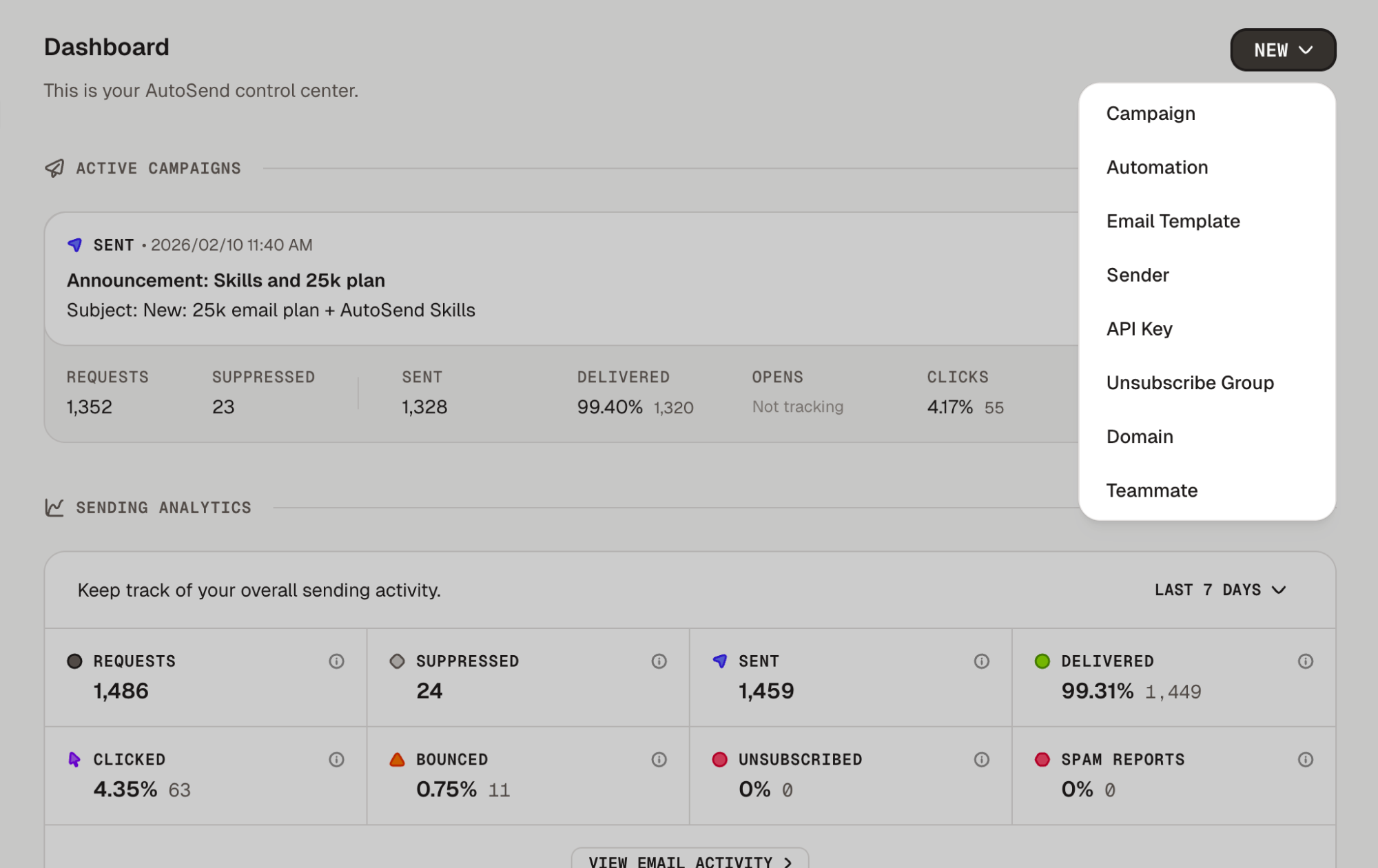 #### Quick Create Menu
Create campaigns and automations directly from the dashboard. Click the "+" button in the top right corner without navigating away from your current page.
#### Faster Campaign and Analytics Loading
Dashboards load faster with caching for workflow analytics and streamlined campaign queries. Separated worker services for email sending, validation, and webhooks handle higher loads independently. Lazy loading for past and failed campaigns reduces initial page load times.
### Fixes:
* Fixed invited users being redirected to the welcome screen instead of their team's workspace
* Resolved analytics text alignment issues that made numbers hard to read
* Added SMTP rate limiting API to prevent sending spikes and improve deliverability
## Dashboard Redesign and Landing Page Refresh
The dashboard has been redesigned from the ground up and a fresh new landing page has launched.
#### Quick Create Menu
Create campaigns and automations directly from the dashboard. Click the "+" button in the top right corner without navigating away from your current page.
#### Faster Campaign and Analytics Loading
Dashboards load faster with caching for workflow analytics and streamlined campaign queries. Separated worker services for email sending, validation, and webhooks handle higher loads independently. Lazy loading for past and failed campaigns reduces initial page load times.
### Fixes:
* Fixed invited users being redirected to the welcome screen instead of their team's workspace
* Resolved analytics text alignment issues that made numbers hard to read
* Added SMTP rate limiting API to prevent sending spikes and improve deliverability
## Dashboard Redesign and Landing Page Refresh
The dashboard has been redesigned from the ground up and a fresh new landing page has launched.
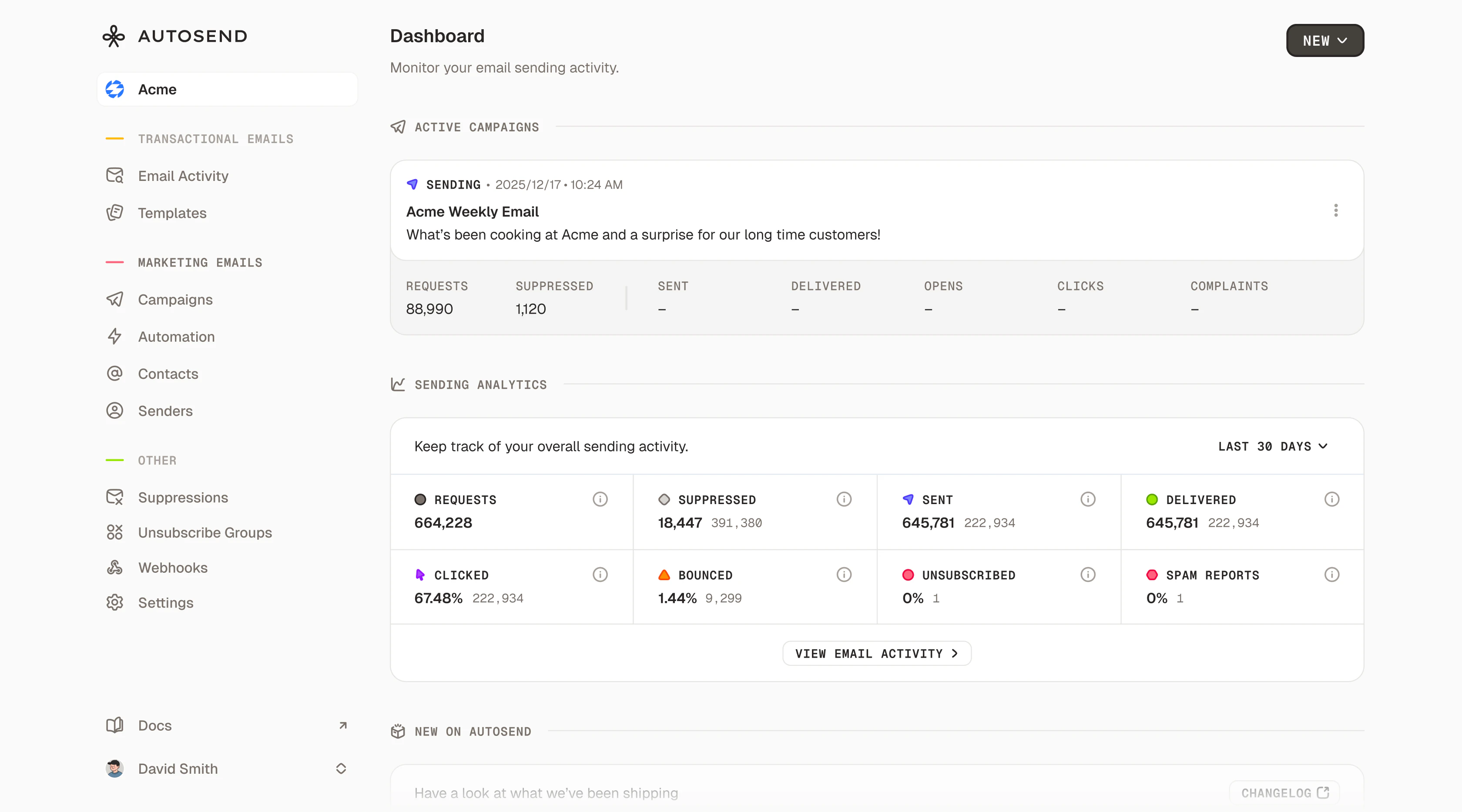 #### Dashboard Redesign
Your dashboard now surfaces key metrics (sends, opens, clicks, bounces), active campaigns, and product updates right when you log in. No more digging through reports.
#### Fresh Landing Page
Completely redesigned with a modern look, interactive sections, smoother animations, and a clearer story about how AutoSend helps you send better emails.
#### Faster CSV Imports
Importing large contact lists is significantly faster. Upload your CSV and get back to work.
#### User ID Support in CSV Imports
Import user IDs alongside contact data to maintain consistent identifiers across systems.
#### List-Unsubscribe Header
The standard `List-Unsubscribe` header is now included in all emails, enabling one-click unsubscribe buttons in Gmail and Apple Mail. No configuration needed.
### Fixes:
* Fixed campaign analytics not refreshing when switching between campaigns
* Resolved dark mode styling issues with the payment alert banner
* Improved link formatting in the email builder
## CC and BCC Support
Native CC and BCC support is now available across AutoSend.
#### Send to Multiple Recipients
Add CC and BCC recipients to any email via API or SMTP relay without sending separate emails.
#### Full Email Activity Tracking
Every CC and BCC recipient is tracked individually. See opens, clicks, bounces, and complaints for each recipient separately.
#### Smart Suppression Handling
When a TO recipient is suppressed, CC and BCC recipients are automatically suppressed too. Bypass options are available when needed.
#### Proper Bounce and Complaint Attribution
Bounces and complaints from CC/BCC recipients are correctly attributed to the right email address.
#### Cleaner Campaign Dashboard
Active campaigns now automatically appear at the top and past campaigns are hidden to reduce visual clutter.
#### Filter Contacts by List ID
Added `contactListId` parameter to the contacts API for filtering contacts by specific lists.
#### Bypass Suppressions
Send an email to a suppressed recipient on a per-email basis for critical communications like password resets.
### Fixes:
* Fixed proration calculations for plan upgrades and downgrades
* Resolved issues with payment cancellations not reflecting correctly
* Fixed billing cycle date updates after plan changes
## Improvements and Bug Fixes
This release focuses on polishing the edges. Clearer errors, better analytics visibility, and a few fixes.
#### Email Automation Landing Page
A dedicated landing page for email automation explaining drip campaigns, onboarding sequences, and triggered emails.
#### Dynamic Validation Errors
Validation errors now tell you exactly what's wrong and where, with specific feedback for contacts, emails, SMTP settings, and suppression groups.
#### Unsubscribe Preferences
The unsubscribe preferences page now shows visible and hidden states for suppression groups, giving you control over what subscribers see.
#### Open Rate Analytics
Campaign and automation analytics now include dedicated open rate sections alongside clicks and deliveries.
#### SMTP API Key Flexibility
All API key types now work with SMTP authentication. Any valid API key works as your SMTP password.
### Fixes:
* Fixed webhook validation errors not displaying correctly when creating or editing webhooks
* Fixed pricing feature strikethrough styling for plans
* Fixed icon visibility issues in dark mode for email status indicators
## Introducing SMTP Support
You can now send emails through AutoSend using SMTP as well as the REST API.
#### Dashboard Redesign
Your dashboard now surfaces key metrics (sends, opens, clicks, bounces), active campaigns, and product updates right when you log in. No more digging through reports.
#### Fresh Landing Page
Completely redesigned with a modern look, interactive sections, smoother animations, and a clearer story about how AutoSend helps you send better emails.
#### Faster CSV Imports
Importing large contact lists is significantly faster. Upload your CSV and get back to work.
#### User ID Support in CSV Imports
Import user IDs alongside contact data to maintain consistent identifiers across systems.
#### List-Unsubscribe Header
The standard `List-Unsubscribe` header is now included in all emails, enabling one-click unsubscribe buttons in Gmail and Apple Mail. No configuration needed.
### Fixes:
* Fixed campaign analytics not refreshing when switching between campaigns
* Resolved dark mode styling issues with the payment alert banner
* Improved link formatting in the email builder
## CC and BCC Support
Native CC and BCC support is now available across AutoSend.
#### Send to Multiple Recipients
Add CC and BCC recipients to any email via API or SMTP relay without sending separate emails.
#### Full Email Activity Tracking
Every CC and BCC recipient is tracked individually. See opens, clicks, bounces, and complaints for each recipient separately.
#### Smart Suppression Handling
When a TO recipient is suppressed, CC and BCC recipients are automatically suppressed too. Bypass options are available when needed.
#### Proper Bounce and Complaint Attribution
Bounces and complaints from CC/BCC recipients are correctly attributed to the right email address.
#### Cleaner Campaign Dashboard
Active campaigns now automatically appear at the top and past campaigns are hidden to reduce visual clutter.
#### Filter Contacts by List ID
Added `contactListId` parameter to the contacts API for filtering contacts by specific lists.
#### Bypass Suppressions
Send an email to a suppressed recipient on a per-email basis for critical communications like password resets.
### Fixes:
* Fixed proration calculations for plan upgrades and downgrades
* Resolved issues with payment cancellations not reflecting correctly
* Fixed billing cycle date updates after plan changes
## Improvements and Bug Fixes
This release focuses on polishing the edges. Clearer errors, better analytics visibility, and a few fixes.
#### Email Automation Landing Page
A dedicated landing page for email automation explaining drip campaigns, onboarding sequences, and triggered emails.
#### Dynamic Validation Errors
Validation errors now tell you exactly what's wrong and where, with specific feedback for contacts, emails, SMTP settings, and suppression groups.
#### Unsubscribe Preferences
The unsubscribe preferences page now shows visible and hidden states for suppression groups, giving you control over what subscribers see.
#### Open Rate Analytics
Campaign and automation analytics now include dedicated open rate sections alongside clicks and deliveries.
#### SMTP API Key Flexibility
All API key types now work with SMTP authentication. Any valid API key works as your SMTP password.
### Fixes:
* Fixed webhook validation errors not displaying correctly when creating or editing webhooks
* Fixed pricing feature strikethrough styling for plans
* Fixed icon visibility issues in dark mode for email status indicators
## Introducing SMTP Support
You can now send emails through AutoSend using SMTP as well as the REST API.
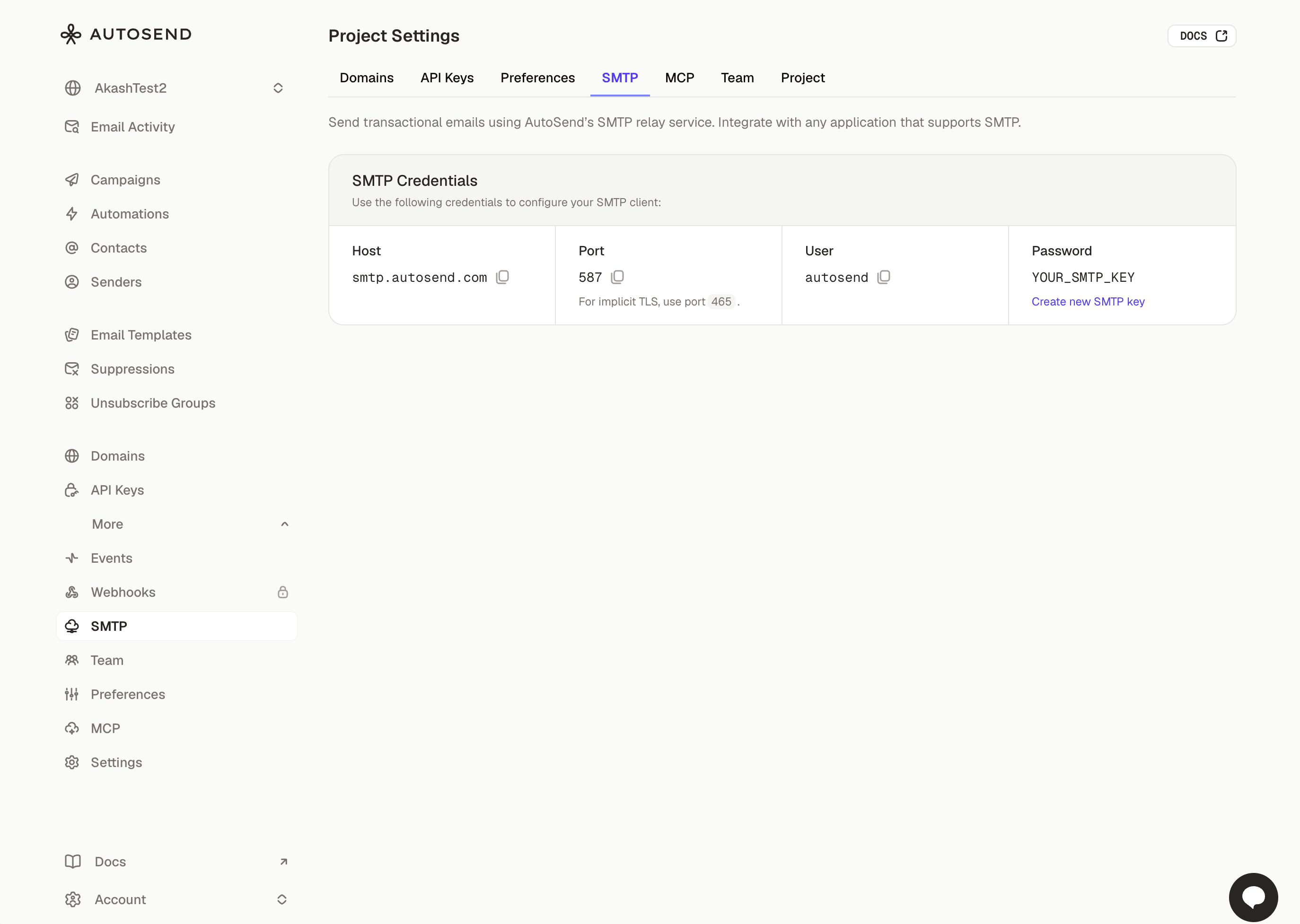 #### Simple Setup
Go to Settings → SMTP to get your credentials. Host, port, and username are pre-configured. Generate an API key to use as your password.
#### Standard SMTP
Connect using `smtp.autosend.com` on port 587 with TLS. Works with any SMTP client, library, or platform that supports standard SMTP.
#### Same Deliverability
All the benefits of AutoSend's sending infrastructure: same reputation, same analytics, same reliability. Perfect for legacy systems or platforms with built-in SMTP support.
### Improvements:
* Campaign and automation analytics now show clicked status sections with cleaner empty states
* You can now sort contacts via the API for paginating large lists in a specific order
### Fixes:
* Fixed date filter equals not working correctly when filtering contacts by an exact date
* Fixed incorrect campaign counts in the campaigns list
## Introducing Spam Checker
Spam Checker analyzes your email content in real-time, flags potential issues, and tells you exactly what to change before you send.
#### Simple Setup
Go to Settings → SMTP to get your credentials. Host, port, and username are pre-configured. Generate an API key to use as your password.
#### Standard SMTP
Connect using `smtp.autosend.com` on port 587 with TLS. Works with any SMTP client, library, or platform that supports standard SMTP.
#### Same Deliverability
All the benefits of AutoSend's sending infrastructure: same reputation, same analytics, same reliability. Perfect for legacy systems or platforms with built-in SMTP support.
### Improvements:
* Campaign and automation analytics now show clicked status sections with cleaner empty states
* You can now sort contacts via the API for paginating large lists in a specific order
### Fixes:
* Fixed date filter equals not working correctly when filtering contacts by an exact date
* Fixed incorrect campaign counts in the campaigns list
## Introducing Spam Checker
Spam Checker analyzes your email content in real-time, flags potential issues, and tells you exactly what to change before you send.
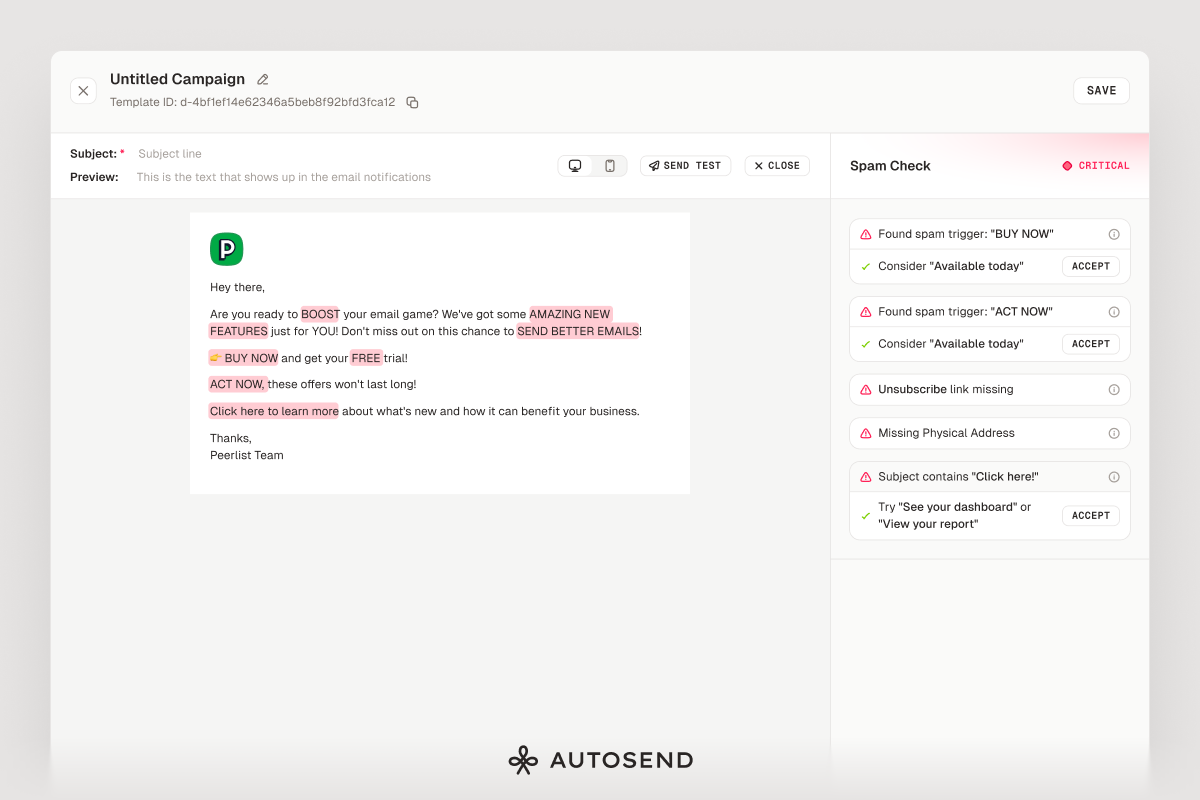 #### Real-time spam analysis
As you write, Spam Checker scans your content for known spam triggers.
#### Severity scoring
Issues are categorized as safe, warning, or critical based on how likely they are to trigger spam filters.
#### Specific issue detection
Catches excessive caps, suspicious URLs, spam trigger words, urgency language, missing unsubscribe links, and more.
#### One-click fixes
Most issues come with suggested replacements. Click "Accept" and the fix is applied instantly.
#### Works everywhere
Available in the email builder for campaigns, automations, transactional templates, and compose.
### Fixes:
* Fixed styling issue in the test email modal
* Fixed alignment and null click issue in automation analytics
* Fixed contact counts not refreshing correctly when adding contacts to a list
* Fixed outline styling on automation sequence cards
## Platform Improvements
Major improvements to how you track campaign performance and how quickly emails reach inboxes.
#### Improved Analytics
Email status tooltips now explain what each status means and what action to take. Date/time formatting is consistent across all views for easier comparison.
#### Faster Campaign Delivery
Upgraded sending infrastructure improves speed and reliability. Campaigns reach inboxes faster with fewer delivery errors, especially for large contact lists.
### Fixes:
* Fixed images breaking email responsiveness on mobile devices
* Resolved a bug where inserting images from your library would fail silently
* Fixed segment evaluation queue causing segments to refresh incorrectly
## Email Builder, Webhooks, and Analytics
Major improvements to the email builder, better webhook tracking, new analytics capabilities, and platform stability fixes.
#### Global Text Color
Set a default text color for your entire email once and all text inherits that color.
#### Plain Text Support
The email builder now properly handles plain text versions of your emails for better deliverability.
#### Better State Management
Selecting buttons, dividers, images, and text blocks is smoother with clearer visual feedback.
#### Better Test Email Experience
Enter test values for email variables directly in the test email modal. Cleaner interface with better feedback.
#### Email Activity Analytics
Key metrics (total sent, delivered, opened, clicked, bounced, failed) are now visible at a glance on the email activities page.
#### Template Table View and Search
Email templates now have a proper table view. Search by name or subject line to find templates faster.
#### Webhook batchId and test field
Webhook events now include `batchId` (for grouping bulk email events) and a `test` boolean field for debugging.
#### Optimized webhook payloads
Reduced payload size by stripping unnecessary data. Faster processing, less bandwidth, and cleaner logs.
### Fixes:
* Email activity modal viewport
* Unsubscribe group undefined error
* Image link focus behavior
* Domain validation false positives
* Button sizing in modals
* Broken documentation links
* Template ID missing in HTML editor
* Workflow automation trigger edge cases
* Automation button state management
## Introducing Email Automations
Email automation is now live in AutoSend. Create triggered sequences with visual workflows, tracking, and unsubscribe group management.
#### Real-time spam analysis
As you write, Spam Checker scans your content for known spam triggers.
#### Severity scoring
Issues are categorized as safe, warning, or critical based on how likely they are to trigger spam filters.
#### Specific issue detection
Catches excessive caps, suspicious URLs, spam trigger words, urgency language, missing unsubscribe links, and more.
#### One-click fixes
Most issues come with suggested replacements. Click "Accept" and the fix is applied instantly.
#### Works everywhere
Available in the email builder for campaigns, automations, transactional templates, and compose.
### Fixes:
* Fixed styling issue in the test email modal
* Fixed alignment and null click issue in automation analytics
* Fixed contact counts not refreshing correctly when adding contacts to a list
* Fixed outline styling on automation sequence cards
## Platform Improvements
Major improvements to how you track campaign performance and how quickly emails reach inboxes.
#### Improved Analytics
Email status tooltips now explain what each status means and what action to take. Date/time formatting is consistent across all views for easier comparison.
#### Faster Campaign Delivery
Upgraded sending infrastructure improves speed and reliability. Campaigns reach inboxes faster with fewer delivery errors, especially for large contact lists.
### Fixes:
* Fixed images breaking email responsiveness on mobile devices
* Resolved a bug where inserting images from your library would fail silently
* Fixed segment evaluation queue causing segments to refresh incorrectly
## Email Builder, Webhooks, and Analytics
Major improvements to the email builder, better webhook tracking, new analytics capabilities, and platform stability fixes.
#### Global Text Color
Set a default text color for your entire email once and all text inherits that color.
#### Plain Text Support
The email builder now properly handles plain text versions of your emails for better deliverability.
#### Better State Management
Selecting buttons, dividers, images, and text blocks is smoother with clearer visual feedback.
#### Better Test Email Experience
Enter test values for email variables directly in the test email modal. Cleaner interface with better feedback.
#### Email Activity Analytics
Key metrics (total sent, delivered, opened, clicked, bounced, failed) are now visible at a glance on the email activities page.
#### Template Table View and Search
Email templates now have a proper table view. Search by name or subject line to find templates faster.
#### Webhook batchId and test field
Webhook events now include `batchId` (for grouping bulk email events) and a `test` boolean field for debugging.
#### Optimized webhook payloads
Reduced payload size by stripping unnecessary data. Faster processing, less bandwidth, and cleaner logs.
### Fixes:
* Email activity modal viewport
* Unsubscribe group undefined error
* Image link focus behavior
* Domain validation false positives
* Button sizing in modals
* Broken documentation links
* Template ID missing in HTML editor
* Workflow automation trigger edge cases
* Automation button state management
## Introducing Email Automations
Email automation is now live in AutoSend. Create triggered sequences with visual workflows, tracking, and unsubscribe group management.
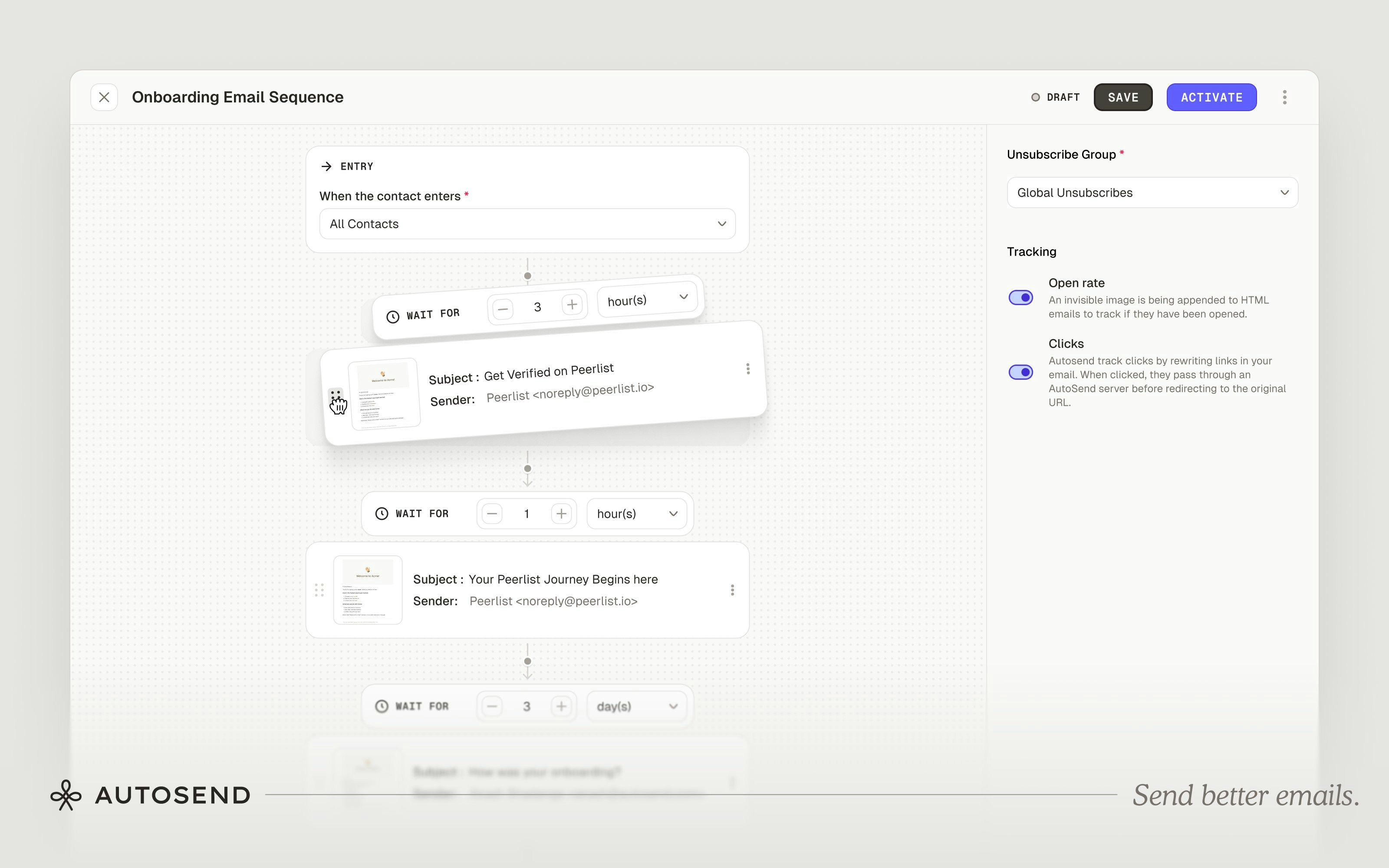 #### Visual Builder
Design automation flows in a drag-and-drop interface. See your entire sequence with entry points, wait steps, and email blocks connected in order.
#### Flexible Timing
Set delays between emails: immediately, hours, or days.
#### Exit Conditions
Control when contacts leave sequences. Exit contacts immediately when they're removed from the triggering list or segment.
#### Unsubscribe Groups
Assign each automation to a specific unsubscribe group so contacts can opt out of individual sequences without unsubscribing from everything.
#### Tracking Built-in
Enable or disable open and click tracking per email. Analytics show open rates, click rates, and engagement metrics per message.
**Common use cases:** Welcome sequences, onboarding drips, re-engagement campaigns, trial conversion sequences, and waitlist nurturing.
## Introducing Teams
AutoSend now supports teams. Invite your team for full platform access with no permission levels to configure.
#### Visual Builder
Design automation flows in a drag-and-drop interface. See your entire sequence with entry points, wait steps, and email blocks connected in order.
#### Flexible Timing
Set delays between emails: immediately, hours, or days.
#### Exit Conditions
Control when contacts leave sequences. Exit contacts immediately when they're removed from the triggering list or segment.
#### Unsubscribe Groups
Assign each automation to a specific unsubscribe group so contacts can opt out of individual sequences without unsubscribing from everything.
#### Tracking Built-in
Enable or disable open and click tracking per email. Analytics show open rates, click rates, and engagement metrics per message.
**Common use cases:** Welcome sequences, onboarding drips, re-engagement campaigns, trial conversion sequences, and waitlist nurturing.
## Introducing Teams
AutoSend now supports teams. Invite your team for full platform access with no permission levels to configure.
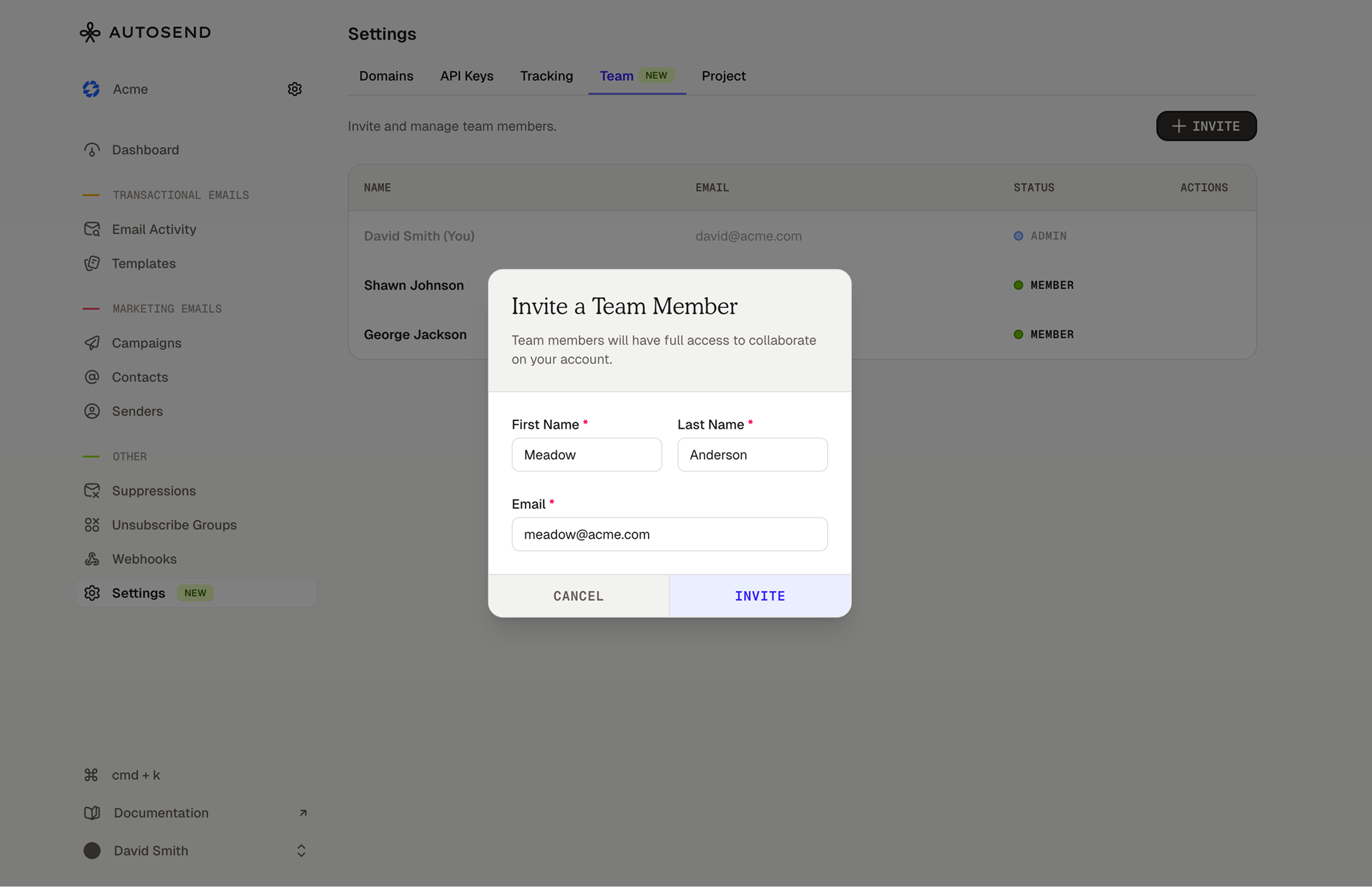 #### Invite Your Team
Head to [Settings → Team](https://autosend.com/settings/team) to invite as many people as you need.
#### Same Access for Everyone
No permission levels to configure. Everyone you invite can do everything you can.
#### Simple Invite Flow
Send an invite, they get a secure link via email, they click it, they're in. Invites are valid for 7 days. You can resend or cancel them anytime.
## Introducing Compose by AutoSend
A free email template builder with markdown support. Create responsive emails without coding.
#### Invite Your Team
Head to [Settings → Team](https://autosend.com/settings/team) to invite as many people as you need.
#### Same Access for Everyone
No permission levels to configure. Everyone you invite can do everything you can.
#### Simple Invite Flow
Send an invite, they get a secure link via email, they click it, they're in. Invites are valid for 7 days. You can resend or cancel them anytime.
## Introducing Compose by AutoSend
A free email template builder with markdown support. Create responsive emails without coding.
 #### Markdown support
Write emails the same way you write docs or READMEs. If you've written markdown before, you already know how to use Compose.
#### Visual blocks
Drag in buttons, columns, spacers, and dividers when markdown isn't enough.
#### Variables for personalization
Drop in `{{first_name}}` or `{{company_name}}` and your email is ready for dynamic content.
#### Responsive by default
Your emails automatically adapt to desktop, tablet, and mobile.
#### Clean HTML export
Production-ready HTML with no inline styles soup. Tested across Gmail, Outlook, Yahoo, and Apple Mail.
#### No signup required
Open [autosend.com/compose](https://autosend.com/compose) and start building. Works with any email provider.
## Email Activity Filters
Filter and analyze your email activity by status, templates, domain, and API key.
#### Markdown support
Write emails the same way you write docs or READMEs. If you've written markdown before, you already know how to use Compose.
#### Visual blocks
Drag in buttons, columns, spacers, and dividers when markdown isn't enough.
#### Variables for personalization
Drop in `{{first_name}}` or `{{company_name}}` and your email is ready for dynamic content.
#### Responsive by default
Your emails automatically adapt to desktop, tablet, and mobile.
#### Clean HTML export
Production-ready HTML with no inline styles soup. Tested across Gmail, Outlook, Yahoo, and Apple Mail.
#### No signup required
Open [autosend.com/compose](https://autosend.com/compose) and start building. Works with any email provider.
## Email Activity Filters
Filter and analyze your email activity by status, templates, domain, and API key.
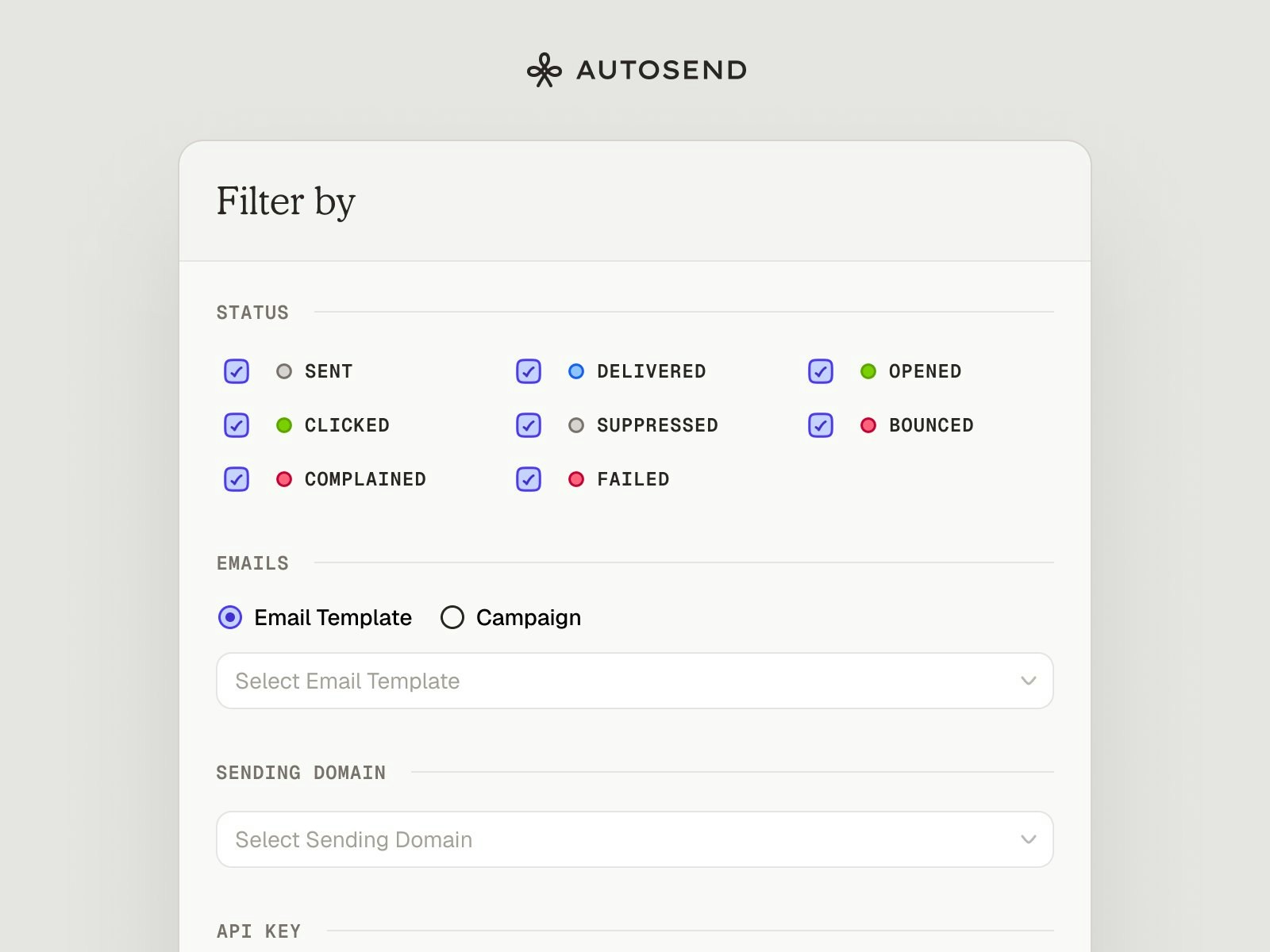 #### Status Filters
Filter by delivery lifecycle (Sent, Delivered, Bounced), engagement (Opened, Clicked), or issues (Complained, Suppressed, Failed).
#### Email Source
Filter by email template or campaign to see activity for specific email types.
#### Sending Domain
Filter emails sent from specific verified domains.
#### API Key
Filter emails sent using specific API keys for better tracking.
Combine multiple filters to narrow down your search and get precise insights into email activity.
## Webhooks and Email Attachments
Two of the most requested features: webhooks management and email attachments.
#### Status Filters
Filter by delivery lifecycle (Sent, Delivered, Bounced), engagement (Opened, Clicked), or issues (Complained, Suppressed, Failed).
#### Email Source
Filter by email template or campaign to see activity for specific email types.
#### Sending Domain
Filter emails sent from specific verified domains.
#### API Key
Filter emails sent using specific API keys for better tracking.
Combine multiple filters to narrow down your search and get precise insights into email activity.
## Webhooks and Email Attachments
Two of the most requested features: webhooks management and email attachments.
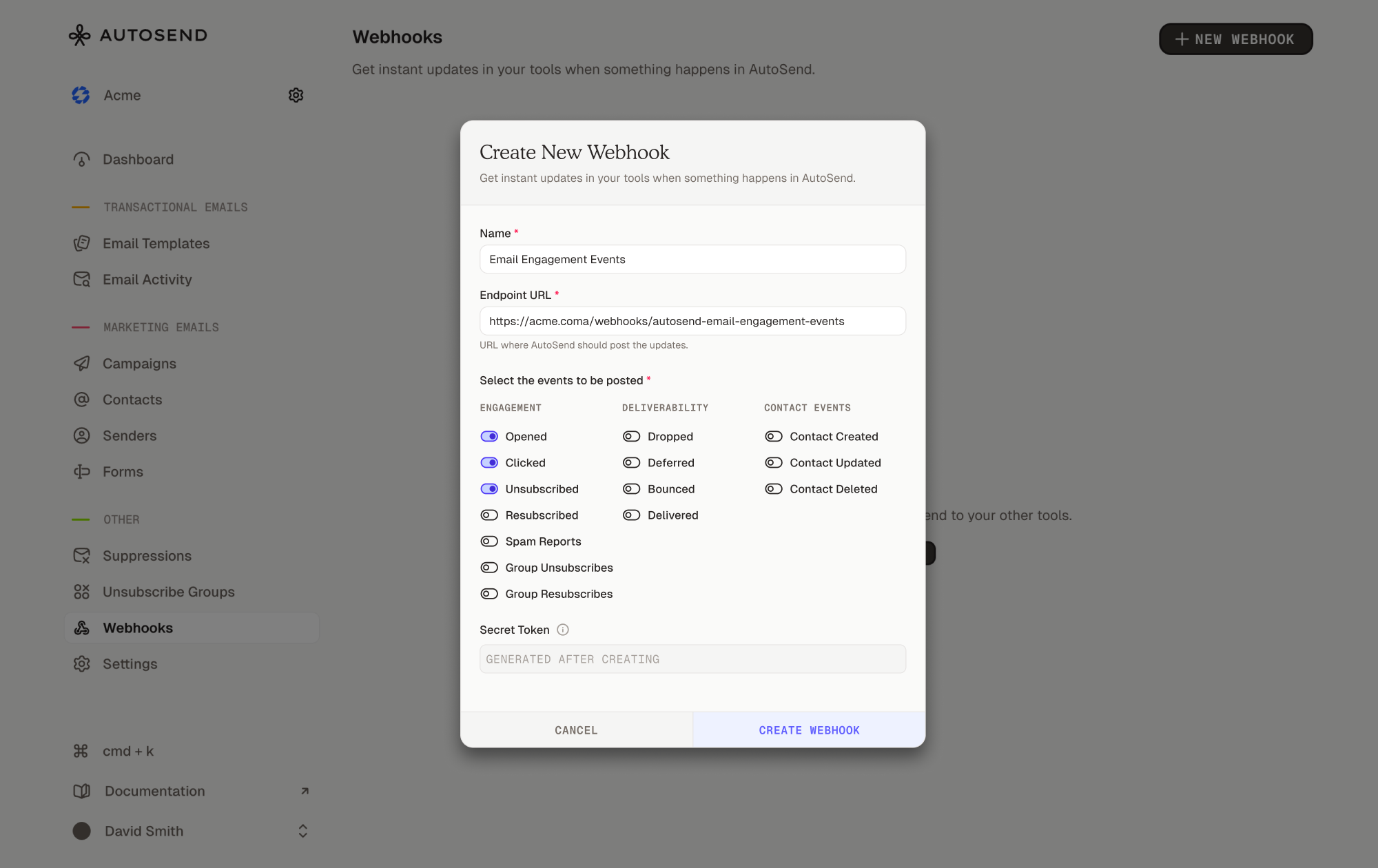 #### Webhooks
Listen to real-time email events directly in your app. Available on Pro 10k plans and above.
Events you can track:
* Delivery lifecycle: `email.sent`, `email.delivered`, `email.deferred`
* Engagement: `email.opened`, `email.clicked`
* Issues: `email.bounced`, `email.spam_reported`
* Preferences: `email.unsubscribed`, `email.group_unsubscribed`, `email.group_resubscribed`
* Contact events: `contact.created`, `contact.updated`, `contact.deleted`
#### Email Attachments
Attach files via base64 upload, S3 file paths, or external URLs. Up to 20 attachments per email, 40MB per file.
### Fixes:
* Fixed pricing page data issues during onboarding.
## Introducing Marketing Emails
You can now create and send marketing campaigns, manage contacts, and build engaged audiences, all from one platform.
#### Campaigns
Create and send one-time or scheduled marketing emails to contacts, lists, or segments. Features include an HTML email designer, variable personalization, real-time preview, send now or schedule, test emails, targeting options, and exclusion lists.
#### Contact Management
All contacts view, contact details, reserved fields, custom fields, CSV import with field mapping, and contact activity tracking.
#### Lists
Static collections of contacts grouped together. Perfect for fixed criteria like "Newsletter Subscribers."
#### Segments
Dynamic groups that update automatically based on conditions. Auto-update as contacts meet or stop meeting your defined criteria.
#### Sender Management
Add sender names, email addresses, and reply-to addresses. Only authenticated domains are allowed for better deliverability.
#### Unsubscribe Groups
Let recipients choose which types of emails they want to receive. Supports CAN-SPAM, GDPR, and CASL compliance.
#### Webhooks
Listen to real-time email events directly in your app. Available on Pro 10k plans and above.
Events you can track:
* Delivery lifecycle: `email.sent`, `email.delivered`, `email.deferred`
* Engagement: `email.opened`, `email.clicked`
* Issues: `email.bounced`, `email.spam_reported`
* Preferences: `email.unsubscribed`, `email.group_unsubscribed`, `email.group_resubscribed`
* Contact events: `contact.created`, `contact.updated`, `contact.deleted`
#### Email Attachments
Attach files via base64 upload, S3 file paths, or external URLs. Up to 20 attachments per email, 40MB per file.
### Fixes:
* Fixed pricing page data issues during onboarding.
## Introducing Marketing Emails
You can now create and send marketing campaigns, manage contacts, and build engaged audiences, all from one platform.
#### Campaigns
Create and send one-time or scheduled marketing emails to contacts, lists, or segments. Features include an HTML email designer, variable personalization, real-time preview, send now or schedule, test emails, targeting options, and exclusion lists.
#### Contact Management
All contacts view, contact details, reserved fields, custom fields, CSV import with field mapping, and contact activity tracking.
#### Lists
Static collections of contacts grouped together. Perfect for fixed criteria like "Newsletter Subscribers."
#### Segments
Dynamic groups that update automatically based on conditions. Auto-update as contacts meet or stop meeting your defined criteria.
#### Sender Management
Add sender names, email addresses, and reply-to addresses. Only authenticated domains are allowed for better deliverability.
#### Unsubscribe Groups
Let recipients choose which types of emails they want to receive. Supports CAN-SPAM, GDPR, and CASL compliance.