> ## Documentation Index
> Fetch the complete documentation index at: https://docs.autosend.com/llms.txt
> Use this file to discover all available pages before exploring further.
# How to send emails from Supabase with SMTP
> Configure Supabase Auth to send authentication emails through AutoSend SMTP.
export const APP_PATHS = {
home: '/',
quickstart: '/quickstart',
domainConfiguration: '/domain',
apiReference: '/api-reference',
sendEmail: '/api-reference/mails/send',
bulkSendEmail: '/api-reference/mails/bulk',
upsertContactApiRef: '/api-reference/contacts/upsert-contact',
transactional: '/transactional-emails',
emailActivity: '/transactional-emails/email-activity',
emailTemplates: '/transactional-emails/email-templates',
sendingEmail: '/quickstart/email-using-api',
transactionalTroubleshooting: '/transactional-emails/troubleshooting',
marketing: '/marketing-emails',
campaigns: '/marketing-emails/campaigns',
contacts: '/marketing-emails/contacts',
contactsIntroduction: '/marketing-emails/contacts/introduction',
contactsImportCsv: '/marketing-emails/contacts/import-csv',
contactsLists: '/marketing-emails/contacts/lists',
contactsSegments: '/marketing-emails/contacts/segments',
contactsCustomFields: '/marketing-emails/contacts/contact-properties',
contactsContactProperties: '/marketing-emails/contacts/contact-properties',
createContactPropertyApiRef: '/api-reference/contact-properties/create',
listContactPropertiesApiRef: '/api-reference/contact-properties/list',
getContactPropertyApiRef: '/api-reference/contact-properties/get-by-name',
deleteContactPropertyApiRef: '/api-reference/contact-properties/delete',
sender: '/marketing-emails/sender',
unsubscribeGroups: '/others/unsubscribe-groups',
webhookIntroduction: '/others/webhooks/introduction',
webhookEventType: '/others/webhooks/event-type',
webhookRetries: '/others/webhooks/retries',
webhookVerifyRequests: '/others/webhooks/verify-requests',
dynamicTemplates: '/dynamic-templates',
guides: '/guides',
sitemap: '/sitemap.xml',
team: '/others/team',
automations: '/automations',
events: '/automations/events',
sendEventApi: '/api-reference/events/send-event',
smtpIntroduction: '/quickstart/smtp',
betterAuth: '/guides/better-auth',
convexGuide: '/guides/convex',
templateVariables: '/transactional-emails/variables',
suppressions: '/others/suppressions',
rateLimit: '/api-reference/rate-limit',
nodejsSdk: '/sdk/nodejs',
smtpIntegrationGuides: '/guides/smtp',
apiKeys: '/api-keys',
encryptedPayloads: '/others/encrypted-payloads',
apiReferenceIntroduction: '/api-reference/introduction',
lovableGuide: '/ai/integrations/lovable',
aiIntroduction: '/ai/introduction',
aiSkills: '/ai/skills',
aiMcpServer: '/ai/mcp-server',
aiLovable: '/ai/integrations/lovable',
aiBolt: '/ai/integrations/bolt',
aiV0: '/ai/integrations/v0',
aiReplit: '/ai/integrations/replit',
mcpClaude: '/ai/mcp-clients/claude',
mcpCursor: '/ai/mcp-clients/cursor',
mcpCopilot: '/ai/mcp-clients/copilot',
mcpWindsurf: '/ai/mcp-clients/windsurf',
mcpCodex: '/ai/mcp-clients/codex',
mcpAntigravity: '/ai/mcp-clients/antigravity',
mcpChatgpt: '/ai/mcp-clients/chatgpt',
mcpRaycast: '/ai/mcp-clients/raycast',
domainWarmup: '/marketing-emails/domain-warmup',
projects: '/projects',
createAutomationApi: '/api-reference/automations/create-automation',
migrationSendgrid: '/migration/sendgrid',
migrationResend: '/migration/resend',
auth0CustomAction: '/guides/auth0-custom-action',
accountBilling: '/others/account/billing',
accountUsage: '/others/account/usage',
inboundIntroduction: '/inbound/introduction',
listInboundMessagesApi: '/api-reference/inbound-emails/list-messages',
getInboundMessageApi: '/api-reference/inbound-emails/get-message',
downloadInboundAttachmentApi: '/api-reference/inbound-emails/download-attachment',
replyToInboundMessageApi: '/api-reference/inbound-emails/reply-to-message',
wikiDailySendingLimit: '/wiki/daily-sending-limit'
};
export const AUTOSEND_PATHS = {
dashboard: 'https://autosend.com/dashboard',
apiKey: 'https://autosend.com/account/api-key',
faqs: 'https://autosend.com/faq',
marketingEmails: 'https://autosend.com/marketing-emails',
webhooks: 'https://autosend.com/webhooks',
composeByAutoSend: 'https://autosend.com/compose',
emailActivity: 'https://autosend.com/email-activities',
team: 'https://autosend.com/settings/team',
pricing: 'https://autosend.com/pricing',
verifyEmail: 'https://autosend.com/compose/email-builder?template=verify-email',
welcomeEmail: 'https://autosend.com/compose/email-builder?template=welcome-email',
productUpdate: 'https://autosend.com/compose/email-builder?template=product-update',
newsletter: 'https://autosend.com/compose/email-builder?template=newsletter',
automations: 'https://autosend.com/automations',
globalSuppressions: 'https://autosend.com/suppressions/global',
signup: 'https://autosend.com/signup',
domains: 'https://autosend.com/settings/domains',
smtpKey: 'https://autosend.com/settings/smtp',
logoKit: 'https://asend.email/logo',
contactsPage: 'https://autosend.com/contacts/list-and-segments',
accountBilling: 'https://autosend.com/account/billing',
accountUsage: 'https://autosend.com/account/usage',
terms: 'https://autosend.com/legal/terms',
inbound: 'https://autosend.com/email-activities/inbound'
};
 Supabase uses email for authentication flows like sign-up confirmations, password resets, and magic links. By default, Supabase uses its built-in email provider, but it has rate limit. For production apps, you can configure it to use AutoSend SMTP for better deliverability.
## Prerequisites
Make sure you have a verified domain added in AutoSend to send emails from.
Create a project-specific SMTP key from the SMTP tab in Project Settings.
## Configuration
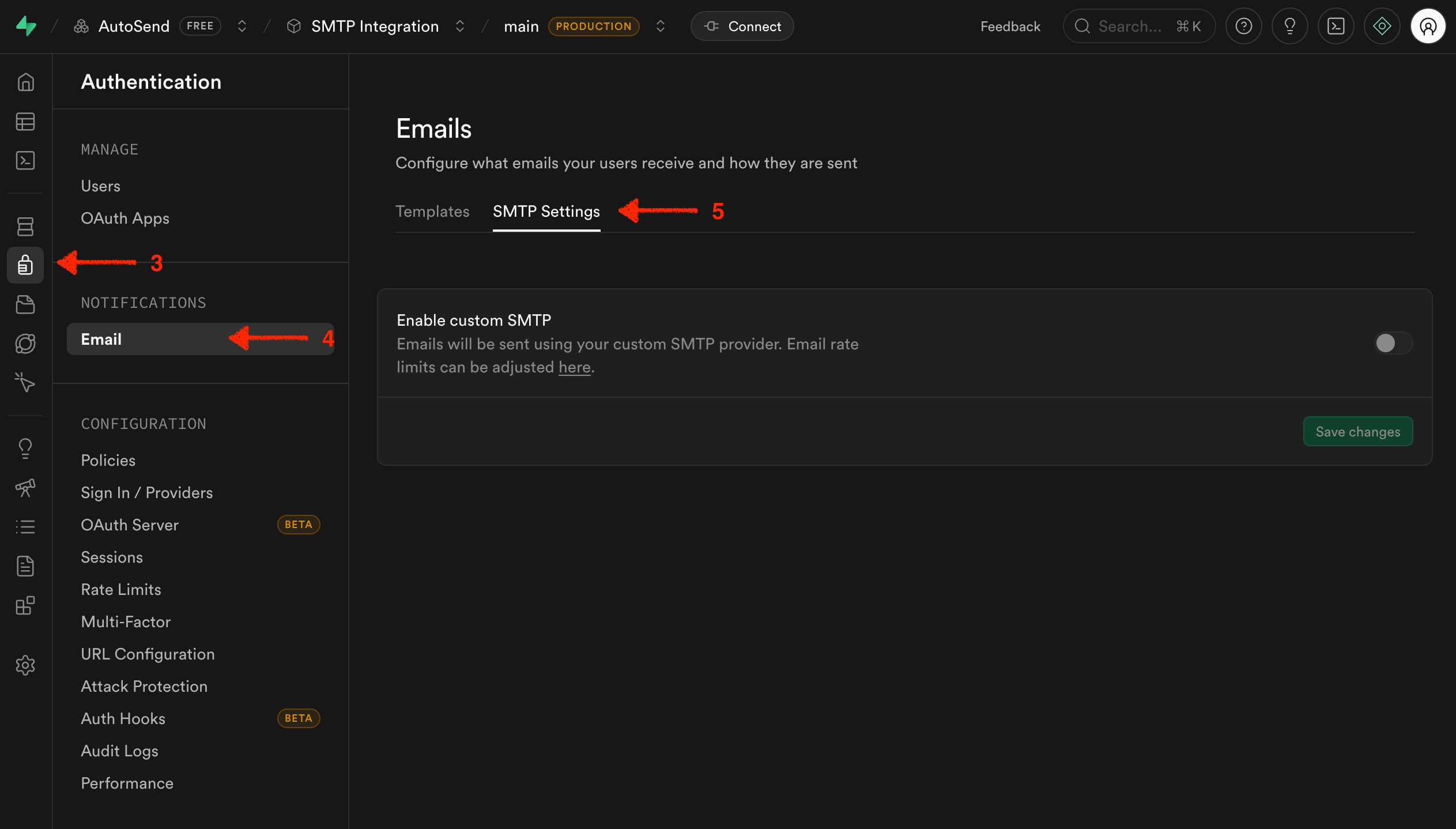
1. Go to your [Supabase dashboard](https://supabase.com/dashboard)
2. Select your project
3. Navigate to **Authentication**
4. Under Notifications, you will see **Email** Section.
5. Go to **SMTP Settings** tab.
Supabase uses email for authentication flows like sign-up confirmations, password resets, and magic links. By default, Supabase uses its built-in email provider, but it has rate limit. For production apps, you can configure it to use AutoSend SMTP for better deliverability.
## Prerequisites
Make sure you have a verified domain added in AutoSend to send emails from.
Create a project-specific SMTP key from the SMTP tab in Project Settings.
## Configuration
1. Go to your [Supabase dashboard](https://supabase.com/dashboard)
2. Select your project
3. Navigate to **Authentication**
4. Under Notifications, you will see **Email** Section.
5. Go to **SMTP Settings** tab.
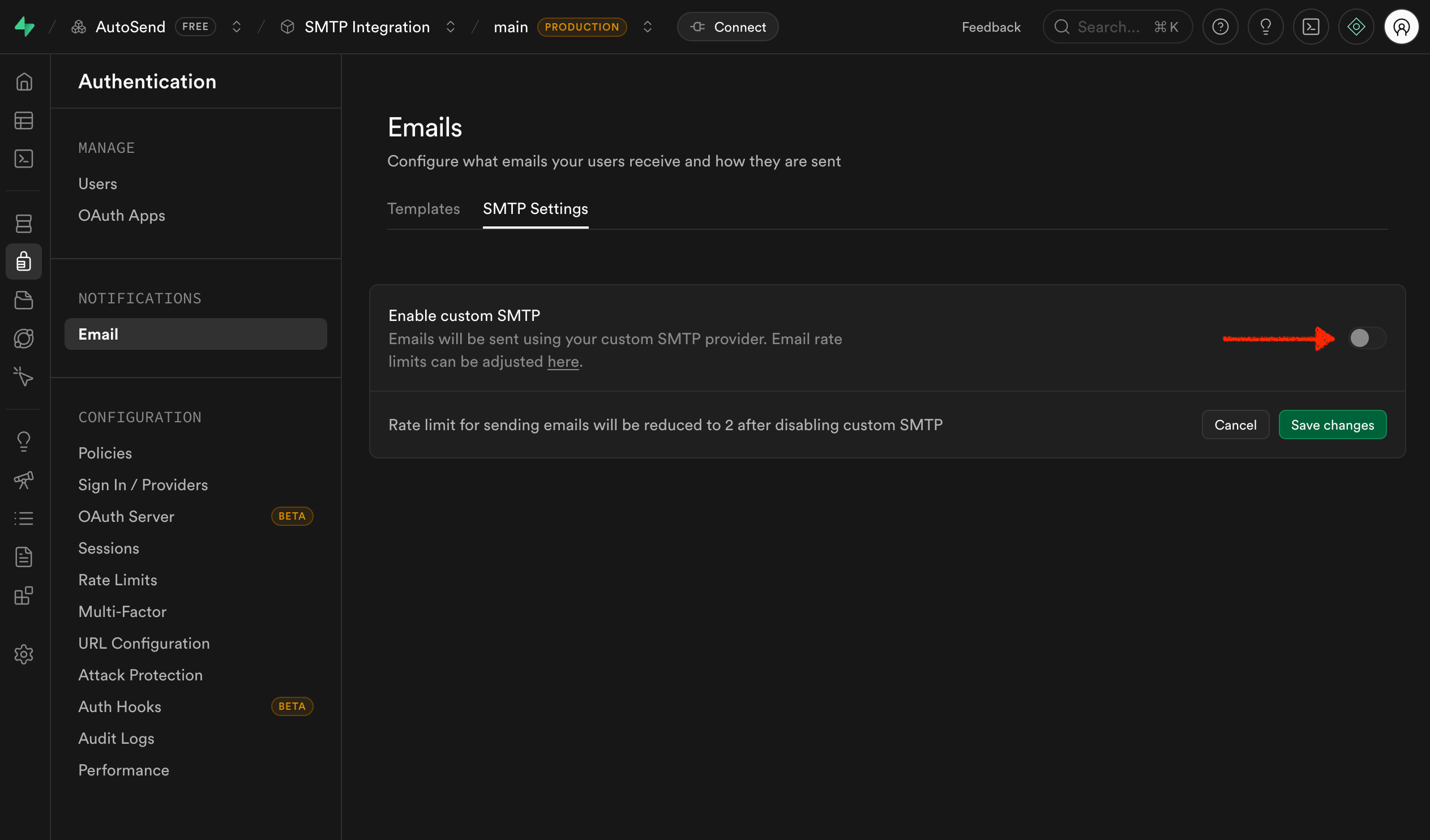
 Toggle **Enable Custom SMTP** to enable the SMTP configuration form.
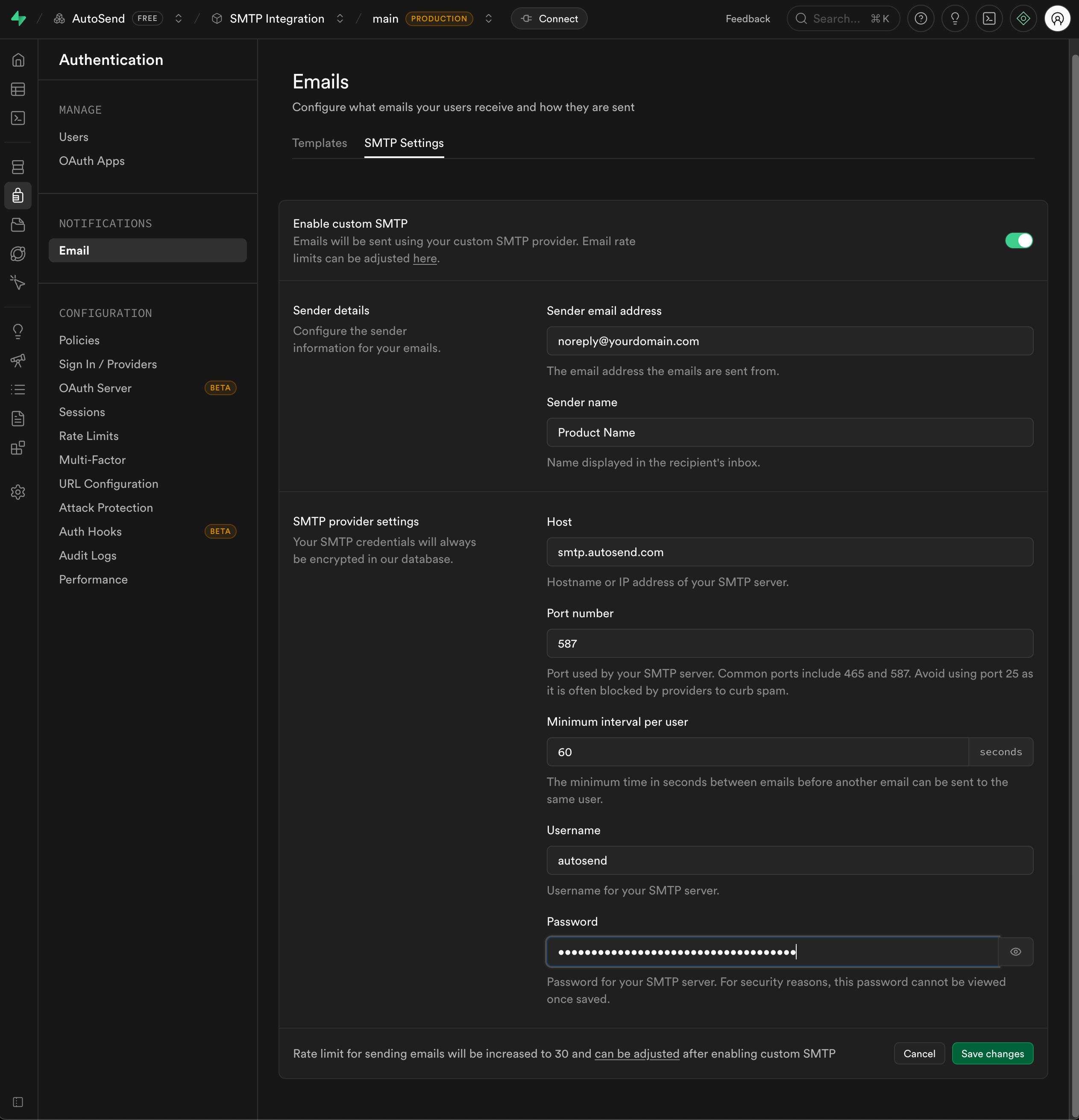
 Fill in the following settings:
| Field | Value |
| ---------------- | ---------------------------------------------------------- |
| **Sender email** | `noreply@yourdomain.com` (must match your verified domain) |
| **Sender name** | Your app name (e.g., "MyApp") |
| **Host** | `smtp.autosend.com` |
| **Port number** | `587` |
| **Username** | autosend |
| **Password** | Your AutoSend SMTP key (AS\_xxx) |
The SMTP password is no longer your API key. Create a project-specific SMTP key from the SMTP tab in Project Settings.
Fill in the following settings:
| Field | Value |
| ---------------- | ---------------------------------------------------------- |
| **Sender email** | `noreply@yourdomain.com` (must match your verified domain) |
| **Sender name** | Your app name (e.g., "MyApp") |
| **Host** | `smtp.autosend.com` |
| **Port number** | `587` |
| **Username** | autosend |
| **Password** | Your AutoSend SMTP key (AS\_xxx) |
The SMTP password is no longer your API key. Create a project-specific SMTP key from the SMTP tab in Project Settings.
 Click **Save** to apply your SMTP configuration.
Send a test email to verify your configuration:
1. Go to **Authentication** → **Users**
2. Click **Invite user**
3. Enter a test email address
4. Click **Invite**
Check the recipient's inbox to confirm the email was delivered through AutoSend.
## Email Templates
Supabase allows you to customize the email templates used for authentication. You can modify these in **Authentication** → **Email Templates**.
Available templates:
* **Confirm signup** - Sent when a user signs up
* **Invite user** - Sent when inviting a user to your project
* **Magic link** - Sent for passwordless login
* **Change email address** - Sent when a user requests an email change
* **Reset password** - Sent for password recovery
Supabase email templates use Go templating syntax. Variables like `{{ .ConfirmationURL }}` are replaced with actual values when the email is sent.
### Example Custom Template
Here's an example of a customized signup confirmation template:
```html theme={null}
Click **Save** to apply your SMTP configuration.
Send a test email to verify your configuration:
1. Go to **Authentication** → **Users**
2. Click **Invite user**
3. Enter a test email address
4. Click **Invite**
Check the recipient's inbox to confirm the email was delivered through AutoSend.
## Email Templates
Supabase allows you to customize the email templates used for authentication. You can modify these in **Authentication** → **Email Templates**.
Available templates:
* **Confirm signup** - Sent when a user signs up
* **Invite user** - Sent when inviting a user to your project
* **Magic link** - Sent for passwordless login
* **Change email address** - Sent when a user requests an email change
* **Reset password** - Sent for password recovery
Supabase email templates use Go templating syntax. Variables like `{{ .ConfirmationURL }}` are replaced with actual values when the email is sent.
### Example Custom Template
Here's an example of a customized signup confirmation template:
```html theme={null}
Welcome to MyApp!
Thanks for signing up. Please confirm your email address by clicking the button below:
Confirm Email
If you didn't create an account, you can safely ignore this email.
Thanks,
The MyApp Team
```
## Rate Limits
Supabase applies rate limits to authentication emails to prevent abuse. These limits are:
* **30 emails per hour** per user
* **4 emails per hour** for the same action (e.g., password reset)
AutoSend's rate limits are separate and typically higher. Check your plan limits for details.
## Troubleshooting
* Verify your SMTP credentials are correct - Check that your sender email domain is verified in
AutoSend - Ensure the sender email matches a verified domain - Check Supabase logs for SMTP
connection errors
* Ensure your domain has proper DNS records (SPF, DKIM, DMARC) - Use a professional sender name,
not "noreply" - Avoid spam trigger words in your email templates - Check your domain reputation
in AutoSend
* Supabase may have firewall restrictions on certain IP ranges - Try using port 465 instead of
587 - Contact Supabase support if the issue persists
* Double-check your SMTP key is correct - Ensure the username is `autosend` and the password is your
SMTP key - Verify your SMTP key is active in the SMTP Settings
## Alternative: Supabase Edge Functions
For more advanced use cases, you can use Supabase Edge Functions with the AutoSend API instead of SMTP. This gives you access to features like:
* Email templates with dynamic variables
* Detailed delivery tracking
* Webhook notifications
Learn how to send emails from Supabase Edge Functions using the AutoSend API