> ## Documentation Index
> Fetch the complete documentation index at: https://docs.autosend.com/llms.txt
> Use this file to discover all available pages before exploring further.
# Usage
> Track how many emails you have sent against your plan limit, get notified before you run out, and top up with email credits or auto-reload.
export const APP_PATHS = {
home: '/',
quickstart: '/quickstart',
domainConfiguration: '/domain',
apiReference: '/api-reference',
sendEmail: '/api-reference/mails/send',
bulkSendEmail: '/api-reference/mails/bulk',
upsertContactApiRef: '/api-reference/contacts/upsert-contact',
transactional: '/transactional-emails',
emailActivity: '/transactional-emails/email-activity',
emailTemplates: '/transactional-emails/email-templates',
sendingEmail: '/quickstart/email-using-api',
transactionalTroubleshooting: '/transactional-emails/troubleshooting',
marketing: '/marketing-emails',
campaigns: '/marketing-emails/campaigns',
contacts: '/marketing-emails/contacts',
contactsIntroduction: '/marketing-emails/contacts/introduction',
contactsImportCsv: '/marketing-emails/contacts/import-csv',
contactsLists: '/marketing-emails/contacts/lists',
contactsSegments: '/marketing-emails/contacts/segments',
contactsCustomFields: '/marketing-emails/contacts/contact-properties',
contactsContactProperties: '/marketing-emails/contacts/contact-properties',
createContactPropertyApiRef: '/api-reference/contact-properties/create',
listContactPropertiesApiRef: '/api-reference/contact-properties/list',
getContactPropertyApiRef: '/api-reference/contact-properties/get-by-name',
deleteContactPropertyApiRef: '/api-reference/contact-properties/delete',
sender: '/marketing-emails/sender',
unsubscribeGroups: '/others/unsubscribe-groups',
webhookIntroduction: '/others/webhooks/introduction',
webhookEventType: '/others/webhooks/event-type',
webhookRetries: '/others/webhooks/retries',
webhookVerifyRequests: '/others/webhooks/verify-requests',
dynamicTemplates: '/dynamic-templates',
guides: '/guides',
sitemap: '/sitemap.xml',
team: '/others/team',
automations: '/automations',
events: '/automations/events',
sendEventApi: '/api-reference/events/send-event',
smtpIntroduction: '/quickstart/smtp',
betterAuth: '/guides/better-auth',
convexGuide: '/guides/convex',
templateVariables: '/transactional-emails/variables',
suppressions: '/others/suppressions',
rateLimit: '/api-reference/rate-limit',
nodejsSdk: '/sdk/nodejs',
smtpIntegrationGuides: '/guides/smtp',
apiKeys: '/api-keys',
encryptedPayloads: '/others/encrypted-payloads',
apiReferenceIntroduction: '/api-reference/introduction',
lovableGuide: '/ai/integrations/lovable',
aiIntroduction: '/ai/introduction',
aiSkills: '/ai/skills',
aiMcpServer: '/ai/mcp-server',
aiLovable: '/ai/integrations/lovable',
aiBolt: '/ai/integrations/bolt',
aiV0: '/ai/integrations/v0',
aiReplit: '/ai/integrations/replit',
mcpClaude: '/ai/mcp-clients/claude',
mcpCursor: '/ai/mcp-clients/cursor',
mcpCopilot: '/ai/mcp-clients/copilot',
mcpWindsurf: '/ai/mcp-clients/windsurf',
mcpCodex: '/ai/mcp-clients/codex',
mcpAntigravity: '/ai/mcp-clients/antigravity',
mcpChatgpt: '/ai/mcp-clients/chatgpt',
mcpRaycast: '/ai/mcp-clients/raycast',
domainWarmup: '/marketing-emails/domain-warmup',
projects: '/projects',
createAutomationApi: '/api-reference/automations/create-automation',
migrationSendgrid: '/migration/sendgrid',
migrationResend: '/migration/resend',
auth0CustomAction: '/guides/auth0-custom-action',
accountBilling: '/others/account/billing',
accountUsage: '/others/account/usage',
inboundIntroduction: '/inbound/introduction',
listInboundMessagesApi: '/api-reference/inbound-emails/list-messages',
getInboundMessageApi: '/api-reference/inbound-emails/get-message',
downloadInboundAttachmentApi: '/api-reference/inbound-emails/download-attachment',
replyToInboundMessageApi: '/api-reference/inbound-emails/reply-to-message',
wikiDailySendingLimit: '/wiki/daily-sending-limit'
};
export const AUTOSEND_PATHS = {
dashboard: 'https://autosend.com/dashboard',
apiKey: 'https://autosend.com/account/api-key',
faqs: 'https://autosend.com/faq',
marketingEmails: 'https://autosend.com/marketing-emails',
webhooks: 'https://autosend.com/webhooks',
composeByAutoSend: 'https://autosend.com/compose',
emailActivity: 'https://autosend.com/email-activities',
team: 'https://autosend.com/settings/team',
pricing: 'https://autosend.com/pricing',
verifyEmail: 'https://autosend.com/compose/email-builder?template=verify-email',
welcomeEmail: 'https://autosend.com/compose/email-builder?template=welcome-email',
productUpdate: 'https://autosend.com/compose/email-builder?template=product-update',
newsletter: 'https://autosend.com/compose/email-builder?template=newsletter',
automations: 'https://autosend.com/automations',
globalSuppressions: 'https://autosend.com/suppressions/global',
signup: 'https://autosend.com/signup',
domains: 'https://autosend.com/settings/domains',
smtpKey: 'https://autosend.com/settings/smtp',
logoKit: 'https://asend.email/logo',
contactsPage: 'https://autosend.com/contacts/list-and-segments',
accountBilling: 'https://autosend.com/account/billing',
accountUsage: 'https://autosend.com/account/usage',
terms: 'https://autosend.com/legal/terms',
inbound: 'https://autosend.com/email-activities/inbound'
};
Open Account Settings > Usage to see how many emails you have sent in the current billing cycle, how close you are to your plan limit, and to purchase or manage email credits.
## Usage Limits
Every AutoSend plan includes a monthly email sending limit. You can send emails up to your plan limit during the billing cycle. Once you reach the limit, sending is **paused** until the next cycle begins or until you add more capacity through [email credits](#email-credits).
### Notifications
AutoSend emails workspace Admins automatically as you approach your limit:
* **At 90% of your plan limit**: a heads-up so you have time to upgrade or top up before sending is paused.
* **At 100% of your plan limit**: confirmation that sending is paused on your account.
### What gets paused
When you hit your limit, both transactional and marketing emails stop sending. Active automation will pause sending until capacity is available again.
### How to keep sending
You have two options when you reach your plan limit:
* **Upgrade your plan**: move to a higher tier to unlock a larger monthly limit. See the [pricing page](https://autosend.com/account/compare-plans).
* **Buy email credits**: top up your account with [email credits](#email-credits) that add to your sending capacity for the current cycle and beyond.
Your effective sending limit each cycle is **plan limit + email credit balance**. As long as the
total is above zero, sending continues.
## Email Credits
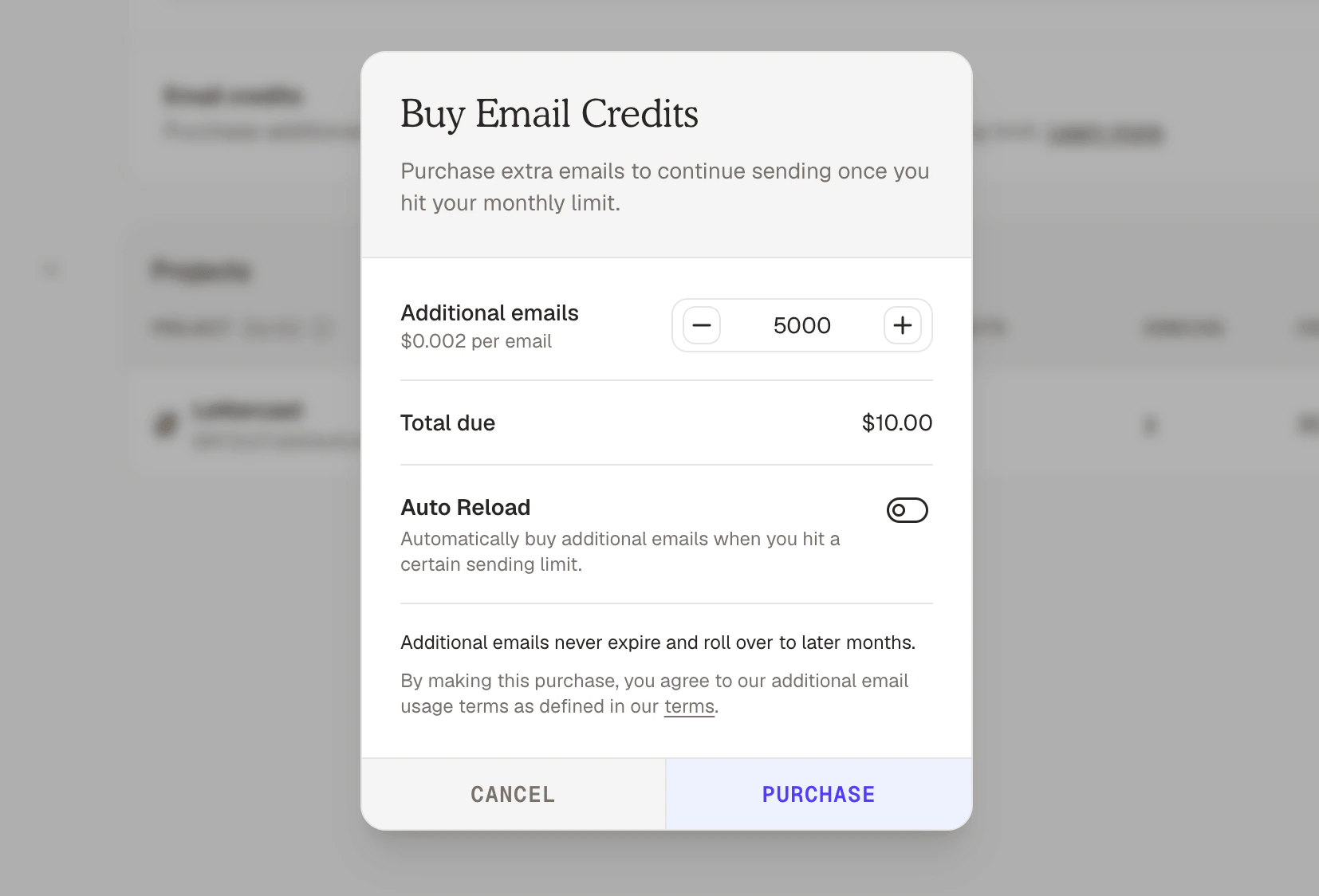
Email credits let you purchase additional sending capacity in advance, on top of your plan. They are useful when you need extra headroom for a campaign, want a buffer against unexpected spikes, or simply prefer to pay for usage upfront.
Buy credits from Account Settings > Usage in the AutoSend dashboard.
 ### How email credits work
* **Top-up in advance**: buy credits whenever you want from the Usage page.
* **Rollover and never expire**: unused credits stay on your account indefinitely and carry over from one billing cycle to the next.
* **Stack with your plan**: credits are consumed only after your plan's included emails for the current cycle are used.
* **Non-refundable**: credits cannot be refunded once purchased.
* **Non-transferable**: credits are tied to your workspace and cannot be moved to another account.
Email credits are non-refundable and non-transferable. Purchase the amount you expect to use.
### Auto-reload
Auto-reload tops up your email credits automatically when your balance gets low, so sending never pauses unexpectedly.
You can enable auto-reload from the Email Credits section on the Usage page. When configured, AutoSend will:
1. Watch your remaining sending capacity (plan limit + credit balance).
2. Trigger a top-up as soon as your balance drops to the **threshold** you set.
3. Charge your default payment method and add the configured amount of credits to your account.
Auto-reload uses the default payment method on file in [Billing](/others/account/billing). Make
sure your card is valid to avoid failed reloads.
## FAQs
Sending is paused on your account until the next billing cycle begins or until you add capacity through an upgrade or email credits. AutoSend notifies Admins by email at 90% and 100% of the limit.
No. Plan emails reset at the start of each billing cycle. Only **email credits** roll over and
never expire.
Email credits are consumed only after you exhaust the emails included with your plan for the
current billing cycle.
No. Email credits are non-refundable. They also cannot be transferred to another workspace.
Auto-reload triggers when your remaining sending capacity drops to the threshold you set. The
configured amount of credits is then purchased using your default payment method.
Only workspace **Admins** can purchase credits, enable auto-reload, or change billing details. See [Team roles and permissions](/others/team) for the full role breakdown.
### How email credits work
* **Top-up in advance**: buy credits whenever you want from the Usage page.
* **Rollover and never expire**: unused credits stay on your account indefinitely and carry over from one billing cycle to the next.
* **Stack with your plan**: credits are consumed only after your plan's included emails for the current cycle are used.
* **Non-refundable**: credits cannot be refunded once purchased.
* **Non-transferable**: credits are tied to your workspace and cannot be moved to another account.
Email credits are non-refundable and non-transferable. Purchase the amount you expect to use.
### Auto-reload
Auto-reload tops up your email credits automatically when your balance gets low, so sending never pauses unexpectedly.
You can enable auto-reload from the Email Credits section on the Usage page. When configured, AutoSend will:
1. Watch your remaining sending capacity (plan limit + credit balance).
2. Trigger a top-up as soon as your balance drops to the **threshold** you set.
3. Charge your default payment method and add the configured amount of credits to your account.
Auto-reload uses the default payment method on file in [Billing](/others/account/billing). Make
sure your card is valid to avoid failed reloads.
## FAQs
Sending is paused on your account until the next billing cycle begins or until you add capacity through an upgrade or email credits. AutoSend notifies Admins by email at 90% and 100% of the limit.
No. Plan emails reset at the start of each billing cycle. Only **email credits** roll over and
never expire.
Email credits are consumed only after you exhaust the emails included with your plan for the
current billing cycle.
No. Email credits are non-refundable. They also cannot be transferred to another workspace.
Auto-reload triggers when your remaining sending capacity drops to the threshold you set. The
configured amount of credits is then purchased using your default payment method.
Only workspace **Admins** can purchase credits, enable auto-reload, or change billing details. See [Team roles and permissions](/others/team) for the full role breakdown.