> ## Documentation Index
> Fetch the complete documentation index at: https://docs.autosend.com/llms.txt
> Use this file to discover all available pages before exploring further.
# Webhooks
> Use webhooks to notify your application about email and contact events in real-time.
export const LOCALTUNNEL_LINK = "https://localtunnel.github.io";
export const NGROK_LINK = "https://ngrok.com";
export const APP_PATHS = {
home: '/',
quickstart: '/quickstart',
domainConfiguration: '/domain',
apiReference: '/api-reference',
sendEmail: '/api-reference/mails/send',
bulkSendEmail: '/api-reference/mails/bulk',
upsertContactApiRef: '/api-reference/contacts/upsert-contact',
transactional: '/transactional-emails',
emailActivity: '/transactional-emails/email-activity',
emailTemplates: '/transactional-emails/email-templates',
sendingEmail: '/quickstart/email-using-api',
transactionalTroubleshooting: '/transactional-emails/troubleshooting',
marketing: '/marketing-emails',
campaigns: '/marketing-emails/campaigns',
contacts: '/marketing-emails/contacts',
contactsIntroduction: '/marketing-emails/contacts/introduction',
contactsImportCsv: '/marketing-emails/contacts/import-csv',
contactsLists: '/marketing-emails/contacts/lists',
contactsSegments: '/marketing-emails/contacts/segments',
contactsCustomFields: '/marketing-emails/contacts/contact-properties',
contactsContactProperties: '/marketing-emails/contacts/contact-properties',
createContactPropertyApiRef: '/api-reference/contact-properties/create',
listContactPropertiesApiRef: '/api-reference/contact-properties/list',
getContactPropertyApiRef: '/api-reference/contact-properties/get-by-name',
deleteContactPropertyApiRef: '/api-reference/contact-properties/delete',
sender: '/marketing-emails/sender',
unsubscribeGroups: '/others/unsubscribe-groups',
webhookIntroduction: '/others/webhooks/introduction',
webhookEventType: '/others/webhooks/event-type',
webhookRetries: '/others/webhooks/retries',
webhookVerifyRequests: '/others/webhooks/verify-requests',
dynamicTemplates: '/dynamic-templates',
guides: '/guides',
sitemap: '/sitemap.xml',
team: '/others/team',
automations: '/automations',
events: '/automations/events',
sendEventApi: '/api-reference/events/send-event',
smtpIntroduction: '/quickstart/smtp',
betterAuth: '/guides/better-auth',
convexGuide: '/guides/convex',
templateVariables: '/transactional-emails/variables',
suppressions: '/others/suppressions',
rateLimit: '/api-reference/rate-limit',
nodejsSdk: '/sdk/nodejs',
smtpIntegrationGuides: '/guides/smtp',
apiKeys: '/api-keys',
encryptedPayloads: '/others/encrypted-payloads',
apiReferenceIntroduction: '/api-reference/introduction',
lovableGuide: '/ai/integrations/lovable',
aiIntroduction: '/ai/introduction',
aiSkills: '/ai/skills',
aiMcpServer: '/ai/mcp-server',
aiLovable: '/ai/integrations/lovable',
aiBolt: '/ai/integrations/bolt',
aiV0: '/ai/integrations/v0',
aiReplit: '/ai/integrations/replit',
mcpClaude: '/ai/mcp-clients/claude',
mcpCursor: '/ai/mcp-clients/cursor',
mcpCopilot: '/ai/mcp-clients/copilot',
mcpWindsurf: '/ai/mcp-clients/windsurf',
mcpCodex: '/ai/mcp-clients/codex',
mcpAntigravity: '/ai/mcp-clients/antigravity',
mcpChatgpt: '/ai/mcp-clients/chatgpt',
mcpRaycast: '/ai/mcp-clients/raycast',
domainWarmup: '/marketing-emails/domain-warmup',
projects: '/projects',
createAutomationApi: '/api-reference/automations/create-automation',
migrationSendgrid: '/migration/sendgrid',
migrationResend: '/migration/resend',
auth0CustomAction: '/guides/auth0-custom-action',
accountBilling: '/others/account/billing',
accountUsage: '/others/account/usage',
inboundIntroduction: '/inbound/introduction',
listInboundMessagesApi: '/api-reference/inbound-emails/list-messages',
getInboundMessageApi: '/api-reference/inbound-emails/get-message',
downloadInboundAttachmentApi: '/api-reference/inbound-emails/download-attachment',
replyToInboundMessageApi: '/api-reference/inbound-emails/reply-to-message',
wikiDailySendingLimit: '/wiki/daily-sending-limit'
};
export const AUTOSEND_PATHS = {
dashboard: 'https://autosend.com/dashboard',
apiKey: 'https://autosend.com/account/api-key',
faqs: 'https://autosend.com/faq',
marketingEmails: 'https://autosend.com/marketing-emails',
webhooks: 'https://autosend.com/webhooks',
composeByAutoSend: 'https://autosend.com/compose',
emailActivity: 'https://autosend.com/email-activities',
team: 'https://autosend.com/settings/team',
pricing: 'https://autosend.com/pricing',
verifyEmail: 'https://autosend.com/compose/email-builder?template=verify-email',
welcomeEmail: 'https://autosend.com/compose/email-builder?template=welcome-email',
productUpdate: 'https://autosend.com/compose/email-builder?template=product-update',
newsletter: 'https://autosend.com/compose/email-builder?template=newsletter',
automations: 'https://autosend.com/automations',
globalSuppressions: 'https://autosend.com/suppressions/global',
signup: 'https://autosend.com/signup',
domains: 'https://autosend.com/settings/domains',
smtpKey: 'https://autosend.com/settings/smtp',
logoKit: 'https://asend.email/logo',
contactsPage: 'https://autosend.com/contacts/list-and-segments',
accountBilling: 'https://autosend.com/account/billing',
accountUsage: 'https://autosend.com/account/usage',
terms: 'https://autosend.com/legal/terms',
inbound: 'https://autosend.com/email-activities/inbound'
};
## What is a webhook?
Webhooks are HTTP callbacks that send real-time notifications to your application when specific events occur. Instead of continuously polling the AutoSend API to check for updates, webhooks push data to your application the moment events happen.
All AutoSend webhooks use HTTPS and deliver a JSON payload that your application can process immediately.
### Why use webhooks? Common use cases:
* **Automatically remove bounced email addresses** from your mailing lists
* **Track email engagement** in real-time (opens, clicks, unsubscribes)
* **Sync contact changes** across multiple systems
* **Receive incoming emails in your app** with the `email.received` event and the Inbound Email API
* **Create alerts** in your messaging or incident tools based on event types
* **Store all events** in your own database for custom reporting and retention
* **Trigger workflows** when specific events occur (e.g., send a Slack notification when an email bounces)
* **Maintain compliance logs** for audit purposes
***
## How to set up webhooks
Create a new route in your application that accepts POST requests.
```javascript NodeJs expandable theme={null}
const express = require('express');
const crypto = require('crypto');
const app = express();
app.use(express.json());
app.post('/webhooks/autosend', (req, res) => {
// Verify signature (see Verify Webhook Requests section)
const signature = req.headers['x-webhook-signature'];
const isValid = verifySignature(
req.body,
signature,
process.env.WEBHOOK_SECRET
);
if (!isValid) {
return res.status(401).json({ error: 'Invalid signature' });
}
// Process the webhook
const { event, data } = req.body;
console.log(`Received ${event} event:`, data);
// Process based on event type
switch (event) {
case 'email.opened':
// Handle email opened
break;
case 'email.clicked':
// Handle email clicked
break;
case 'contact.created':
// Handle contact created
break;
// ... handle other events
}
// Always respond quickly with 2xx status
res.status(200).json({ received: true });
});
function verifySignature(body, signature, secret) {
const expectedSignature = crypto
.createHmac('sha256', secret)
.update(JSON.stringify(body))
.digest('hex');
return signature === expectedSignature;
}
app.listen(3000, () => {
console.log('Webhook endpoint listening on port 3000');
});
```
```javascript NextJs expandable theme={null}
// pages/api/webhooks.js
import crypto from 'crypto';
export default async function handler(req, res) {
if (req.method !== 'POST') {
return res.status(405).json({ error: 'Method not allowed' });
}
// Verify signature
const signature = req.headers['x-webhook-signature'];
const webhookSecret = process.env.WEBHOOK_SECRET;
const expectedSignature = crypto
.createHmac('sha256', webhookSecret)
.update(JSON.stringify(req.body))
.digest('hex');
if (signature !== expectedSignature) {
return res.status(401).json({ error: 'Invalid signature' });
}
// Process webhook
const { event, data } = req.body;
console.log(`Received ${event} event:`, data);
// Respond immediately
res.status(200).json({ received: true });
}
```
```python Python expandable theme={null}
from flask import Flask, request, jsonify
import hmac
import hashlib
import os
app = Flask(__name__)
WEBHOOK_SECRET = os.getenv('WEBHOOK_SECRET')
def verify_signature(payload, signature):
expected = hmac.new(
WEBHOOK_SECRET.encode('utf-8'),
payload.encode('utf-8'),
hashlib.sha256
).hexdigest()
return hmac.compare_digest(expected, signature)
@app.route('/webhooks/autosend', methods=['POST'])
def webhook():
signature = request.headers.get('X-Webhook-Signature')
payload = request.get_data(as_text=True)
if not signature or not verify_signature(payload, signature):
return jsonify({'error': 'Invalid signature'}), 401
data = request.json
event = data.get('event')
print(f'Received {event} event')
return jsonify({'received': True}), 200
```
When you receive an event, respond with an `HTTP 200 OK` status within 10
seconds to confirm successful delivery.
1. Go to Webhooks in the AutoSend sidebar
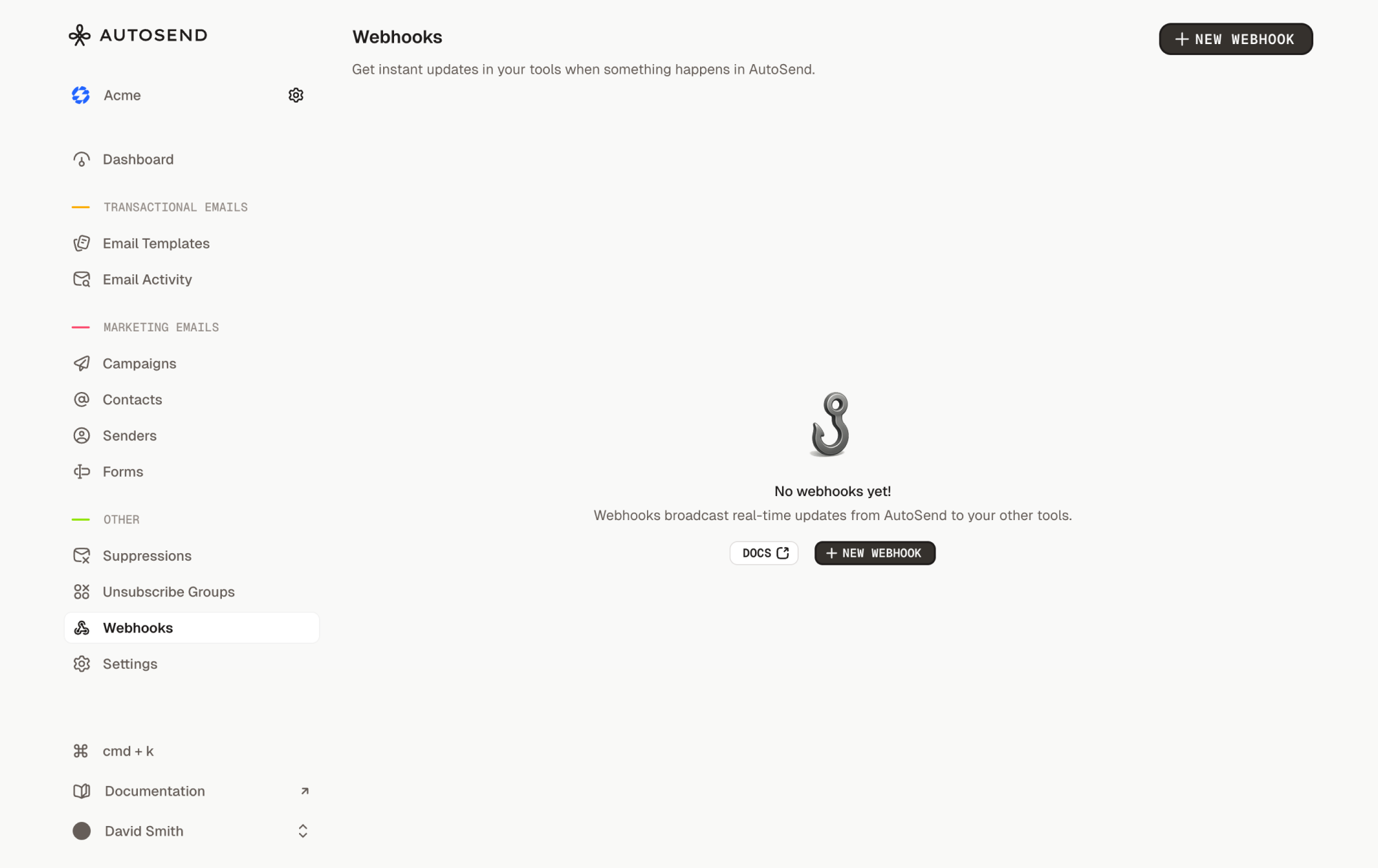 2. Click **"New Webhook"**
3. Fill in the webhook details:
* **Name**: A friendly name for identification (e.g., "Production Email Tracker")
* **Endpoint URL**: Your publicly accessible HTTPS URL. For local development, use a tunneling service like ngrok or localtunnel.
* **Events**: Select the events you want to receive notifications for
4. Click **"Create Webhook"**
2. Click **"New Webhook"**
3. Fill in the webhook details:
* **Name**: A friendly name for identification (e.g., "Production Email Tracker")
* **Endpoint URL**: Your publicly accessible HTTPS URL. For local development, use a tunneling service like ngrok or localtunnel.
* **Events**: Select the events you want to receive notifications for
4. Click **"Create Webhook"**
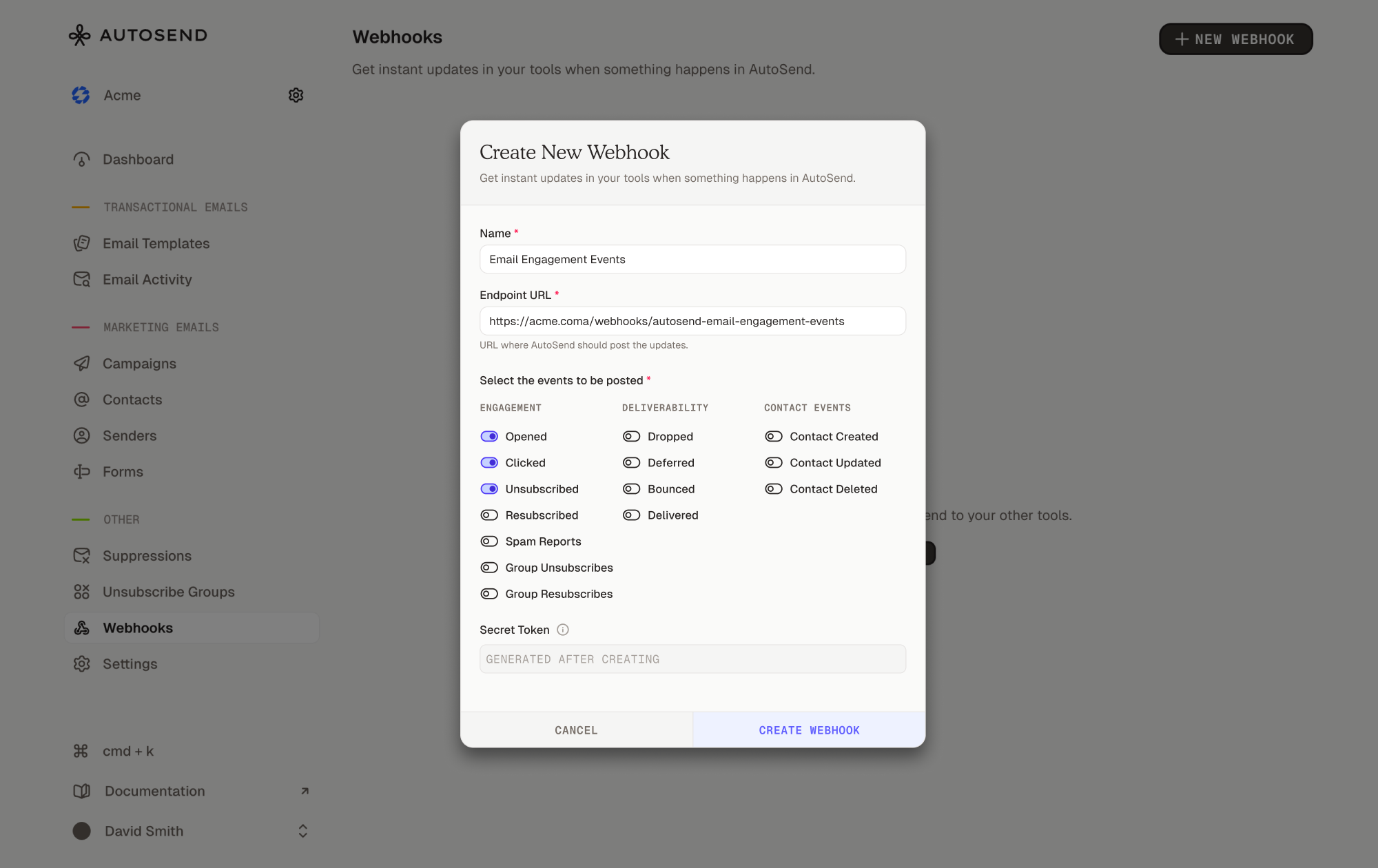 5. Copy the secret token and store it securely. You'll need it to verify webhook requests.
Store your webhook secret as an environment variable
(`WEBHOOK_SECRET=your_secret_here`). Never commit it to version control. In
production, use a secret management service like AWS Secrets Manager.
Add logging to your endpoint to verify incoming requests:
```javascript theme={null}
app.post('/webhooks/autosend', (req, res) => {
console.log('Webhook received!');
console.log('Event:', req.body.event);
console.log('Data:', JSON.stringify(req.body.data, null, 2));
res.status(200).json({ received: true });
});
```
Trigger test events by performing actions in AutoSend:
* **For email events**: Send a test campaign or transactional email
* **For contact events**: Create, update, or delete a test contact
Watch your logs to confirm your endpoint receives the webhook requests.
After testing locally, deploy your webhook endpoint to your production environment (Vercel, Netlify, AWS Lambda, Railway, etc.).
**Your production endpoint must:**
* Use HTTPS (required)
* Respond within 10 seconds
* Implement proper error handling
* Verify webhook signatures
Once deployed, create a new webhook in AutoSend with your production URL. If you used a tunneling URL for development, you'll need to register a separate webhook for production.
***
## Managing webhooks
From the Webhooks page, you can:
* **View all webhooks** for your project, displayed as cards with webhook details
* **Edit webhooks**: Click the menu (⋮) on a webhook card and select "Edit"
* **Delete webhooks**: Click the menu (⋮) and select "Delete"
* **Check webhook status**: Each card shows whether the webhook is "Enabled" or "Disabled"
* **Copy webhook details**: The webhook ID and URL are copyable from each card
If you lose your webhook secret, you can reveal it by editing the webhook and
clicking "Reveal Secret".
***
## Best practices
Process webhooks asynchronously so you can respond within 10 seconds:
```javascript theme={null}
// ❌ Bad: Synchronous processing
app.post("/webhooks/autosend", async (req, res) => {
await updateDatabase(data);
await sendToAnalytics(data);
res.status(200).json({ received: true });
});
// ✅ Good: Asynchronous processing
app.post("/webhooks/autosend", async (req, res) => {
// Queue for background processing
await queue.add("process-webhook", { event, data });
// Respond immediately
res.status(200).json({ received: true });
});
```
Never trust incoming webhook requests without verification. See the Verify Webhook Requests guide for implementation details.
Maintain detailed logs for debugging:
```javascript theme={null}
app.post("/webhooks/autosend", (req, res) => {
logger.info(
{
deliveryId: req.headers["x-webhook-delivery-id"],
event: req.body.event,
timestamp: new Date().toISOString(),
},
"Webhook received"
);
// Process webhook
});
```
Track webhook delivery success and failure rates. AutoSend automatically tracks `failureCount`, `lastSuccessAt`, and `lastFailedAt` for each webhook. See Retries and Replays for monitoring examples.
***
## FAQ
AutoSend supports email engagement events (opened, clicked, bounced, delivered, etc.) and contact events (created, updated, deleted). See the Event Types guide for the complete list.
If AutoSend doesn't receive a 200 response from your webhook endpoint, it automatically retries delivery up to 3 times with exponential backoff (1 min, 5 min, 15 min). See Retries and Replays for details.
Yes, you can create up to 100 webhooks per project. Each webhook can subscribe to different events and point to different endpoints.
No, webhook URLs cannot be changed after creation for security reasons. To use a different URL, delete the existing webhook and create a new one.
AutoSend retries failed deliveries up to 3 times with exponential backoff. After all retries are exhausted, the delivery is marked as failed. See the Retries and Replays guide for details.
Yes, webhook requests have a 10-second timeout. Make sure your endpoint responds within this window.
Use tools like ngrok or localtunnel to expose your local server to the internet. Create a webhook in AutoSend with your tunnel URL, then trigger events by sending emails or managing contacts.
Yes, all webhooks are sent over HTTPS and include an HMAC-SHA256 signature for verification. See Verify Webhook Requests for implementation details.
***
## Related resources
Complete list of webhook events and payloads
Automatic retry logic and best practices
Security and signature verification
Manage your webhooks from the AutoSend sidebar
Receive incoming emails via the `email.received` event and the Inbound Email API
5. Copy the secret token and store it securely. You'll need it to verify webhook requests.
Store your webhook secret as an environment variable
(`WEBHOOK_SECRET=your_secret_here`). Never commit it to version control. In
production, use a secret management service like AWS Secrets Manager.
Add logging to your endpoint to verify incoming requests:
```javascript theme={null}
app.post('/webhooks/autosend', (req, res) => {
console.log('Webhook received!');
console.log('Event:', req.body.event);
console.log('Data:', JSON.stringify(req.body.data, null, 2));
res.status(200).json({ received: true });
});
```
Trigger test events by performing actions in AutoSend:
* **For email events**: Send a test campaign or transactional email
* **For contact events**: Create, update, or delete a test contact
Watch your logs to confirm your endpoint receives the webhook requests.
After testing locally, deploy your webhook endpoint to your production environment (Vercel, Netlify, AWS Lambda, Railway, etc.).
**Your production endpoint must:**
* Use HTTPS (required)
* Respond within 10 seconds
* Implement proper error handling
* Verify webhook signatures
Once deployed, create a new webhook in AutoSend with your production URL. If you used a tunneling URL for development, you'll need to register a separate webhook for production.
***
## Managing webhooks
From the Webhooks page, you can:
* **View all webhooks** for your project, displayed as cards with webhook details
* **Edit webhooks**: Click the menu (⋮) on a webhook card and select "Edit"
* **Delete webhooks**: Click the menu (⋮) and select "Delete"
* **Check webhook status**: Each card shows whether the webhook is "Enabled" or "Disabled"
* **Copy webhook details**: The webhook ID and URL are copyable from each card
If you lose your webhook secret, you can reveal it by editing the webhook and
clicking "Reveal Secret".
***
## Best practices
Process webhooks asynchronously so you can respond within 10 seconds:
```javascript theme={null}
// ❌ Bad: Synchronous processing
app.post("/webhooks/autosend", async (req, res) => {
await updateDatabase(data);
await sendToAnalytics(data);
res.status(200).json({ received: true });
});
// ✅ Good: Asynchronous processing
app.post("/webhooks/autosend", async (req, res) => {
// Queue for background processing
await queue.add("process-webhook", { event, data });
// Respond immediately
res.status(200).json({ received: true });
});
```
Never trust incoming webhook requests without verification. See the Verify Webhook Requests guide for implementation details.
Maintain detailed logs for debugging:
```javascript theme={null}
app.post("/webhooks/autosend", (req, res) => {
logger.info(
{
deliveryId: req.headers["x-webhook-delivery-id"],
event: req.body.event,
timestamp: new Date().toISOString(),
},
"Webhook received"
);
// Process webhook
});
```
Track webhook delivery success and failure rates. AutoSend automatically tracks `failureCount`, `lastSuccessAt`, and `lastFailedAt` for each webhook. See Retries and Replays for monitoring examples.
***
## FAQ
AutoSend supports email engagement events (opened, clicked, bounced, delivered, etc.) and contact events (created, updated, deleted). See the Event Types guide for the complete list.
If AutoSend doesn't receive a 200 response from your webhook endpoint, it automatically retries delivery up to 3 times with exponential backoff (1 min, 5 min, 15 min). See Retries and Replays for details.
Yes, you can create up to 100 webhooks per project. Each webhook can subscribe to different events and point to different endpoints.
No, webhook URLs cannot be changed after creation for security reasons. To use a different URL, delete the existing webhook and create a new one.
AutoSend retries failed deliveries up to 3 times with exponential backoff. After all retries are exhausted, the delivery is marked as failed. See the Retries and Replays guide for details.
Yes, webhook requests have a 10-second timeout. Make sure your endpoint responds within this window.
Use tools like ngrok or localtunnel to expose your local server to the internet. Create a webhook in AutoSend with your tunnel URL, then trigger events by sending emails or managing contacts.
Yes, all webhooks are sent over HTTPS and include an HMAC-SHA256 signature for verification. See Verify Webhook Requests for implementation details.
***
## Related resources
Complete list of webhook events and payloads
Automatic retry logic and best practices
Security and signature verification
Manage your webhooks from the AutoSend sidebar
Receive incoming emails via the `email.received` event and the Inbound Email API