> ## Documentation Index
> Fetch the complete documentation index at: https://docs.autosend.com/llms.txt
> Use this file to discover all available pages before exploring further.
# How to send email with AutoSend SMTP
> Send transactional emails using AutoSend's SMTP relay service. Integrate with any application that supports SMTP.
export const APP_PATHS = {
home: '/',
quickstart: '/quickstart',
domainConfiguration: '/domain',
apiReference: '/api-reference',
sendEmail: '/api-reference/mails/send',
bulkSendEmail: '/api-reference/mails/bulk',
upsertContactApiRef: '/api-reference/contacts/upsert-contact',
transactional: '/transactional-emails',
emailActivity: '/transactional-emails/email-activity',
emailTemplates: '/transactional-emails/email-templates',
sendingEmail: '/quickstart/email-using-api',
transactionalTroubleshooting: '/transactional-emails/troubleshooting',
marketing: '/marketing-emails',
campaigns: '/marketing-emails/campaigns',
contacts: '/marketing-emails/contacts',
contactsIntroduction: '/marketing-emails/contacts/introduction',
contactsImportCsv: '/marketing-emails/contacts/import-csv',
contactsLists: '/marketing-emails/contacts/lists',
contactsSegments: '/marketing-emails/contacts/segments',
contactsCustomFields: '/marketing-emails/contacts/contact-properties',
contactsContactProperties: '/marketing-emails/contacts/contact-properties',
createContactPropertyApiRef: '/api-reference/contact-properties/create',
listContactPropertiesApiRef: '/api-reference/contact-properties/list',
getContactPropertyApiRef: '/api-reference/contact-properties/get-by-name',
deleteContactPropertyApiRef: '/api-reference/contact-properties/delete',
sender: '/marketing-emails/sender',
unsubscribeGroups: '/others/unsubscribe-groups',
webhookIntroduction: '/others/webhooks/introduction',
webhookEventType: '/others/webhooks/event-type',
webhookRetries: '/others/webhooks/retries',
webhookVerifyRequests: '/others/webhooks/verify-requests',
dynamicTemplates: '/dynamic-templates',
guides: '/guides',
sitemap: '/sitemap.xml',
team: '/others/team',
automations: '/automations',
events: '/automations/events',
sendEventApi: '/api-reference/events/send-event',
smtpIntroduction: '/quickstart/smtp',
betterAuth: '/guides/better-auth',
convexGuide: '/guides/convex',
templateVariables: '/transactional-emails/variables',
suppressions: '/others/suppressions',
rateLimit: '/api-reference/rate-limit',
nodejsSdk: '/sdk/nodejs',
smtpIntegrationGuides: '/guides/smtp',
apiKeys: '/api-keys',
encryptedPayloads: '/others/encrypted-payloads',
apiReferenceIntroduction: '/api-reference/introduction',
lovableGuide: '/ai/integrations/lovable',
aiIntroduction: '/ai/introduction',
aiSkills: '/ai/skills',
aiMcpServer: '/ai/mcp-server',
aiLovable: '/ai/integrations/lovable',
aiBolt: '/ai/integrations/bolt',
aiV0: '/ai/integrations/v0',
aiReplit: '/ai/integrations/replit',
mcpClaude: '/ai/mcp-clients/claude',
mcpCursor: '/ai/mcp-clients/cursor',
mcpCopilot: '/ai/mcp-clients/copilot',
mcpWindsurf: '/ai/mcp-clients/windsurf',
mcpCodex: '/ai/mcp-clients/codex',
mcpAntigravity: '/ai/mcp-clients/antigravity',
mcpChatgpt: '/ai/mcp-clients/chatgpt',
mcpRaycast: '/ai/mcp-clients/raycast',
domainWarmup: '/marketing-emails/domain-warmup',
projects: '/projects',
createAutomationApi: '/api-reference/automations/create-automation',
migrationSendgrid: '/migration/sendgrid',
migrationResend: '/migration/resend',
auth0CustomAction: '/guides/auth0-custom-action',
accountBilling: '/others/account/billing',
accountUsage: '/others/account/usage',
inboundIntroduction: '/inbound/introduction',
listInboundMessagesApi: '/api-reference/inbound-emails/list-messages',
getInboundMessageApi: '/api-reference/inbound-emails/get-message',
downloadInboundAttachmentApi: '/api-reference/inbound-emails/download-attachment',
replyToInboundMessageApi: '/api-reference/inbound-emails/reply-to-message',
wikiDailySendingLimit: '/wiki/daily-sending-limit'
};
export const AUTOSEND_PATHS = {
dashboard: 'https://autosend.com/dashboard',
apiKey: 'https://autosend.com/account/api-key',
faqs: 'https://autosend.com/faq',
marketingEmails: 'https://autosend.com/marketing-emails',
webhooks: 'https://autosend.com/webhooks',
composeByAutoSend: 'https://autosend.com/compose',
emailActivity: 'https://autosend.com/email-activities',
team: 'https://autosend.com/settings/team',
pricing: 'https://autosend.com/pricing',
verifyEmail: 'https://autosend.com/compose/email-builder?template=verify-email',
welcomeEmail: 'https://autosend.com/compose/email-builder?template=welcome-email',
productUpdate: 'https://autosend.com/compose/email-builder?template=product-update',
newsletter: 'https://autosend.com/compose/email-builder?template=newsletter',
automations: 'https://autosend.com/automations',
globalSuppressions: 'https://autosend.com/suppressions/global',
signup: 'https://autosend.com/signup',
domains: 'https://autosend.com/settings/domains',
smtpKey: 'https://autosend.com/settings/smtp',
logoKit: 'https://asend.email/logo',
contactsPage: 'https://autosend.com/contacts/list-and-segments',
accountBilling: 'https://autosend.com/account/billing',
accountUsage: 'https://autosend.com/account/usage',
terms: 'https://autosend.com/legal/terms',
inbound: 'https://autosend.com/email-activities/inbound'
};
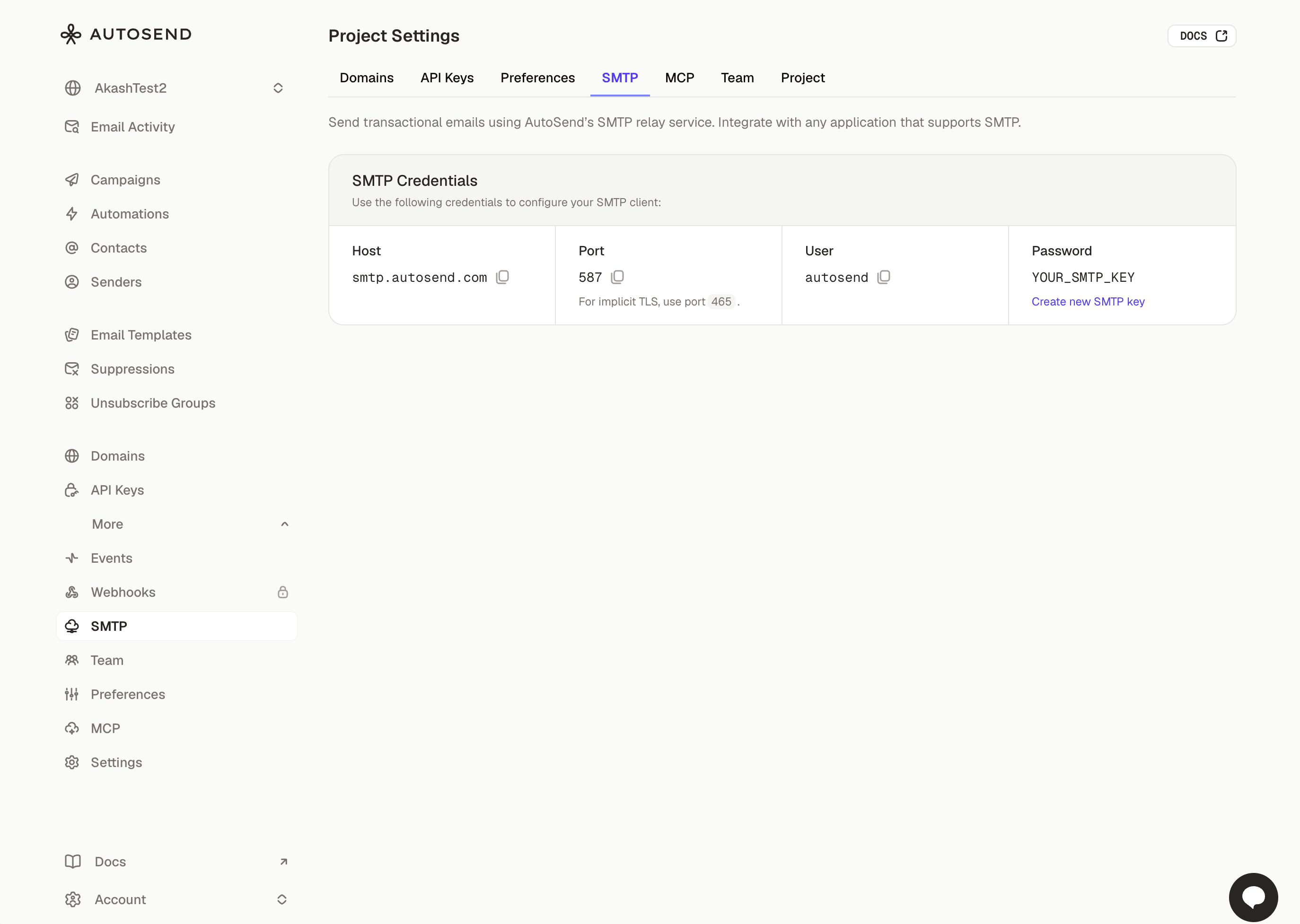 AutoSend provides an SMTP relay service that allows you to send transactional emails using standard SMTP protocols. This is useful when integrating with platforms that require SMTP credentials, such as [Supabase](/guides/smtp/supabase), [WordPress](/guides/smtp/wordpress), or other services that don't support REST APIs.
## Prerequisites
Make sure you have a verified domain added in AutoSend to send emails from.
Create a project-specific SMTP key from the SMTP tab in Project Settings.
## SMTP Credentials
Use the following credentials to configure your SMTP client:
| Setting | Value |
| -------------- | --------------------------------- |
| **Host** | `smtp.autosend.com` |
| **Port** | `465`, `587` |
| **Username** | autosend |
| **Password** | AS\_xxxx (Your AutoSend SMTP key) |
| **Encryption** | TLS/SSL (see port guide below) |
**API Key and SMTP Key are different.** Your API key (used to authenticate REST API requests)
cannot be used as your SMTP password. SMTP requires a separate, project-specific SMTP key created
from the [SMTP tab in Project Settings](https://autosend.com/settings/smtp).
## Port Configuration
AutoSend supports multiple ports to accommodate different network configurations:
| Port | Security | Description |
| ----- | ------------ | ----------------------------------------------------------------------------- |
| `465` | Implicit TLS | SMTPS - Connection is encrypted from the start. Recommended for most uses. |
| `587` | STARTTLS | Submission port - Starts unencrypted, upgrades to TLS. Most widely supported. |
**Which port should I use?** Start with port `587` (STARTTLS) as it's the most widely supported.
For implicit TLS, use port `465`.
## Integration Examples
```javascript Node.js expandable theme={null}
const nodemailer = require('nodemailer');
const transporter = nodemailer.createTransport({
host: 'smtp.autosend.com',
port: 587,
secure: true,
auth: {
user: 'autosend',
pass: 'AS_xxx',
},
});
await transporter.sendMail({
from: 'sender@yourdomain.com',
to: 'recipient@example.com',
subject: 'Hello from AutoSend',
html: '
AutoSend provides an SMTP relay service that allows you to send transactional emails using standard SMTP protocols. This is useful when integrating with platforms that require SMTP credentials, such as [Supabase](/guides/smtp/supabase), [WordPress](/guides/smtp/wordpress), or other services that don't support REST APIs.
## Prerequisites
Make sure you have a verified domain added in AutoSend to send emails from.
Create a project-specific SMTP key from the SMTP tab in Project Settings.
## SMTP Credentials
Use the following credentials to configure your SMTP client:
| Setting | Value |
| -------------- | --------------------------------- |
| **Host** | `smtp.autosend.com` |
| **Port** | `465`, `587` |
| **Username** | autosend |
| **Password** | AS\_xxxx (Your AutoSend SMTP key) |
| **Encryption** | TLS/SSL (see port guide below) |
**API Key and SMTP Key are different.** Your API key (used to authenticate REST API requests)
cannot be used as your SMTP password. SMTP requires a separate, project-specific SMTP key created
from the [SMTP tab in Project Settings](https://autosend.com/settings/smtp).
## Port Configuration
AutoSend supports multiple ports to accommodate different network configurations:
| Port | Security | Description |
| ----- | ------------ | ----------------------------------------------------------------------------- |
| `465` | Implicit TLS | SMTPS - Connection is encrypted from the start. Recommended for most uses. |
| `587` | STARTTLS | Submission port - Starts unencrypted, upgrades to TLS. Most widely supported. |
**Which port should I use?** Start with port `587` (STARTTLS) as it's the most widely supported.
For implicit TLS, use port `465`.
## Integration Examples
```javascript Node.js expandable theme={null}
const nodemailer = require('nodemailer');
const transporter = nodemailer.createTransport({
host: 'smtp.autosend.com',
port: 587,
secure: true,
auth: {
user: 'autosend',
pass: 'AS_xxx',
},
});
await transporter.sendMail({
from: 'sender@yourdomain.com',
to: 'recipient@example.com',
subject: 'Hello from AutoSend',
html: 'Welcome!
This email was sent via SMTP.
',
});
```
```python Python expandable theme={null}
import smtplib
from email.mime.text import MIMEText
from email.mime.multipart import MIMEMultipart
smtp_host = "smtp.autosend.com"
smtp_port = 587
username = "sender@yourdomain.com"
password = "as_your_smtp_key_here"
msg = MIMEMultipart("alternative")
msg["Subject"] = "Hello from AutoSend"
msg["From"] = username
msg["To"] = "recipient@example.com"
html = "Welcome!
This email was sent via SMTP.
"
msg.attach(MIMEText(html, "html"))
with smtplib.SMTP(smtp_host, smtp_port) as server:
server.starttls()
server.login(username, password)
server.sendmail(username, ["recipient@example.com"], msg.as_string())
```
```php PHP expandable theme={null}
isSMTP();
$mail->Host = 'smtp.autosend.com';
$mail->SMTPAuth = true;
$mail->Username = 'sender@yourdomain.com';
$mail->Password = 'as_your_smtp_key_here';
$mail->SMTPSecure = PHPMailer::ENCRYPTION_STARTTLS;
$mail->Port = 587;
$mail->setFrom('sender@yourdomain.com', 'Your Name');
$mail->addAddress('recipient@example.com');
$mail->isHTML(true);
$mail->Subject = 'Hello from AutoSend';
$mail->Body = 'Welcome!
This email was sent via SMTP.
';
$mail->send();
?>
```
```ruby Ruby expandable theme={null}
require 'net/smtp'
message = <<~MESSAGE
From: sender@yourdomain.com
To: recipient@example.com
Subject: Hello from AutoSend
Content-Type: text/html
Welcome!
This email was sent via SMTP.
MESSAGE
Net::SMTP.start('smtp.autosend.com', 587, 'yourdomain.com',
'sender@yourdomain.com', 'as_your_smtp_key_here', :plain) do |smtp|
smtp.send_message message, 'sender@yourdomain.com', 'recipient@example.com'
end
```
```go Go expandable theme={null}
package main
import (
"net/smtp"
)
func main() {
auth := smtp.PlainAuth("", "sender@yourdomain.com", "as_your_smtp_key_here", "smtp.autosend.com")
to := []string{"recipient@example.com"}
msg := []byte("To: recipient@example.com\r\n" +
"Subject: Hello from AutoSend\r\n" +
"Content-Type: text/html\r\n" +
"\r\n" +
"Welcome!
This email was sent via SMTP.
\r\n")
err := smtp.SendMail("smtp.autosend.com:587", auth, "sender@yourdomain.com", to, msg)
if err != nil {
panic(err)
}
}
```
## Platform Integrations
AutoSend SMTP works with any platform that supports SMTP configuration:
Send authentication emails through AutoSend SMTP.
Send emails from Customer.io through AutoSend SMTP.
Send authentication emails from Descope through AutoSend SMTP.
Send emails from Node.js apps using Nodemailer with AutoSend SMTP.
Send auth emails from Supabase through AutoSend SMTP.
Configure WordPress to send emails through AutoSend SMTP.
## Testing with Swaks
[Swaks](https://www.jetmore.org/john/code/swaks/) (Swiss Army Knife for SMTP) is a powerful command-line tool for testing SMTP configurations.
### Installation
```bash macOS theme={null}
brew install swaks
```
```bash Ubuntu/Debian theme={null}
sudo apt-get install swaks
```
```bash Windows theme={null}
# Using Chocolatey
choco install swaks
```
### Basic Test
```bash theme={null}
swaks --to recipient@example.com \
--from sender@yourdomain.com \
--server smtp.autosend.com \
--port 587 \
--tls \
--auth-user sender@yourdomain.com \
--auth-password AS_xxx
--header "Subject: Test Email via SMTP" \
--body "This email was sent via AutoSend SMTP."
```
### Test with Implicit TLS (Port 465)
```bash theme={null}
swaks --to recipient@example.com \
--from sender@yourdomain.com \
--server smtp.autosend.com \
--port 465 \
--auth-user sender@yourdomain.com \
--auth-password as_your_smtp_key_here \
--tlsc
```
### Test with HTML Body
```bash theme={null}
swaks --to recipient@example.com \
--from sender@yourdomain.com \
--server smtp.autosend.com \
--port 587 \
--auth-user sender@yourdomain.com \
--auth-password as_your_smtp_key_here \
--header "Content-Type: text/html" \
--body "Test Email
This is a test from swaks.
"
```
Add `-v` or `-vv` for detailed SMTP conversation logs.
## Troubleshooting
**Possible causes:**
* The SMTP port may be blocked by your firewall or ISP
* Incorrect server hostname
* Network connectivity issues
**Solutions:**
* Verify the hostname is `smtp.autosend.com`
* Check your firewall rules
* Test connectivity: `telnet smtp.autosend.com 587`
**Possible causes:**
* Invalid SMTP key
* Username doesn't match a verified sender
**Solutions:**
* Verify your SMTP key in the SMTP Settings
* Ensure the username is a verified sender email address
* Check that your domain is properly verified
* Check for any extra whitespace in your credentials
**Possible causes:**
* Using wrong encryption mode for the port
* TLS certificate verification issues
**Solutions:**
* For ports `465`: Use implicit TLS (connection encrypted from start)
* For ports `587`: Use STARTTLS (starts unencrypted, upgrades to TLS)
* If using swaks, add `--tlsc` flag only for ports 465
**Possible causes:**
* Domain not verified
* SPF/DKIM not configured
* Recipient server blocking
**Solutions:**
* Verify your sending domain is configured and verified in AutoSend
* Check the sender email matches your verified domain
* Add the required DNS records for SPF and DKIM
* Review email activity in the Email Activity dashboard
## FAQs
Yes! All emails sent through SMTP appear in your AutoSend Dashboard under the [**Email
Activity**](/transactional-emails/email-activity) section. You can view delivery status, opens,
clicks, and bounces just like API-sent emails.
SMTP rate limits are the same as the REST API. Your plan's sending limits apply across both SMTP
and API. Check your [Dashboard](https://autosend.com/dashboard) for your current limits.
Yes, AutoSend SMTP supports standard MIME attachments. Most SMTP libraries handle attachment
encoding automatically. The maximum message size is 25MB including attachments.
SMTP adds minimal overhead compared to the REST API. For high-volume sending or when you need
immediate delivery confirmation, the API may be slightly faster. For most use cases, SMTP
performance is excellent.
Yes! [Webhooks](/others/webhooks/introduction) are triggered for all events (delivery, bounce,
open, click, etc.) regardless of whether the email was sent via SMTP or the API.
Yes, you can send from any email address on a verified domain. Simply use the desired sender
address in the "From" field. But make sure the domain is verified in your AutoSend account.
## Next Steps
Set up SPF, DKIM, and DMARC for better deliverability
Explore our REST API for more advanced use cases
Set up webhooks to track email events in real-time
Monitor your email delivery and engagement