> ## Documentation Index
> Fetch the complete documentation index at: https://docs.autosend.com/llms.txt
> Use this file to discover all available pages before exploring further.
# Email Activity
> Track delivery, performance, and troubleshoot issues for your transactional emails.
export const IMAGES = {
logo: `${`https://dqy38fnwh4fqs.cloudfront.net/`}autosend/docs/autosend-docs-logo.png`,
emailActivityHome: `${`https://dqy38fnwh4fqs.cloudfront.net/`}autosend/docs/email-activity-home.png`,
emailActivityClicks: `${`https://dqy38fnwh4fqs.cloudfront.net/`}autosend/docs/email-activity-clicks.png`,
emailTemplate: {
testData: `${`https://dqy38fnwh4fqs.cloudfront.net/`}autosend/docs/test-data.png`,
emailPreview: `${`https://dqy38fnwh4fqs.cloudfront.net/`}autosend/docs/email-preview.png`,
creatingEmailTemplate: `${`https://dqy38fnwh4fqs.cloudfront.net/`}autosend/docs/create-email-template.png`,
sendingTestEmail: `${`https://dqy38fnwh4fqs.cloudfront.net/`}autosend/docs/send-test-email.png`
},
addSender: `${`https://dqy38fnwh4fqs.cloudfront.net/`}autosend/docs/add-sender.png`,
createList: `${`https://dqy38fnwh4fqs.cloudfront.net/`}autosend/docs/create-list.png`,
createSegment: `${`https://dqy38fnwh4fqs.cloudfront.net/`}autosend/docs/create-segment.png`,
contacts: `${`https://dqy38fnwh4fqs.cloudfront.net/`}autosend/docs/contacts.png`,
allContacts: `${`https://dqy38fnwh4fqs.cloudfront.net/`}autosend/docs/all-contacts.png`,
contactDetails: `${`https://dqy38fnwh4fqs.cloudfront.net/`}autosend/docs/contact-details.png`,
csvContactDetails: `${`https://dqy38fnwh4fqs.cloudfront.net/`}autosend/docs/csv-contact-details.png`,
importCsv: `${`https://dqy38fnwh4fqs.cloudfront.net/`}autosend/docs/import-csv.png`,
importSuccess: `${`https://dqy38fnwh4fqs.cloudfront.net/`}autosend/docs/import-successful.png`,
mapFields: `${`https://dqy38fnwh4fqs.cloudfront.net/`}autosend/docs/map-fields.png`,
listContactDetails: `${`https://dqy38fnwh4fqs.cloudfront.net/`}autosend/docs/list-contact-details.png`,
createList: `${`https://dqy38fnwh4fqs.cloudfront.net/`}autosend/docs/create-list.png`,
listDetails: `${`https://dqy38fnwh4fqs.cloudfront.net/`}autosend/docs/list-details.png`,
contactSegment: `${`https://dqy38fnwh4fqs.cloudfront.net/`}autosend/docs/contact-segment.png`,
createSegment: `${`https://dqy38fnwh4fqs.cloudfront.net/`}autosend/docs/create-segment.png`,
customFieldDetails: `${`https://dqy38fnwh4fqs.cloudfront.net/`}autosend/docs/custom-field-details.png`,
newCustomField: `${`https://dqy38fnwh4fqs.cloudfront.net/`}autosend/docs/new-custom-field.png`,
campaignsList: `${`https://dqy38fnwh4fqs.cloudfront.net/`}autosend/docs/campaigns-list.png`,
campaignsEmpty: `${`https://dqy38fnwh4fqs.cloudfront.net/`}autosend/docs/campaigns-empty.png`,
designCampaign: `${`https://dqy38fnwh4fqs.cloudfront.net/`}autosend/docs/design-campaign.png`,
campaignDetails: `${`https://dqy38fnwh4fqs.cloudfront.net/`}autosend/docs/campaign-details.png`,
reviewCampaign: `${`https://dqy38fnwh4fqs.cloudfront.net/`}autosend/docs/review-campaign.png`,
campaignSuccess: `${`https://dqy38fnwh4fqs.cloudfront.net/`}autosend/docs/campaign-success.png`,
testCampaign: `${`https://dqy38fnwh4fqs.cloudfront.net/`}autosend/docs/test-campaign.png`,
sendTestCampaign: `${`https://dqy38fnwh4fqs.cloudfront.net/`}autosend/docs/send-test-campaign.png`
};
**Email Activity** gives you a complete view of every email (transactional or marketing) sent through your AutoSend account. It helps you track delivery, performance, and troubleshoot issues related to your transactional email workflows.
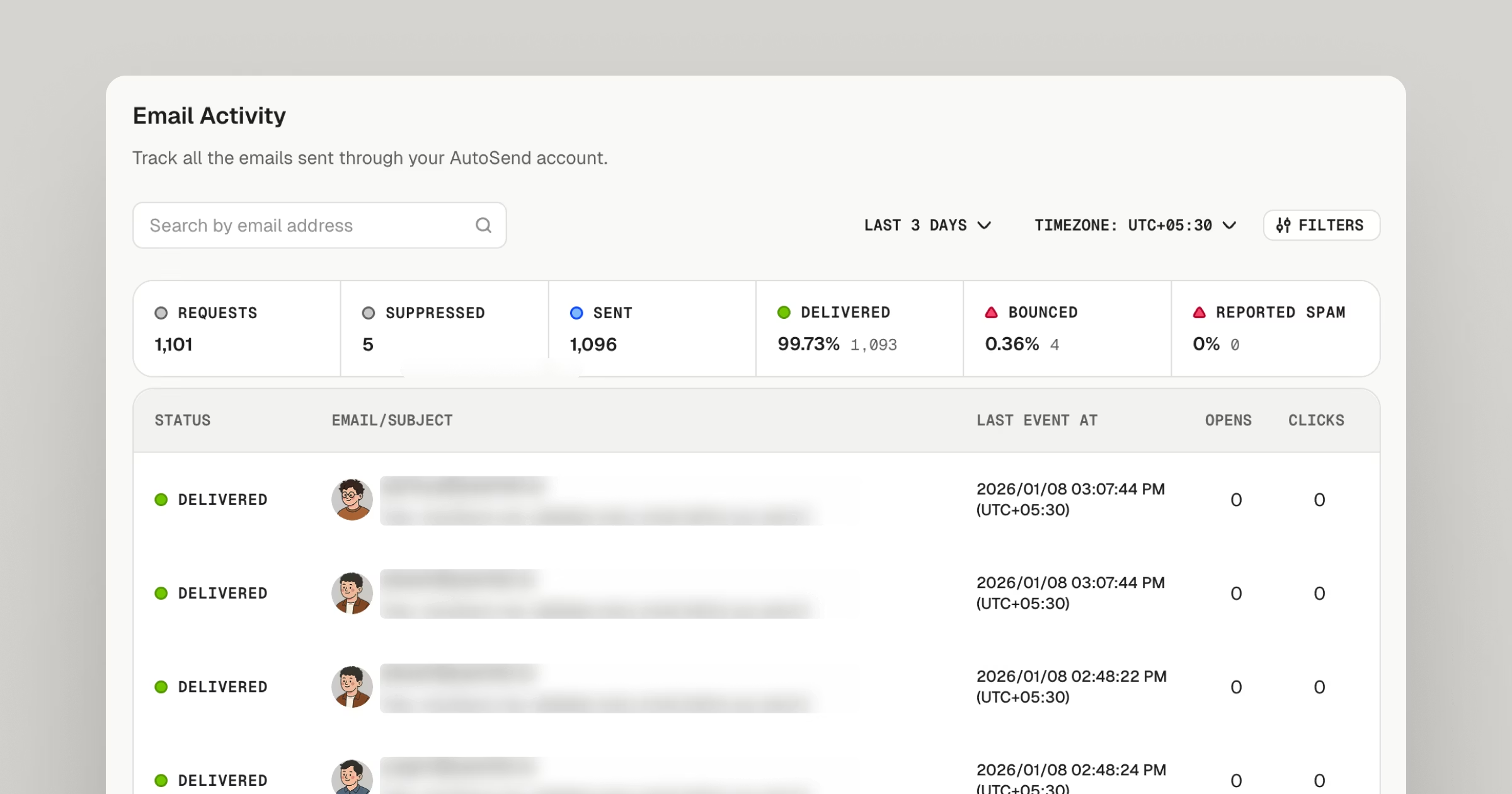 Every time a transactional email is sent from your AutoSend account, whether it’s a password reset, order confirmation, or notification, it appears in your **Email Activity** view.
You can monitor each message’s status, delivery details, and engagement (if applicable).
The **Email Activity** section acts as your go-to audit log for transactional messages, helping you ensure reliable email delivery and visibility across your system.
## What You Can See
Each entry in the Email Activity list includes:
* **Status:** The delivery state of the email — *Processed, Queued, Sent, Delivered, or Bounced.*
* **Recipient:** The email address the message was sent to.
* **Subject:** The subject line of the email.
* **Timestamp:** When the email was sent.
* **Opens:** How many times the email was opened by the recipient. (This is only available if tracking is turned on.)
* **Clicks:** How many times the links in the email were clicked by the recipient. (This is only available if tracking is turned on.)
You can click on an individual email record to view the Event History and Details like activity logs, including SMTP response codes, bounce reasons, or event timelines (send → delivery → open → click, etc., depending on available tracking).
Every time a transactional email is sent from your AutoSend account, whether it’s a password reset, order confirmation, or notification, it appears in your **Email Activity** view.
You can monitor each message’s status, delivery details, and engagement (if applicable).
The **Email Activity** section acts as your go-to audit log for transactional messages, helping you ensure reliable email delivery and visibility across your system.
## What You Can See
Each entry in the Email Activity list includes:
* **Status:** The delivery state of the email — *Processed, Queued, Sent, Delivered, or Bounced.*
* **Recipient:** The email address the message was sent to.
* **Subject:** The subject line of the email.
* **Timestamp:** When the email was sent.
* **Opens:** How many times the email was opened by the recipient. (This is only available if tracking is turned on.)
* **Clicks:** How many times the links in the email were clicked by the recipient. (This is only available if tracking is turned on.)
You can click on an individual email record to view the Event History and Details like activity logs, including SMTP response codes, bounce reasons, or event timelines (send → delivery → open → click, etc., depending on available tracking).
 ***
## Email Activity Filters
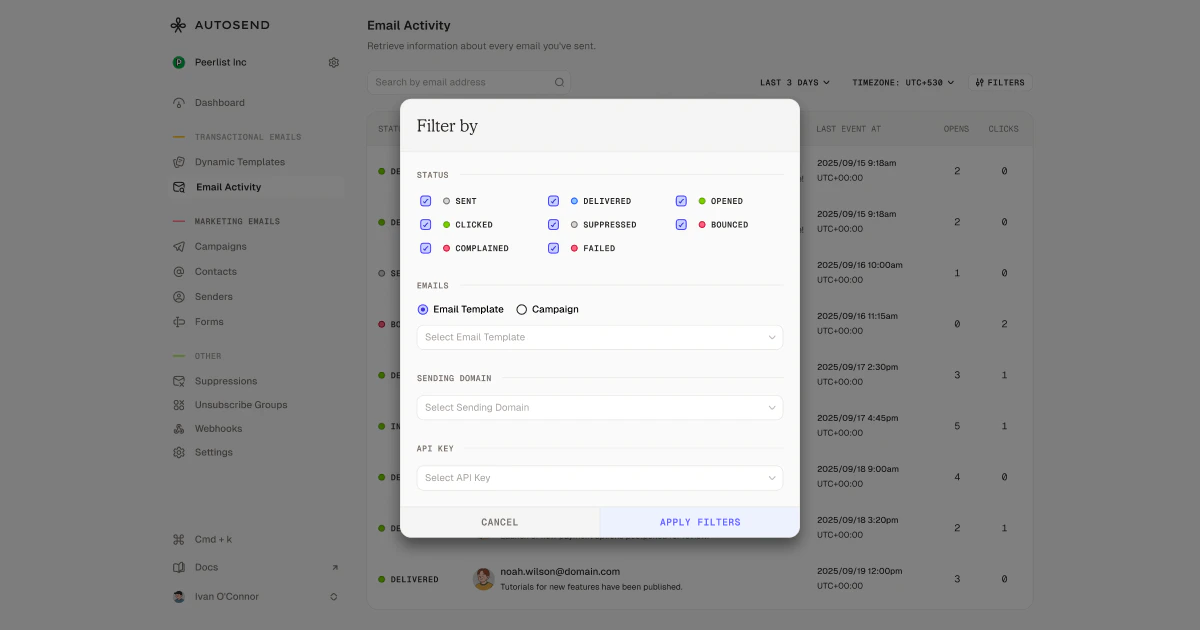
You can filter your email activity by multiple criteria to quickly identify patterns, troubleshoot issues, and analyze performance.
***
## Email Activity Filters
You can filter your email activity by multiple criteria to quickly identify patterns, troubleshoot issues, and analyze performance.
 ### Filter Options
* **Status Filters**: Filter by email delivery and engagement status
* Delivery lifecycle: Sent, Delivered, Bounced
* Engagement: Opened, Clicked
* Issues: Complained, Suppressed, Failed
* **Email Source**: Filter by email template or campaign to see activity for specific email types
* **Sending Domain**: Filter emails sent from specific verified domains
* **API Key**: Filter emails sent using specific API keys for better organization and tracking
***
## Why It’s Useful
Monitoring your **Email Activity** helps you:
* **Diagnose delivery issues:** Identify bounces, failures, or deferrals quickly.
* **Track engagement:** See when recipients open or click transactional emails (if tracking is enabled).
* **Verify email behavior:** Confirm if an email was triggered and sent successfully from your application.
* **Optimize deliverability:** Spot patterns that might affect your sending reputation and take corrective steps (e.g., cleaning invalid contacts).
### Filter Options
* **Status Filters**: Filter by email delivery and engagement status
* Delivery lifecycle: Sent, Delivered, Bounced
* Engagement: Opened, Clicked
* Issues: Complained, Suppressed, Failed
* **Email Source**: Filter by email template or campaign to see activity for specific email types
* **Sending Domain**: Filter emails sent from specific verified domains
* **API Key**: Filter emails sent using specific API keys for better organization and tracking
***
## Why It’s Useful
Monitoring your **Email Activity** helps you:
* **Diagnose delivery issues:** Identify bounces, failures, or deferrals quickly.
* **Track engagement:** See when recipients open or click transactional emails (if tracking is enabled).
* **Verify email behavior:** Confirm if an email was triggered and sent successfully from your application.
* **Optimize deliverability:** Spot patterns that might affect your sending reputation and take corrective steps (e.g., cleaning invalid contacts).