

More Room on Hobby and Starter Plans
We’ve raised limits on our smaller marketing plans:- Hobby - Up to 20 contact lists and 20 segments.
- Starter - Up to 10 automations, 25 contact lists, and 25 segments.
Other changes:
- The unsubscribe preferences page now shows your subscription groups correctly.
- Auto-reload for email credits now charges your saved card more reliably.
- Deleted drafts no longer count toward the limit of 50 draft campaigns per project.
Delete Domains That Are in Use
You can now delete a sending domain even when campaigns or automations are using it. Before you confirm, we show you what will happen: senders on that domain are deleted, its scheduled and sending campaigns are stopped, and active automations using it are paused. This can’t be undone.Other changes:
- More domains - Hobby plans can now add up to 3 domains, and Starter plans up to 10.
Build Visual Templates from MCP
Your AI assistant can now create and edit visual templates through the AutoSend MCP server, not just code templates. Templates made this way open in the visual builder, so you can keep editing them in the dashboard. If a template uses something MCP can’t edit safely, it tells you to make that change in the dashboard instead. See the MCP Server documentation to get started.Other changes:
- Signing in to the AutoSend MCP server from Codex now works.
- Bounce reason in webhooks - Bounce webhook events now include the bounce reason in the
reasonfield.
Privacy Mode
Org admins can now turn on Privacy mode for a project from Settings > Preferences. When it’s on, no one on the project can preview the content of sent emails. Email activity still shows the status, timeline, and events for every email. Only the email body is hidden.Other changes:
- Footer branding per project - The AutoSend footer branding setting now applies to each project instead of your whole organization. If you had turned it on before, check it in Settings > Preferences for each project.
- Duplicating a campaign that uses a code template no longer copies the old preview text.
Unsubscribe Links, Always Included
If a campaign or automation email doesn’t have an unsubscribe link, AutoSend now adds one to the footer for you. Every marketing email stays compliant, even if you forget the{{unsubscribe}} tag. Emails that already have an unsubscribe link are left as they are.Other changes:
- Campaign analytics via API - A new endpoint,
GET /campaigns/:campaignId/analytics, returns a campaign’s counts along with its delivery, success, and true open rates. It’s also available through MCP. Read the Get Campaign Analytics API reference to learn more. - A small bug of inconsistent campaign numbers is fixed and now they match everywhere, whether you check them in the dashboard or through MCP.
See the Email You Sent
Email activity now lets you preview the email a recipient got, with their variables filled in. On marketing plans, a View contact button also takes you straight to the recipient’s contact page.One-Click DNS Setup
Setting up a sending domain no longer means copying DNS records by hand. If your DNS provider supports Domain Connect, click Auto-configure DNS on the domain page, approve the records at your provider, and you’re sent back to AutoSend while we check them. If your provider doesn’t support it, you can still add the records manually.Other changes:
- The unsubscribe webhook now fires when a contact unsubscribes by clicking the link in an email.
- Domain status alerts - If a verified sending domain goes back to pending, for example because a DNS record was removed, everyone on the project now gets an email so you can fix it before sends are affected.
Block Recipient Domains
You can now block entire recipient domains from Settings > Preferences. Emails to a blocked domain are never sent, which helps you keep throwaway or unwanted domains out of your sends.Control AutoSend Branding
On paid plans, you can now choose whether your emails show the AutoSend footer branding, right from Settings > Preferences.Export Lists and Segments
You can now export any contact list or segment as a CSV file, right from its page. Use it to back up your audience, share it with your team, or work with it in a spreadsheet. Exports support up to 20,000 contacts.Other changes:
- Usage alerts - We now email you when you’ve used 90% and 100% of your sending quota, and when your email credits run out, so a paused send never takes you by surprise.
Add Campaign Recipients to a List or Suppression Group
From the Email Activity tab of a sent or paused campaign, you can now add recipients to a contact list or a suppression group in a few clicks. Filter or search the recipients first, then add only the ones you need. For example, put everyone who clicked into an “Engaged” list for your next campaign, or suppress everyone who bounced.Large campaigns are processed in the background, and you’ll see the progress without leaving the page.Other changes:
- Gradual send protects your reputation - A gradual campaign now pauses on its own if its bounce rate goes above 10% (15% for the first 500 emails) or its complaint rate goes above 0.01%. This stops a bad list from hurting your sender reputation. To resume a campaign paused this way, contact support.
- The subject line in template preview now shows your variables as written, like
{{first_name}}, instead of test values.
See True Opens in Email Activity
Opening an email’s activity now marks each open with a TRUE OPEN badge when it came from a real person, not an automatic open from privacy features or security scanners. It’s the same logic behind the True Open rate in campaign analytics, now visible per email.Other changes:
- Re-check DNS on verified domains - Verifying a domain again now re-checks all its DNS records, so records you add later, like MAIL FROM or DMARC, show up as verified right away.
- Dashboard icons now render correctly in Chrome.
Campaign Insights
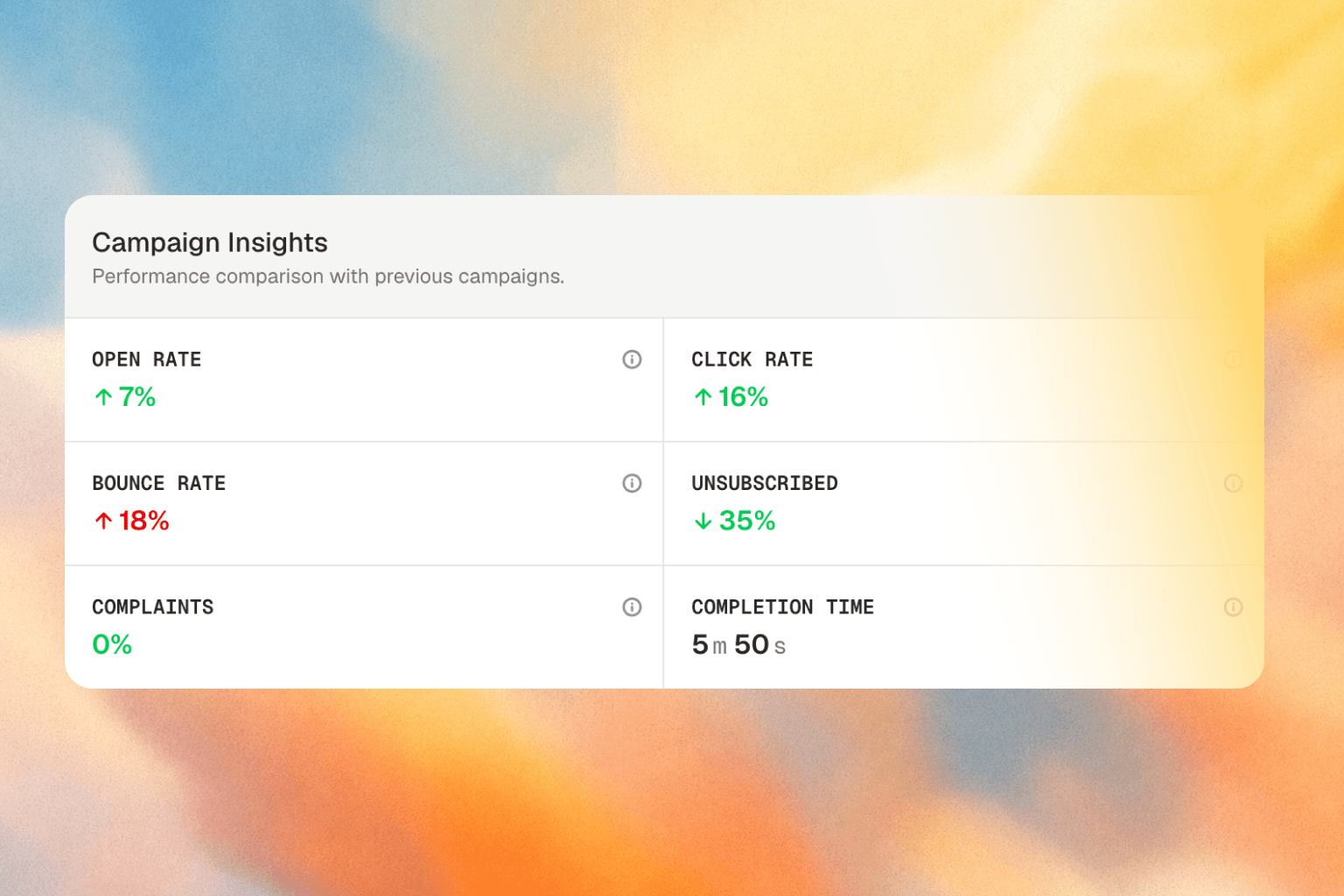
- Compared with your last campaigns - Open rate, click rate, bounce rate, unsubscribes, and complaints are compared against the average of up to 5 earlier campaigns sent from the same project. With clear up-down signals, now it is easy for you to understand how your new campaign performed.
- Completion time - See how long the campaign took to reach all its recipients.
- Final numbers include late activity - 10 days after a campaign is sent, AutoSend saves its final numbers, so opens and clicks that come in later still count. For gradual send campaigns, the 10 days start after the last batch.
Other changes:
- Check an email’s status via API - A new endpoint returns the current status of any email you’ve sent. Read the Get Email Status API reference to learn more.
- Long bounce reasons now have a Show more button, so you can read the full reason.
Auto-Abort for Long-Paused Campaigns
Campaigns that stay paused for 14 days without being resumed are now aborted on their own, and we email you when it happens. This keeps old sends from going out to an outdated audience weeks later. Emails that were never sent show as Cancelled in email activity.Other changes:
- Clearer bounce reasons - Bounce reasons in email activity and suppressions are now cleaned up and easier to read, and they wrap instead of getting cut off in the suppression table.
- Email skills in the builder - The email builder now has a quick link to AutoSend’s AI email skills.
- Current plan badge - The pricing page now marks the plan you’re on.
- A sending domain can no longer be removed while active campaigns or automations are using it.
Media Library
All your uploaded images now live on their own Media Library page in the sidebar. Upload, browse, and manage images in one place, then use them in any campaign, template, or automation.Better Domain Settings
The domain details page now shows a Verified or Pending status for each DNS record, so you can see at a glance which records still need fixing.On select plans, you can also turn on Multi-region sending when adding a domain. Your emails are then sent through more than one region for better deliverability and performance.Other changes:
- Safe buffer for scheduled campaigns - If you schedule a campaign less than 2 minutes away, we now add a small buffer and tell you, instead of failing the send.
- Variables inserted in the email builder no longer get escaped and break.
- Paused and aborted campaigns can no longer be edited by mistake.
Campaigns, Redesigned
Three tabs for sent campaigns
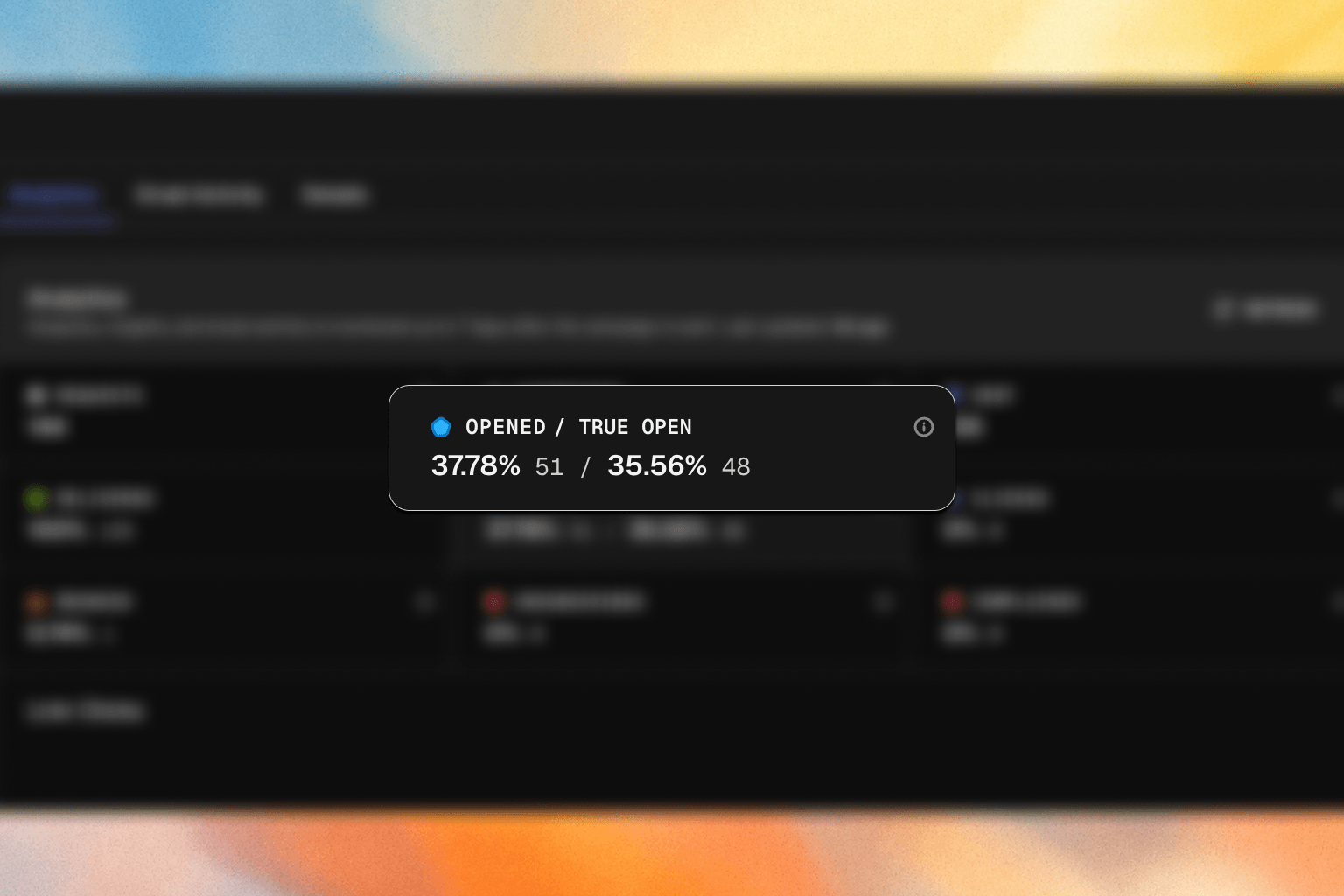
Sent campaigns now open in three tabs. Each tab has its own link, so you can share a direct view with your team.- Analytics - See how your campaign performed, including a new True Open rate that leaves out automatic opens from Apple Mail Privacy Protection, Gmail’s image proxy, and security scanners. Open and click rates are now calculated from delivered emails instead of sent emails, so they’re more accurate.
- Email Activity - See every recipient with their status, opens, and clicks. Search by email, filter by status (including Unsubscribed), sort the list, and export it to work with outside AutoSend.
- Details - A read-only view of the template, campaign details, and tracking settings used for the send.
Fallback Values for Email Variables
Variables can now have a fallback value for contacts whose field is empty. For example, writeHi {{first_name | "there"}} and a contact without a first name sees “Hi there” instead of “Hi ”.Other changes:
- Segment filters for empty dates - Date properties in segments now support is empty and is not empty, so you can, for example, find contacts who have never opened an email.
- Your email sending limit now shows the exact time it resets, not just the date.
- Resuming a regular (non-gradual) campaign now asks for confirmation first.
- Your sending quota is no longer counted twice when a campaign is resumed or stopped.
- Text colors in lists now display correctly in the email builder.
Know Where Every Contact Came From
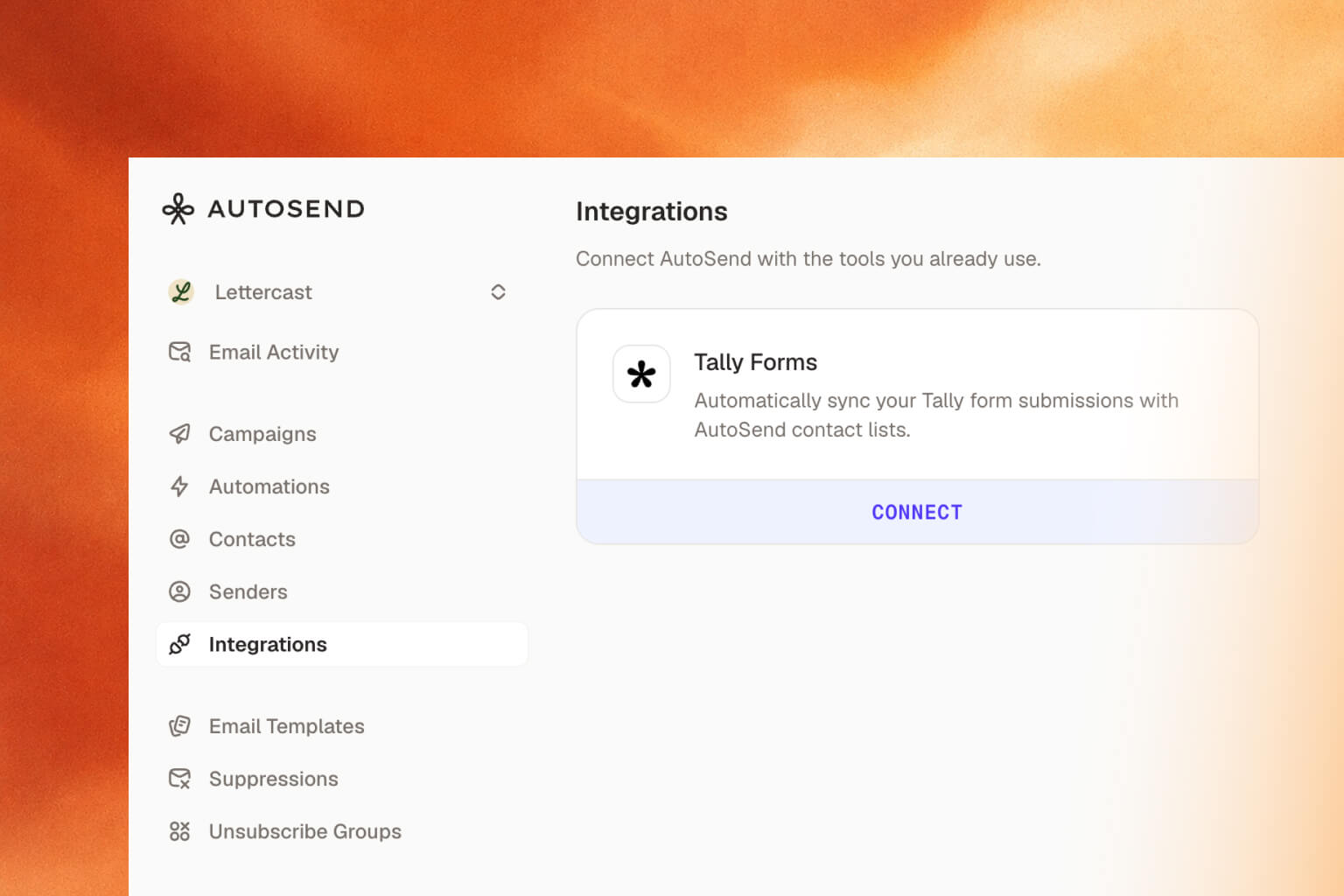
Every contact now has a Source property that shows how it was added: manually, through the API, by CSV import, through MCP, from a SendGrid or Resend migration, or from an integration like Tally Forms. Use it to filter contacts or build segments.See When a Contact Last Opened Your Email
Contacts also have a new Email Last Opened At property. It only counts real opens, not automatic ones from privacy features and security scanners, so you can build segments of people who actually read your emails.Other changes:
- Date fields on a contact, like Email Last Opened At, now show the time as well as the date.
- Email activity now shows the sender’s email address when no sender name is set, instead of “undefined”.
- MCP:
list_templatesnow supports search, filtering by template type, and pagination, replacing the separatesearch_templatestool. - Invoices for credit top-ups - Buying email credits now generates an invoice you can download from Billing.
Tally Forms Integration
Rename Lists and Segments
You can now edit the name of any list or segment after creating it.Many Quality of Life Improvements
- Image library in the email builder - Open your image library straight from the builder header in campaigns, templates, and automations. You can also copy any image’s URL from its menu in one click.
- Filter email activity by automation - Email Activity filters now include Automation, next to Template and Campaign, so you can see every email a specific automation has sent.
- Clearing contact fields works as expected - Emptying a field on a contact now actually clears it. The API also accepts
nullfor optional fields when creating or updating contacts. - HTML size limit - Email HTML is now capped at 4MB. Larger emails are rejected with a clear error instead of failing silently.
- Inbound attachment downloads - Pass
download=truewhen fetching an inbound attachment to get the file directly, instead of a download URL. - Clearer Inbound API errors - The Inbound Email API now returns more specific error messages with suggestions on how to fix them.
- Scheduled campaigns now show correctly in campaign counts and lists.
Gradual Send, Made it better
Gradual send campaigns are now easier to control and much easier to follow.- Pause any time - Pause a gradual campaign even before it starts sending, while it’s still scheduled.
- Resume with a preview - Resuming now shows a confirmation with the new start date, time, and increase strategy before anything goes out.
- See what’s coming - While a campaign is paused, the chart shows the remaining batches, contacts, and expected finish date based on your resume choice.
- Full pause history - Every pause and resume is recorded, with the reason shown on the chart (for example, “Manually paused” or “Daily limit reached”).
- Next batch time - The campaign header shows how many contacts are done and when the next batch will go out.
- Always visible - Scheduled and paused campaigns now stay at the top of your campaign list, no matter how old they are.
Faster Test Emails and Contact Properties
Improved Testing Email Experience
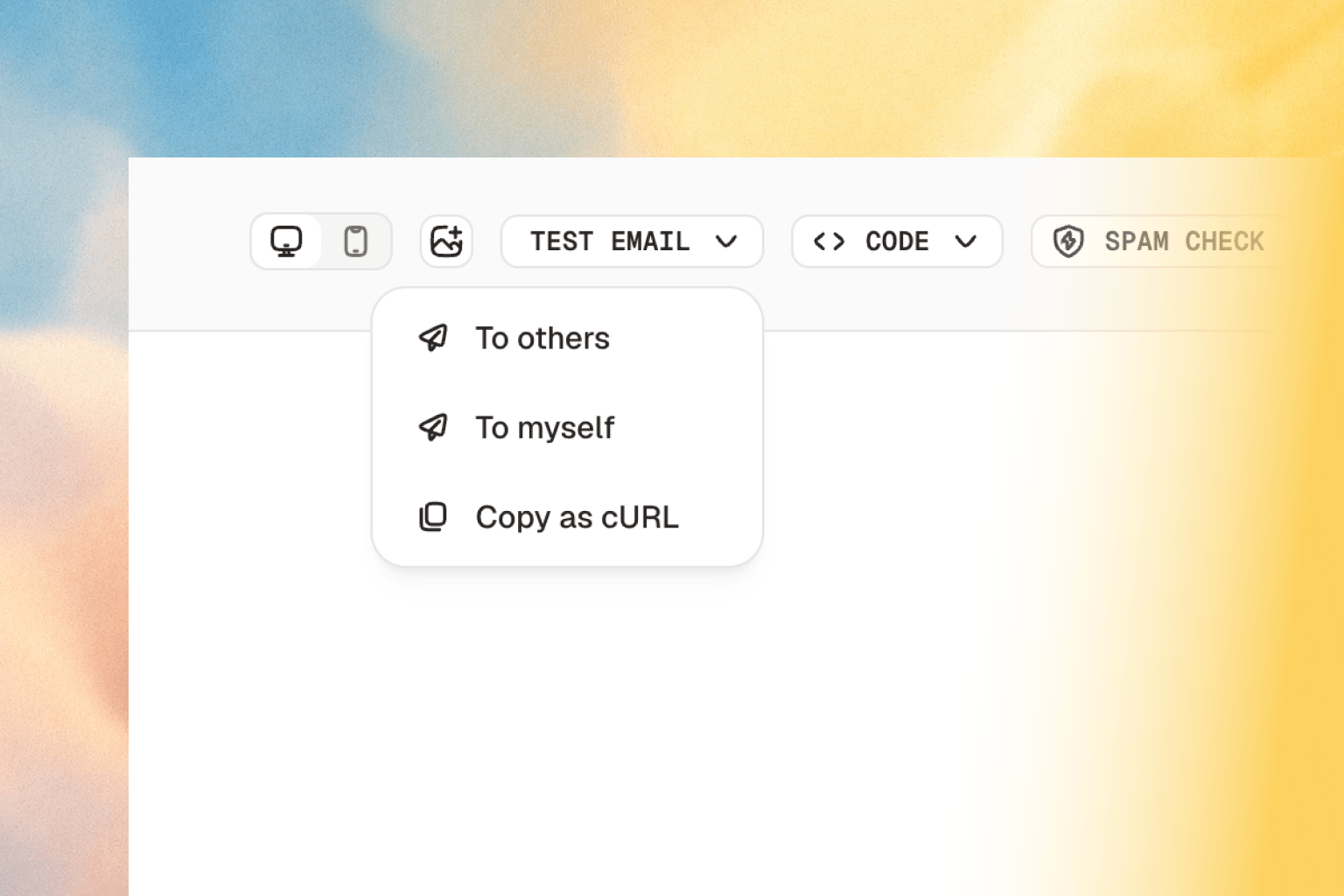
- Send to myself: Testing an email no longer means typing your address every time. Pick Send to myself from the test email dropdown and the test goes straight to your account inbox.
- Copy as cURL: Happy with how a test looks? Click Copy as cURL to get a ready-to-run command for that exact send, payload included. Run it in your terminal or drop it into your codebase.
Custom Fields are now Contact Properties
Custom Fields are now called Contact Properties across AutoSend. The new name matches how you actually use them.Please note: This is a rename only. Everything you’ve already set up keeps working. The API still accepts the old Custom Fields naming, so you can switch to Contact Properties whenever it suits you.Read the Contact Properties docs and the API reference to learn more.Inbound Email API
email.received webhook with the message metadata, and your app calls a structured REST endpoint to fetch the full message including headers, plain text and HTML bodies, attachments, and verdicts.Every project is provisioned with a default receiving domain in the form {prefix}@{uniquesubdomain}.autosend.email, so you can start receiving email immediately without any DNS setup. You can also enable Inbound on a verified custom domain.Use it to give your AI agents a fully two-way email address, route customer replies into a support portal, log incoming emails into your CRM, attach candidate replies to your ATS, or build a custom email client.Read how to setup and use the Inbound Email API and browse the API reference to learn more.Encrypted Send Requests
For teams that need an extra layer of security, AutoSend now supports encrypted email-send requests. Fetch a public key and send an encrypted payload to the send endpoint, so sensitive email content is protected in transit beyond standard HTTPS.Read the encrypted payloads guide to learn more.Other changes:
- For gradual send, you can now change the send time even while a campaign is paused.
- New sending domains now warm up on their own. AutoSend automatically raises your daily send limit a little each day to build a healthy reputation, with a clear banner showing your current limit. Read the domain warmup guide for details.
- Contacts can now store a mobile number as a default field.
- Attachments and webhook events now carry stable, consistent identifiers with better validation, making it easier to reliably match events and files in your own systems.
- Error messages across the API (campaigns, webhooks, events, projects, suppression groups, and more) were rewritten to be clearer and more helpful.
More Flexible Automations and Builder Margins
Wait steps on any branch
Delays used to live only on the main flow. Now you can add a wait step to any branch, so each path moves at its own pace. One branch can wait three days before a follow-up while another continues right away.Property triggers now catch new contacts
Automations using the Contact property matches with trigger now also fire when a contact is created with a matching value, not only when that value changes later. New contacts enter the right journey from day one.Read the Email Automations documentation to learn more.Margin controls in the email builder
Blocks in the email builder now support margins, so you can control the space around content directly instead of stacking padding or spacer blocks.- Set margins per block for precise spacing between elements
- Build cleaner, more consistent layouts without workaround blocks
Fixes
- Icon colors now render correctly in the builder
- Preview spacing now matches what recipients see in their inbox
Resend Migration and Smaller Fixes
Switching from Resend? Use our migration API with your Resend API key to bring your contacts, templates, and suppression lists straight into AutoSend. Follow the step-by-step migration guide, so you don’t have to rebuild anything by hand.This release also cleans up delete API responses and fixes a handful of rough edges:- The campaign reply-to address now saves correctly
- Polished email builder to remove few glitches.
Automations for Imported Contacts
When you import contacts from a CSV file, you can now drop them straight into an automation. AutoSend runs validation checks first, so only valid, sendable contacts get enrolled. This turns a plain import into the start of a live email sequence.Webhook Management via API
You can now create and manage your webhooks straight from the public API, alongside a fix that keeps scheduled gradual-send campaigns from showing a false “quota reached” warning or skipping paused days.Other Changes:
- Delete Your Account - You can now delete account right from the app, giving you full control over your data.
- Cleaner Template Copying - Copying content from a template preview now gives you clean, readable text instead of raw HTML code, ready to paste anywhere.
AutoSend on Mobile
AutoSend now works smoothly on your phone. We rebuilt the dashboard, email activity, campaigns, contacts, senders, events, account settings, automations, and webhook pages to look and work well on small screens, so you can check on your sending from anywhere.Other changes:
- Campaign redesign - Campaigns get a refreshed look and a clearer layout, making it easier to see what matters at a glance. Small touches include a refresh button on each campaign card and dedicated email activity for each campaign.
- Copying content from a template preview now gives you clean, readable text instead of raw HTML code, ready to paste anywhere.
- The sidebar now clearly flags any domain that isn’t verified yet, so nothing slips through.
Revamped Billing and Usage with Email Credits
The Billing and Usage pages have been redesigned, and we’ve replaced overage billing (additional emails) with email credits.From Billing, you can manage your subscription, update payment methods, edit billing details, and download past invoices, all in one place. From Usage, you can track your sending for the current billing period, see usage broken down per project, purchase email credits, and configure auto-reload.Previously, going over your plan limit was billed on your next invoice as additional emails. That’s been replaced by email credits, which you purchase upfront. Credits roll over, never expire, and stack on top of your plan limit. Enable auto-reload to top up automatically when your balance drops to a threshold you set.Read the Billing and Usage docs to learn more.Project-Specific SMTP Keys
The SMTP password is no longer your API key. Each project now has its own SMTP key that you create from the SMTP tab in Project Settings. API keys continue to work for REST API requests, but SMTP integrations need to be updated to use the new key.Read the SMTP quickstart to learn more.Other changes:
- [feat] New billing page is now live with more detailed plan options
- [feat] New integrations section on the Transactional Email landing page
- [fix] Logged-out users are now redirected to the login page when hitting protected pages
Official Convex component
sendEmail from any mutation and the component handles queueing, idempotency, retries with backoff, webhook signature verification, and the full delivery lifecycle (queued, sending, retrying, sent, failed, canceled) for you.It also supports templates, CC/BCC, attachments (base64 or URL), bulk sends with per-recipient merge fields, suppression groups, multi-project setups via Account API Keys, and a test sandbox that rewrites recipients while you’re wiring things up.The package is open source on GitHub and published on npm as @autosend/convex. The guide includes a paste-ready prompt so any AI coding assistant (Cursor, Claude Code, Copilot, Codex) can wire it up for you in one shot.Read the Convex integration guide for setup, sending variants, status tracking, and configuration.Event-Triggered Automations and EU Region
Two big additions: a new trigger type that fires on events from your app, and a new sending region for EU customers.
Events in Email Automations
Until now, automations could only trigger based on contact properties or list membership. That works for things like “plan changed to pro” or “contact added to waitlist,” but it can’t react to something that just happened in your app.Events fix that. You can now define custom events (likesignup_completed, project_published, team_member_invited) with typed properties, send them from your backend via API, and use them to trigger automations the moment they fire.The real power comes from combining events with branching. A single signup_completed event can branch contacts based on plan or team_size. Solo users get a self-serve onboarding sequence, teams get collaboration tips, and enterprise gets a white-glove welcome. One automation, multiple paths.Read the Events in Automations documentation to learn more, and check the Send Event API reference to start firing events from your backend.EU Region
You can now choose EU as your sending region. Select it when adding a new domain. For existing verified domains, you’ll need to update your DNS records if you decide to switch the region.Read the Domain documentation to learn more.Automation Branching
If you’ve been creating separate automations just to send different emails to different segments, that’s no longer necessary. Branching is now live in AutoSend. One automation, multiple paths.
Branch by contact property
Split any automation into branches based on contact properties. Each branch gets its own filters, wait times, and email sequence.For example, a new contact gets added to your list. Instead of sending everyone the same onboarding sequence, you branch based on their plan:- Trial users get a sequence focused on activation and conversion
- Pro users get tips on getting the most out of their plan
- Business users get a white-glove onboarding with dedicated support info
Automations API
We also opened up API endpoints for Automations, so you can create and manage automations programmatically. List, create, get, update, pause, resume, and delete automations directly from your code.Read the Email Automations documentation to learn more about branching, and check the Automations API reference to start managing automations programmatically.RBAC and Projects API
Two big additions to multi-project support: role-based access control for your team and a full Projects API.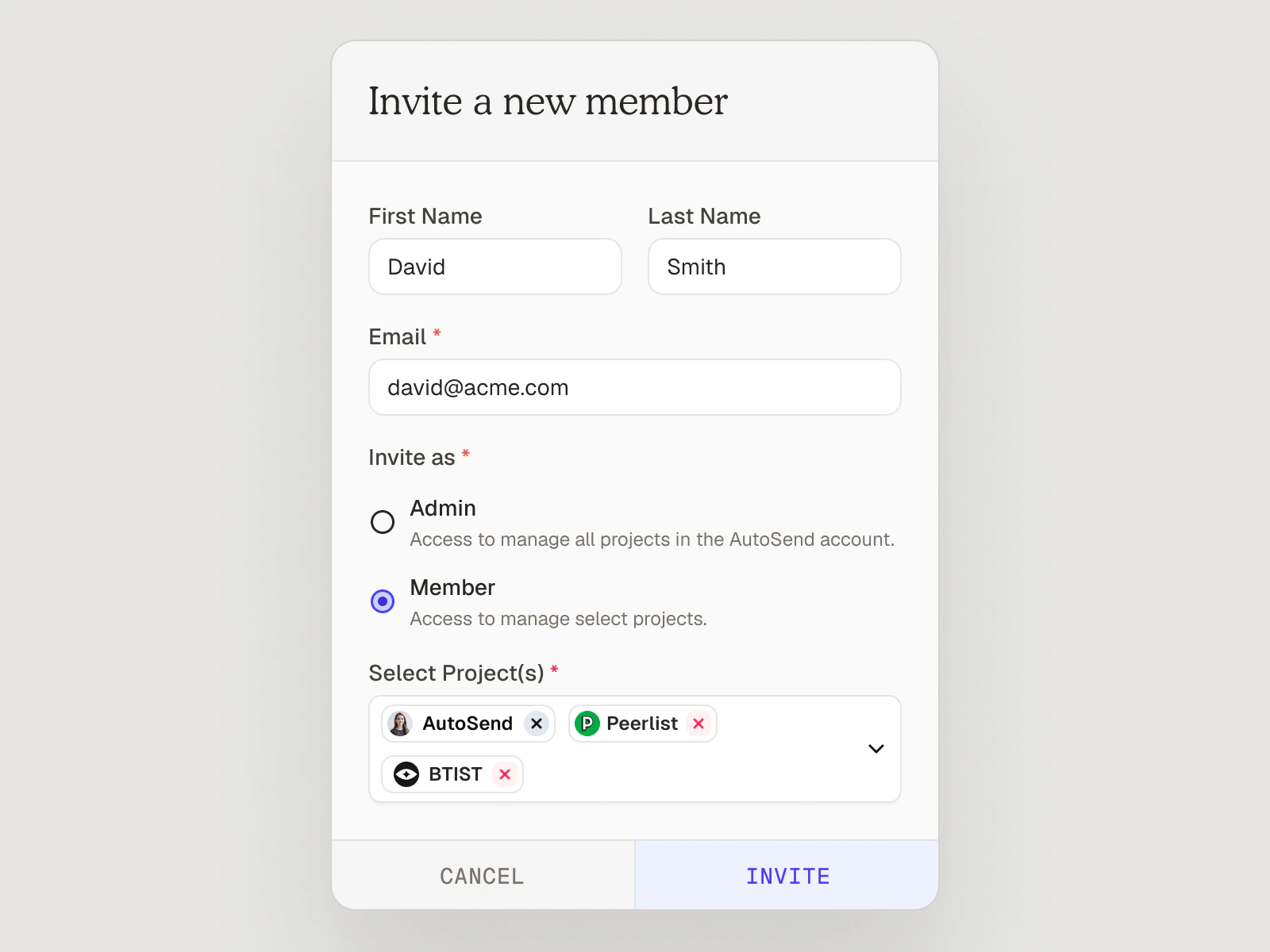
Role-Based Access Control
Team permissions now have two distinct roles: Admin and Member.- Admins have full access to the entire workspace, including all projects, domains, billing, and member management.
- Members have scoped access. Admins assign them to specific projects, and they can only see and operate within those projects. Members can also add or remove other members within their assigned projects.
Projects API
You can now manage projects programmatically using the Account Admin API key (ASA_ prefix). Three endpoints are available:- List Projects - Retrieve all projects in your organization.
- Create Project - Create a new project with a name. The project is ready to use immediately.
- Delete Project - Permanently delete a project and all its associated resources. This cannot be undone.
Introducing Projects
You can now create multiple Projects under a single AutoSend account. Each project is a fully isolated workspace with its own API keys, contacts, senders, templates, campaigns, automations, and webhooks. Your subscription and monthly email quota are shared across all projects.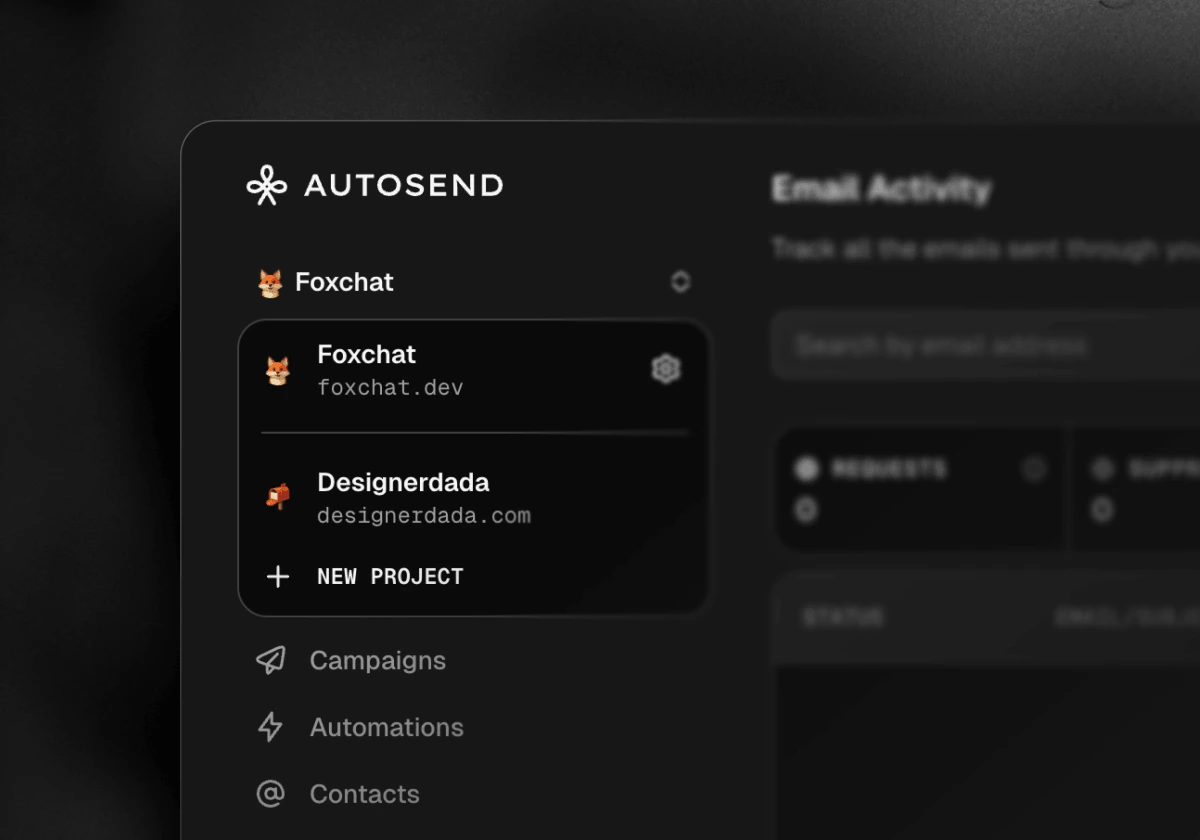
Why Projects?
- Keep Production, Staging, and Development environments completely separate
- Run multiple independent products under one subscription and billing
- Build multi-tenant platforms (CRMs, Shopify apps, marketing tools) where each customer gets their own isolated project
- Manage multiple clients as an agency without any data mixing
Two types of API Keys:
Along with Projects, we’re introducing a second API key type:- Project API Key (
AS_...): Scoped to a single project. Use this for sending emails, managing contacts, templates, and campaigns. The right key for most integrations. - Account API Key (
ASA_...): Cross-project scope. Use this to programmatically create, update, or delete projects. All requests with an Account API Key require anx-project-idheader to specify the target project, except when creating a new project.
NEW: 41 API Endpoints Added to API Reference
The API reference just got a major expansion. Seven new endpoint groups are now fully documented, covering everything from campaign management to domain configuration.
Here’s what’s new:
- Custom Fields (4 endpoints) - List, get by name, create, and delete custom contact fields for flexible segmentation.
- Templates (5 endpoints) - Get, create, update, delete, and search email templates programmatically.
- Senders (4 endpoints) - List, get, create, and delete verified sender identities.
- Campaigns (8 endpoints) - Full campaign lifecycle management: list, get, create, update, pause, resume, abort, and delete.
- Domains (5 endpoints) - List, get, add, verify, and delete sending domains.
- Contact Lists (7 endpoints) - List, get, create, and delete lists, plus get contacts, bulk add, and remove contacts.
- Suppression Groups (8 endpoints) - List, get, create, update, and delete groups, plus search entries, bulk suppress, and bulk unsuppress.
Email Automations v2.0: New Trigger Types + Visual Builder
Email automations just got a lot more powerful. You can now trigger automations based on contact properties, not just list or segment membership.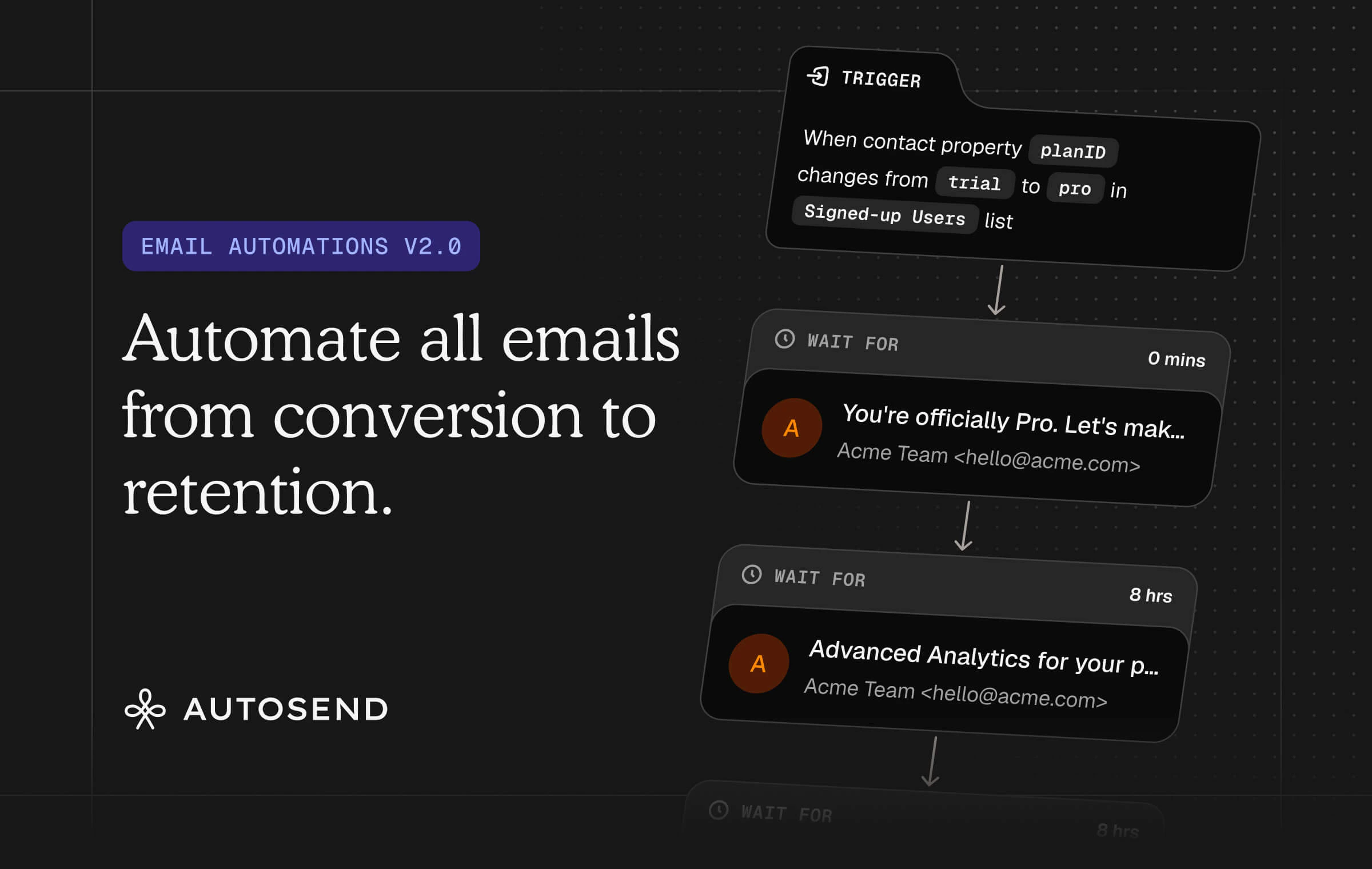
Three Trigger Types:
- New contact is added to: Trigger when a contact joins a specific list or segment. Same as before.
- Contact property matches with: Trigger when a contact’s property matches a condition you define (e.g.,
verifiedequalstrue). Great for targeting contacts based on their current state. - Contact property changes from → to: Trigger when a contact’s property transitions from one value to another (e.g.,
publishedchanges fromunpublishedtopublished). Perfect for reacting to real-time changes. Supports multiple conditions with AND/OR logic.
Brand new visual workflow builder
Build your automation sequences in a completely redesigned visual workflow builder with a cleaner interface and smoother experience. Do try the email drag-n-drop to rearrange emails in your sequence. That’s our favorite part.Read the updated Email Automations documentation to learn more.NEW: AutoSend MCP Server is here.
You can now manage your email campaigns, templates, contacts, and senders directly from AI assistants.
NEW: Domain warmup is now built into AutoSend.
If you’ve ever started sending on a new domain and wondered why your open rates were tanking, this is for you.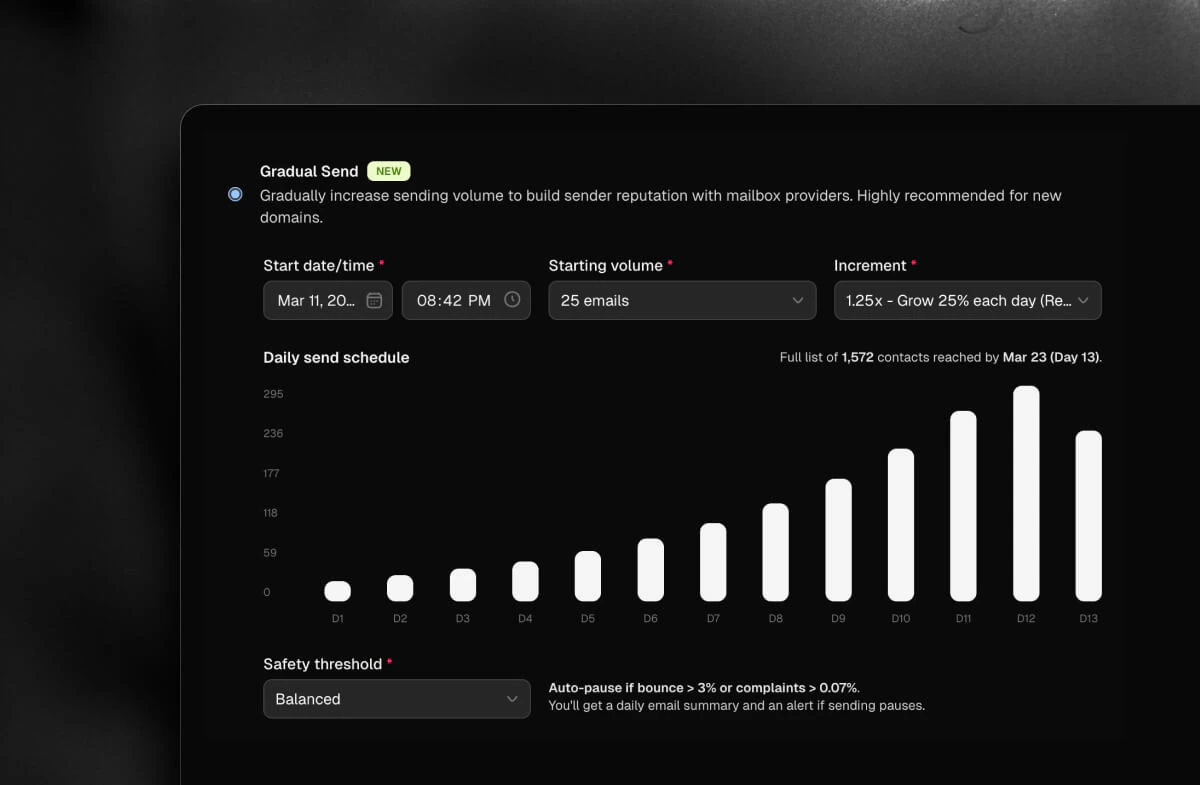
Quick Create Menu and Performance Improvements
We shipped quality-of-life improvements this week. Faster workflows, cleaner analytics, and a few important fixes.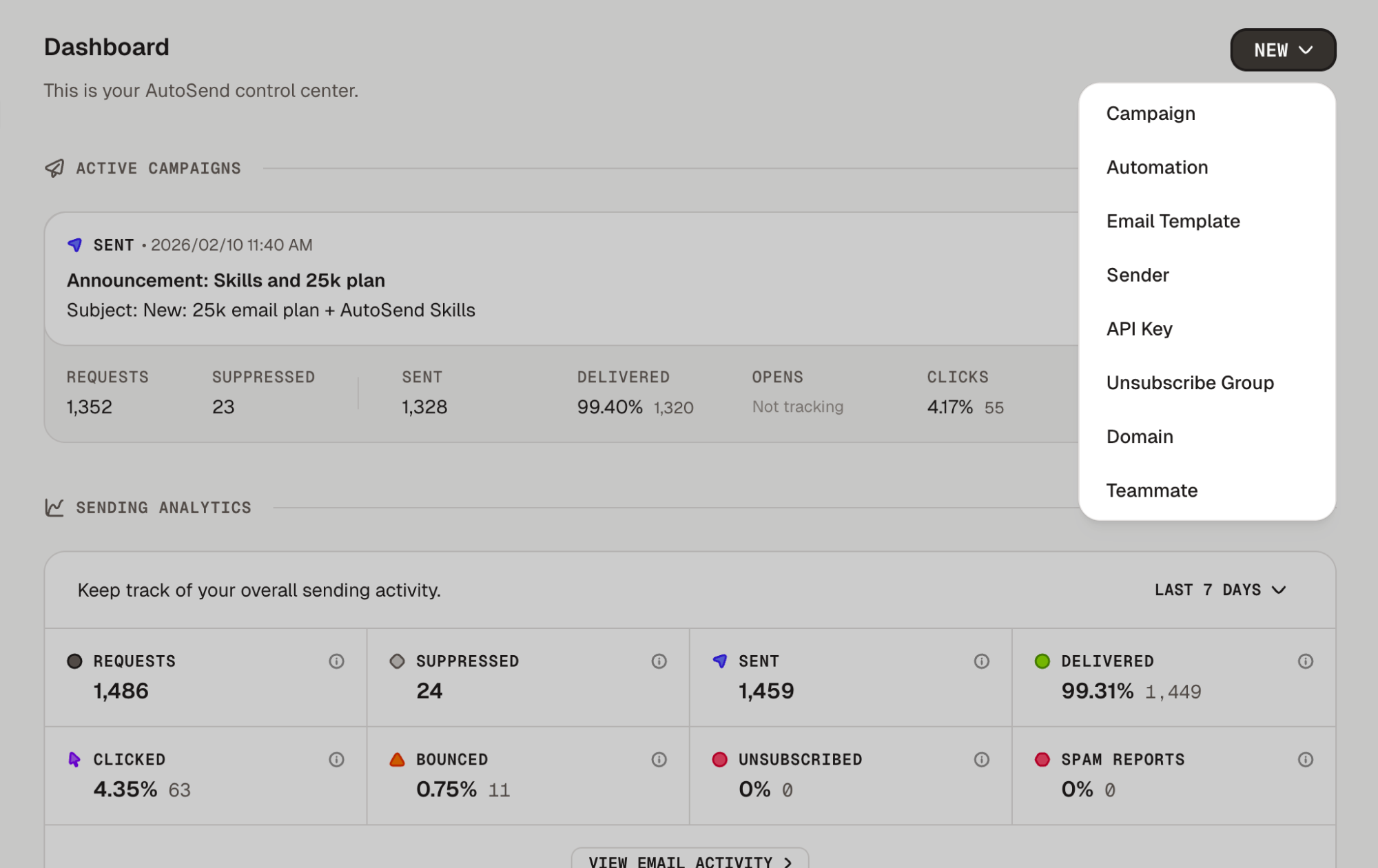
Quick Create Menu
Create campaigns and automations directly from the dashboard. Click the ”+” button in the top right corner without navigating away from your current page.Faster Campaign and Analytics Loading
Dashboards load faster with caching for workflow analytics and streamlined campaign queries. Separated worker services for email sending, validation, and webhooks handle higher loads independently. Lazy loading for past and failed campaigns reduces initial page load times.Fixes:
- Fixed invited users being redirected to the welcome screen instead of their team’s workspace
- Resolved analytics text alignment issues that made numbers hard to read
- Added SMTP rate limiting API to prevent sending spikes and improve deliverability
Dashboard Redesign and Landing Page Refresh
The dashboard has been redesigned from the ground up and a fresh new landing page has launched.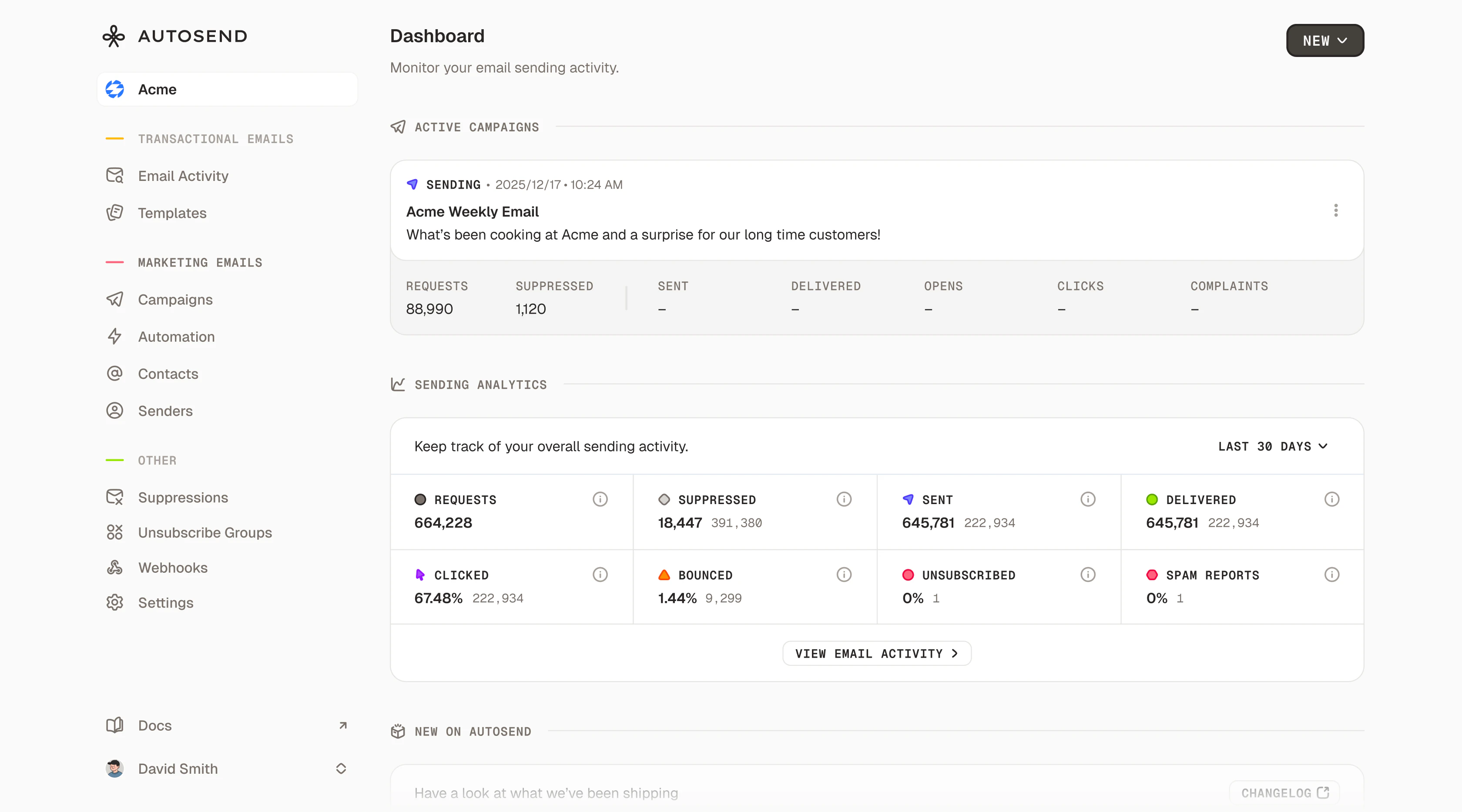
Dashboard Redesign
Your dashboard now surfaces key metrics (sends, opens, clicks, bounces), active campaigns, and product updates right when you log in. No more digging through reports.Fresh Landing Page
Completely redesigned with a modern look, interactive sections, smoother animations, and a clearer story about how AutoSend helps you send better emails.Faster CSV Imports
Importing large contact lists is significantly faster. Upload your CSV and get back to work.User ID Support in CSV Imports
Import user IDs alongside contact data to maintain consistent identifiers across systems.List-Unsubscribe Header
The standardList-Unsubscribe header is now included in all emails, enabling one-click unsubscribe buttons in Gmail and Apple Mail. No configuration needed.Fixes:
- Fixed campaign analytics not refreshing when switching between campaigns
- Resolved dark mode styling issues with the payment alert banner
- Improved link formatting in the email builder
CC and BCC Support
Native CC and BCC support is now available across AutoSend.Send to Multiple Recipients
Add CC and BCC recipients to any email via API or SMTP relay without sending separate emails.Full Email Activity Tracking
Every CC and BCC recipient is tracked individually. See opens, clicks, bounces, and complaints for each recipient separately.Smart Suppression Handling
When a TO recipient is suppressed, CC and BCC recipients are automatically suppressed too. Bypass options are available when needed.Proper Bounce and Complaint Attribution
Bounces and complaints from CC/BCC recipients are correctly attributed to the right email address.Cleaner Campaign Dashboard
Active campaigns now automatically appear at the top and past campaigns are hidden to reduce visual clutter.Filter Contacts by List ID
AddedcontactListId parameter to the contacts API for filtering contacts by specific lists.Bypass Suppressions
Send an email to a suppressed recipient on a per-email basis for critical communications like password resets.Fixes:
- Fixed proration calculations for plan upgrades and downgrades
- Resolved issues with payment cancellations not reflecting correctly
- Fixed billing cycle date updates after plan changes
Improvements and Bug Fixes
This release focuses on polishing the edges. Clearer errors, better analytics visibility, and a few fixes.Email Automation Landing Page
A dedicated landing page for email automation explaining drip campaigns, onboarding sequences, and triggered emails.Dynamic Validation Errors
Validation errors now tell you exactly what’s wrong and where, with specific feedback for contacts, emails, SMTP settings, and suppression groups.Unsubscribe Preferences
The unsubscribe preferences page now shows visible and hidden states for suppression groups, giving you control over what subscribers see.Open Rate Analytics
Campaign and automation analytics now include dedicated open rate sections alongside clicks and deliveries.SMTP API Key Flexibility
All API key types now work with SMTP authentication. Any valid API key works as your SMTP password.Fixes:
- Fixed webhook validation errors not displaying correctly when creating or editing webhooks
- Fixed pricing feature strikethrough styling for plans
- Fixed icon visibility issues in dark mode for email status indicators
Introducing SMTP Support
You can now send emails through AutoSend using SMTP as well as the REST API.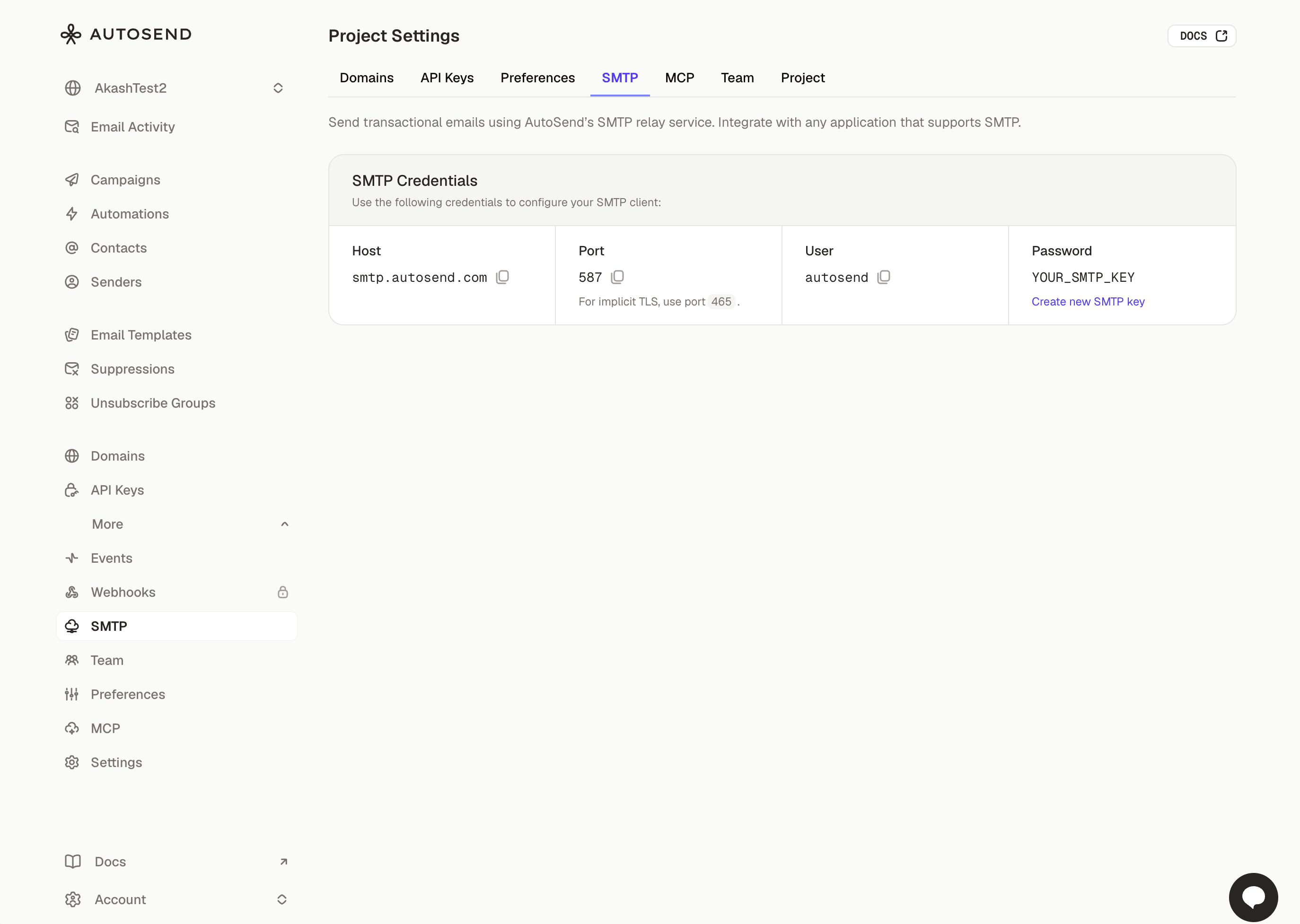
Simple Setup
Go to Settings → SMTP to get your credentials. Host, port, and username are pre-configured. Generate an API key to use as your password.Standard SMTP
Connect usingsmtp.autosend.com on port 587 with TLS. Works with any SMTP client, library, or platform that supports standard SMTP.Same Deliverability
All the benefits of AutoSend’s sending infrastructure: same reputation, same analytics, same reliability. Perfect for legacy systems or platforms with built-in SMTP support.Improvements:
- Campaign and automation analytics now show clicked status sections with cleaner empty states
- You can now sort contacts via the API for paginating large lists in a specific order
Fixes:
- Fixed date filter equals not working correctly when filtering contacts by an exact date
- Fixed incorrect campaign counts in the campaigns list
Introducing Spam Checker
Spam Checker analyzes your email content in real-time, flags potential issues, and tells you exactly what to change before you send.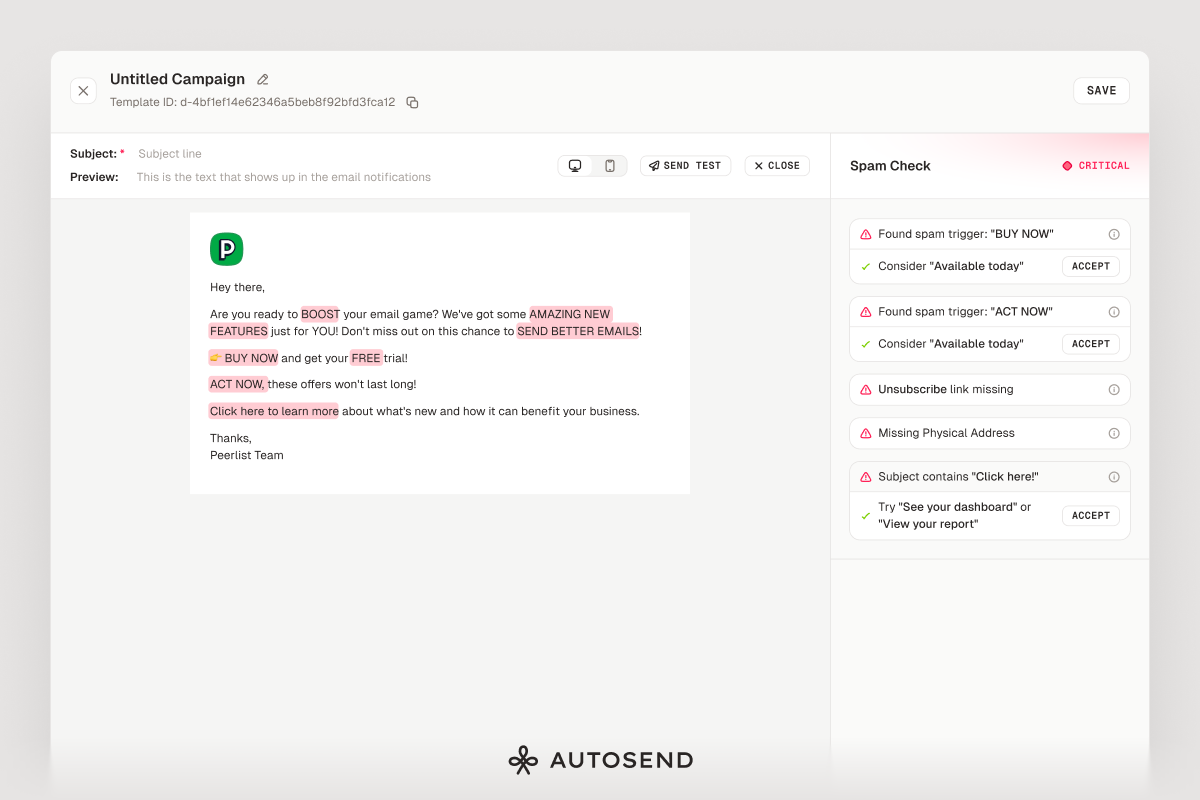
Real-time spam analysis
As you write, Spam Checker scans your content for known spam triggers.Severity scoring
Issues are categorized as safe, warning, or critical based on how likely they are to trigger spam filters.Specific issue detection
Catches excessive caps, suspicious URLs, spam trigger words, urgency language, missing unsubscribe links, and more.One-click fixes
Most issues come with suggested replacements. Click “Accept” and the fix is applied instantly.Works everywhere
Available in the email builder for campaigns, automations, transactional templates, and compose.Fixes:
- Fixed styling issue in the test email modal
- Fixed alignment and null click issue in automation analytics
- Fixed contact counts not refreshing correctly when adding contacts to a list
- Fixed outline styling on automation sequence cards
Platform Improvements
Major improvements to how you track campaign performance and how quickly emails reach inboxes.Improved Analytics
Email status tooltips now explain what each status means and what action to take. Date/time formatting is consistent across all views for easier comparison.Faster Campaign Delivery
Upgraded sending infrastructure improves speed and reliability. Campaigns reach inboxes faster with fewer delivery errors, especially for large contact lists.Fixes:
- Fixed images breaking email responsiveness on mobile devices
- Resolved a bug where inserting images from your library would fail silently
- Fixed segment evaluation queue causing segments to refresh incorrectly
Email Builder, Webhooks, and Analytics
Major improvements to the email builder, better webhook tracking, new analytics capabilities, and platform stability fixes.Global Text Color
Set a default text color for your entire email once and all text inherits that color.Plain Text Support
The email builder now properly handles plain text versions of your emails for better deliverability.Better State Management
Selecting buttons, dividers, images, and text blocks is smoother with clearer visual feedback.Better Test Email Experience
Enter test values for email variables directly in the test email modal. Cleaner interface with better feedback.Email Activity Analytics
Key metrics (total sent, delivered, opened, clicked, bounced, failed) are now visible at a glance on the email activities page.Template Table View and Search
Email templates now have a proper table view. Search by name or subject line to find templates faster.Webhook batchId and test field
Webhook events now includebatchId (for grouping bulk email events) and a test boolean field for debugging.Optimized webhook payloads
Reduced payload size by stripping unnecessary data. Faster processing, less bandwidth, and cleaner logs.Fixes:
- Email activity modal viewport
- Unsubscribe group undefined error
- Image link focus behavior
- Domain validation false positives
- Button sizing in modals
- Broken documentation links
- Template ID missing in HTML editor
- Workflow automation trigger edge cases
- Automation button state management
Introducing Email Automations
Email automation is now live in AutoSend. Create triggered sequences with visual workflows, tracking, and unsubscribe group management.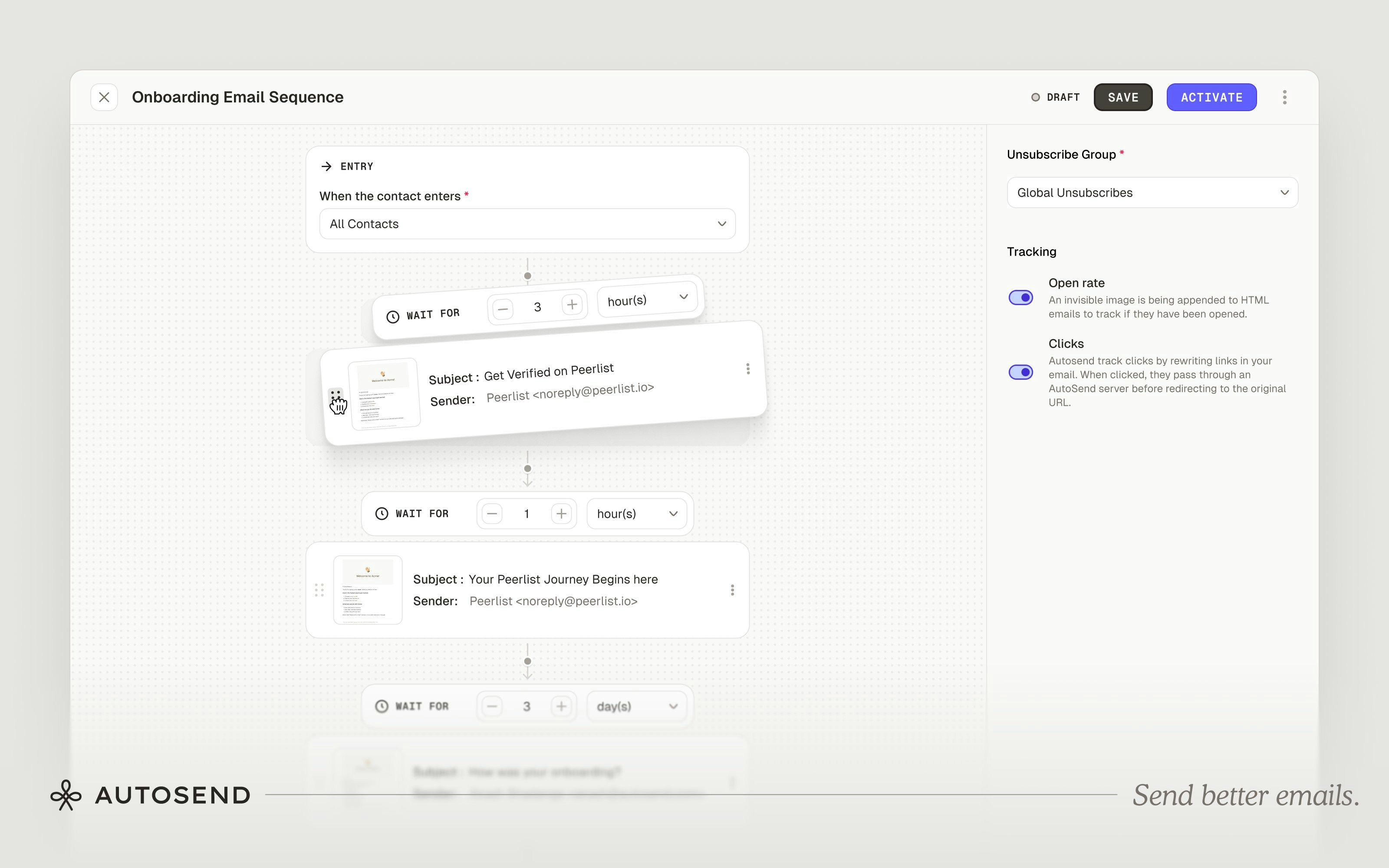
Visual Builder
Design automation flows in a drag-and-drop interface. See your entire sequence with entry points, wait steps, and email blocks connected in order.Flexible Timing
Set delays between emails: immediately, hours, or days.Exit Conditions
Control when contacts leave sequences. Exit contacts immediately when they’re removed from the triggering list or segment.Unsubscribe Groups
Assign each automation to a specific unsubscribe group so contacts can opt out of individual sequences without unsubscribing from everything.Tracking Built-in
Enable or disable open and click tracking per email. Analytics show open rates, click rates, and engagement metrics per message.Common use cases: Welcome sequences, onboarding drips, re-engagement campaigns, trial conversion sequences, and waitlist nurturing.Introducing Teams
AutoSend now supports teams. Invite your team for full platform access with no permission levels to configure.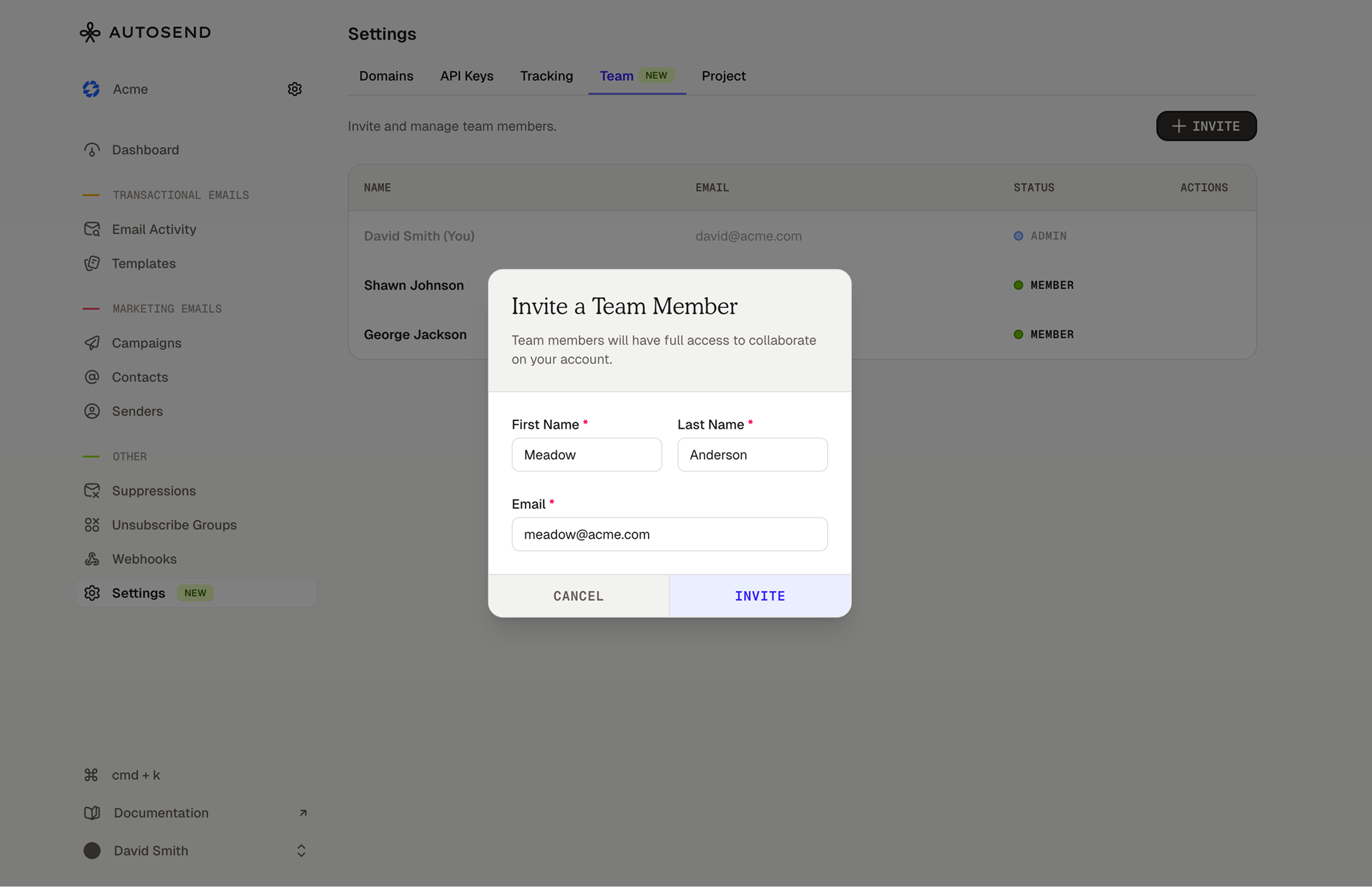
Invite Your Team
Head to Settings → Team to invite as many people as you need.Same Access for Everyone
No permission levels to configure. Everyone you invite can do everything you can.Simple Invite Flow
Send an invite, they get a secure link via email, they click it, they’re in. Invites are valid for 7 days. You can resend or cancel them anytime.Introducing Compose by AutoSend
A free email template builder with markdown support. Create responsive emails without coding.
Markdown support
Write emails the same way you write docs or READMEs. If you’ve written markdown before, you already know how to use Compose.Visual blocks
Drag in buttons, columns, spacers, and dividers when markdown isn’t enough.Variables for personalization
Drop in{{first_name}} or {{company_name}} and your email is ready for dynamic content.Responsive by default
Your emails automatically adapt to desktop, tablet, and mobile.Clean HTML export
Production-ready HTML with no inline styles soup. Tested across Gmail, Outlook, Yahoo, and Apple Mail.No signup required
Open autosend.com/compose and start building. Works with any email provider.Email Activity Filters
Filter and analyze your email activity by status, templates, domain, and API key.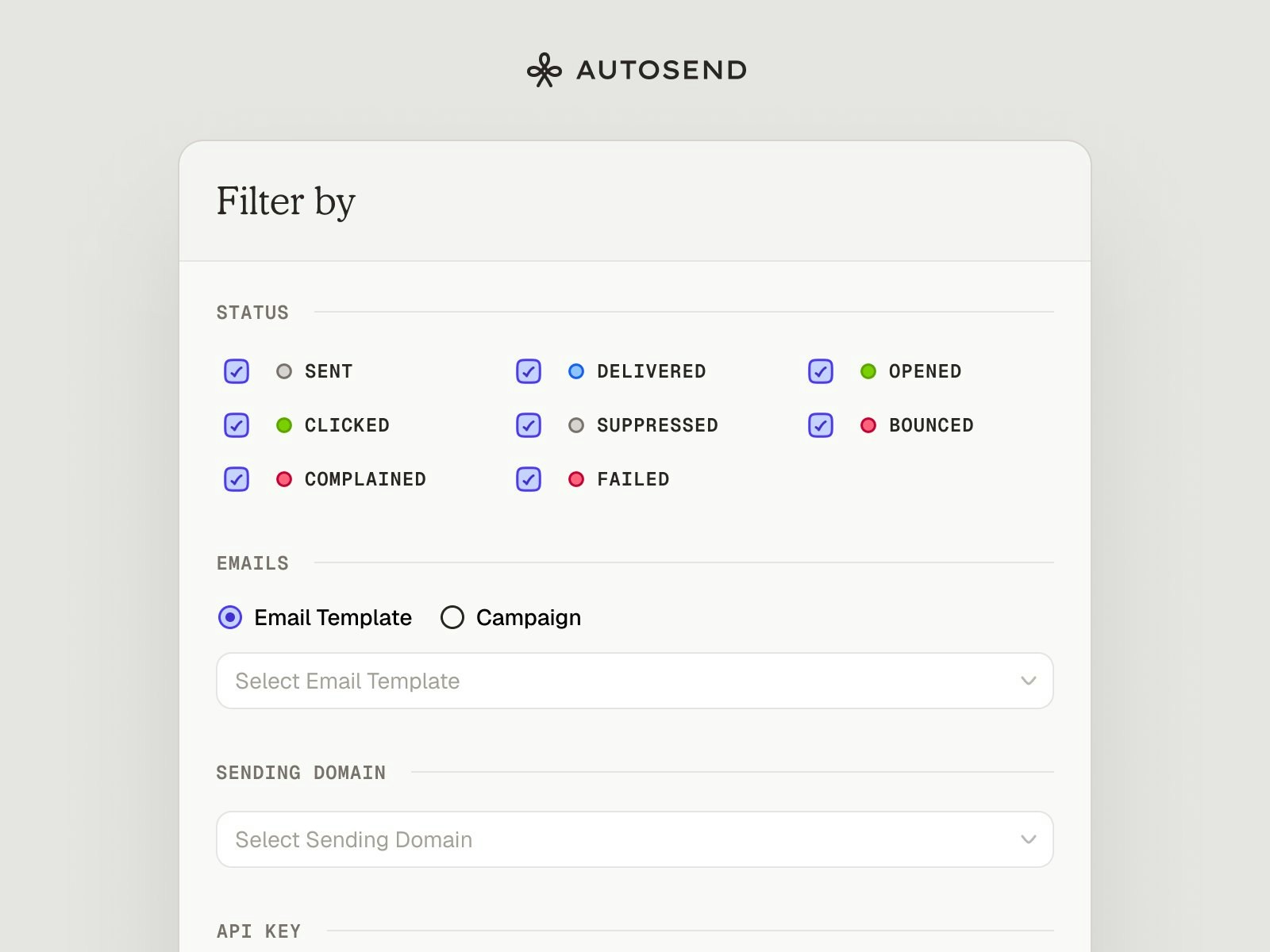
Status Filters
Filter by delivery lifecycle (Sent, Delivered, Bounced), engagement (Opened, Clicked), or issues (Complained, Suppressed, Failed).Email Source
Filter by email template or campaign to see activity for specific email types.Sending Domain
Filter emails sent from specific verified domains.API Key
Filter emails sent using specific API keys for better tracking.Combine multiple filters to narrow down your search and get precise insights into email activity.Webhooks and Email Attachments
Two of the most requested features: webhooks management and email attachments.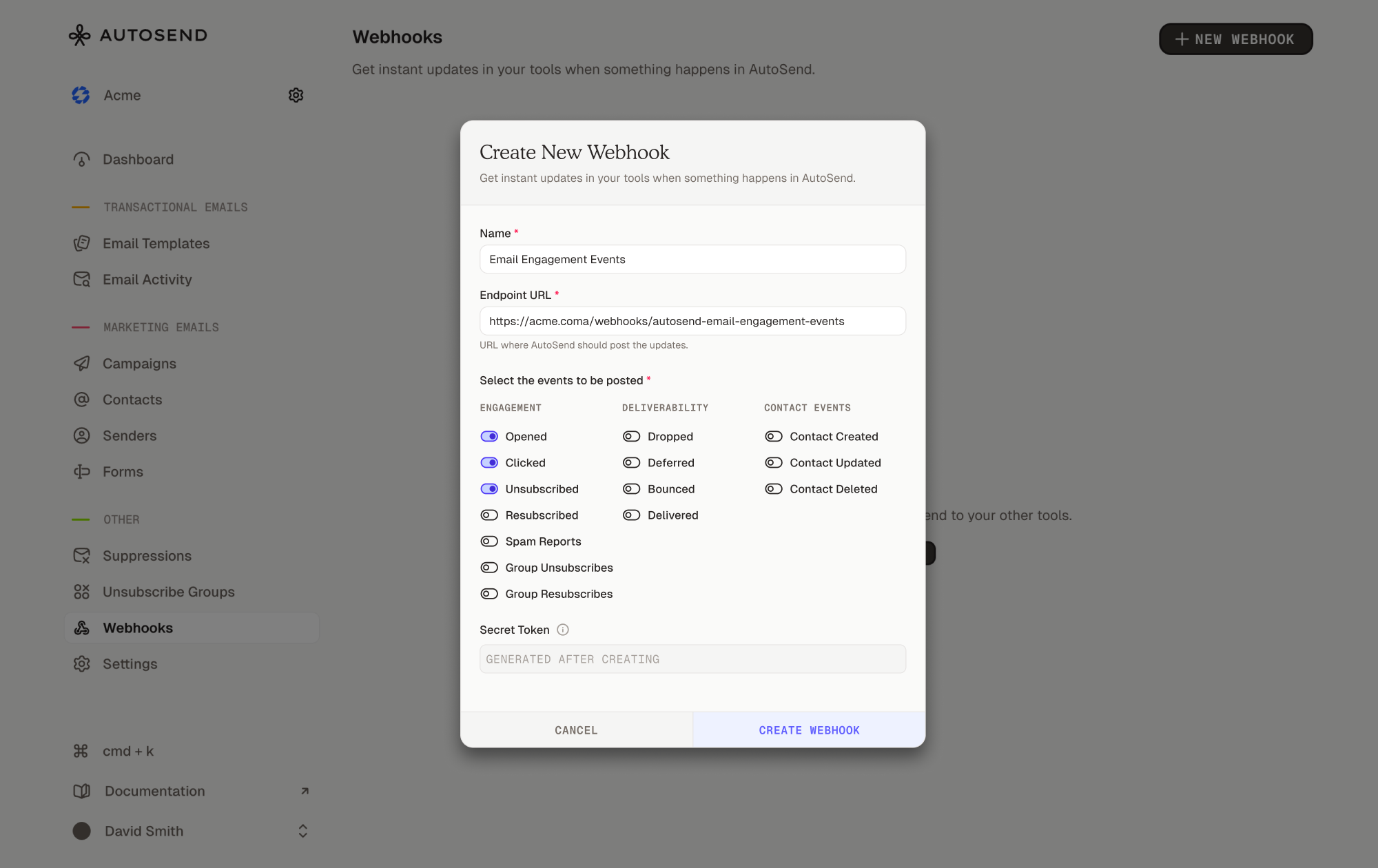
Webhooks
Listen to real-time email events directly in your app. Available on Pro 10k plans and above.Events you can track:- Delivery lifecycle:
email.sent,email.delivered,email.deferred - Engagement:
email.opened,email.clicked - Issues:
email.bounced,email.spam_reported - Preferences:
email.unsubscribed,email.group_unsubscribed,email.group_resubscribed - Contact events:
contact.created,contact.updated,contact.deleted
Email Attachments
Attach files via base64 upload, S3 file paths, or external URLs. Up to 20 attachments per email, 40MB per file.Fixes:
- Fixed pricing page data issues during onboarding.