

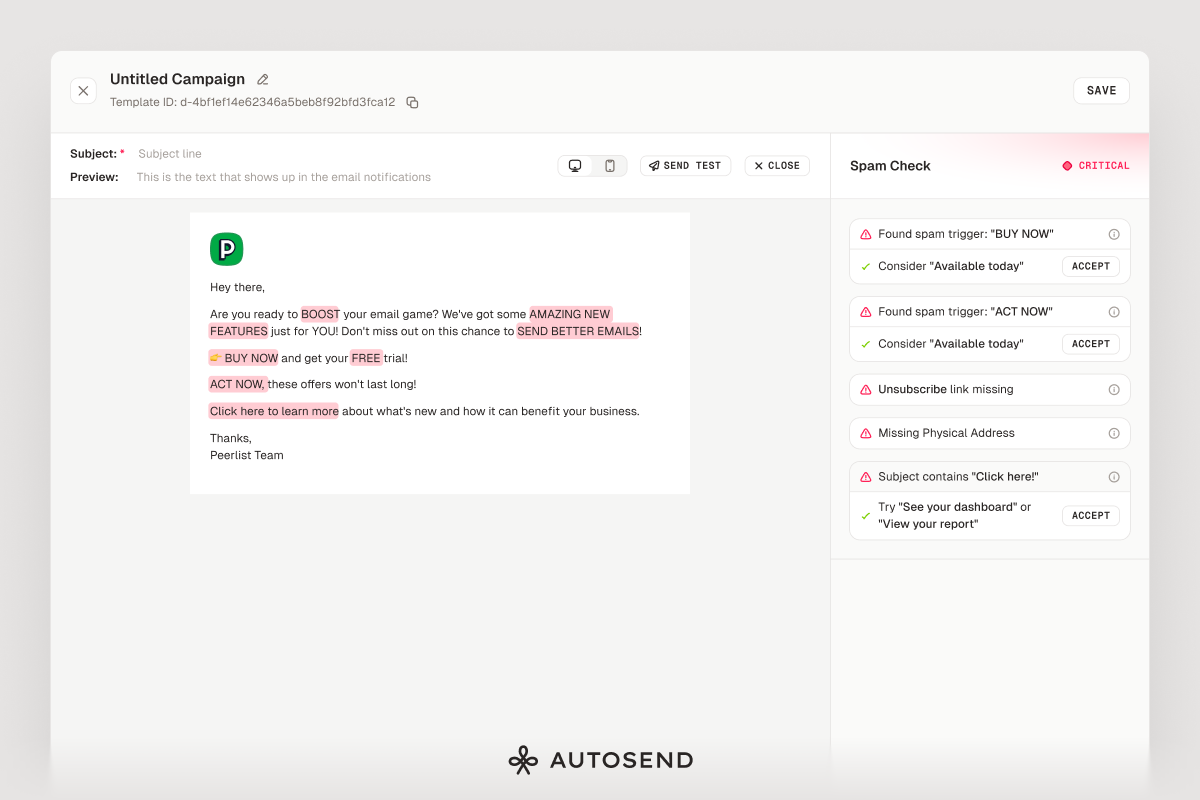
What’s New
- Real-time spam analysis - As you write, Spam Checker scans your content for known spam triggers. No need to run a separate check or switch tools.
- Severity scoring - Issues are categorized as safe, warning, or critical based on how likely they are to trigger spam filters. Focus on what matters most.
- Specific issue detection - We check for excessive caps, suspicious URLs, spam trigger words, urgency language, missing unsubscribe links, and more. Each issue shows exactly where the problem is in your email.
- One-click fixes - Most issues come with suggested replacements. Click “Accept” and the fix is applied instantly. No copy-pasting required.
- Works everywhere - Available in the email builder for campaigns, automations, transactional templates, and compose. Same experience across the board.
What It Catches
- High-risk spam words like “click here”, “buy now”, “limited time”
- Excessive capitalization and punctuation (STOP YELLING!!!)
- URL shorteners and suspicious links
- Deceptive claims and urgency language
- Missing unsubscribe links in marketing emails
Improvements
- Better analytics UI - Campaign and automation analytics now show clicked status sections. Empty states are cleaner and more helpful.
- Pricing slider overhaul - The plan comparison slider is smoother and more responsive. Demo CTAs in onboarding are more prominent.
Bug Fixes
- Send test email background - Fixed styling issue in the test email modal.
- Info icon alignment - Fixed alignment and null click issue in automation analytics.
- Contacts count not updating - Contact counts now refresh correctly when adding contacts to a list.
- Automation card border - Fixed outline styling on sequence cards.
As always, let us know if you run into issues or have feedback at . We’re listening to every single suggestion you have.