

Prerequisites
Verified Domain
Make sure you have a verified domain added in AutoSend to send emails from.
SMTP Key
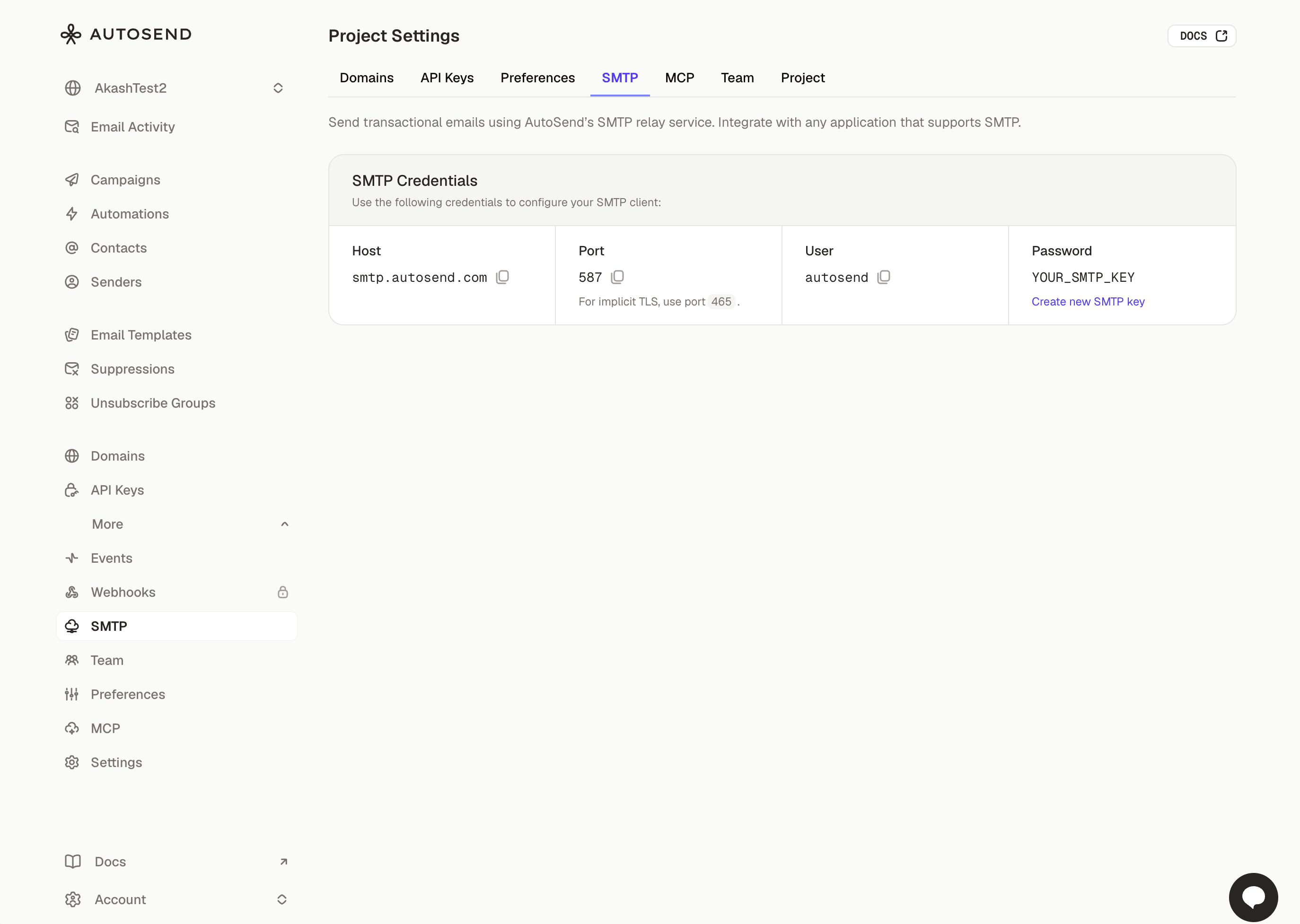
Create a project-specific SMTP key from the SMTP tab in Project Settings.
SMTP Credentials
Use the following credentials to configure your SMTP client:Port Configuration
AutoSend supports multiple ports to accommodate different network configurations:Integration Examples
Platform Integrations
AutoSend SMTP works with any platform that supports SMTP configuration:
Auth0
Send authentication emails through AutoSend SMTP.

Customer.io
Send emails from Customer.io through AutoSend SMTP.

Descope
Send authentication emails from Descope through AutoSend SMTP.
Nodemailer
Send emails from Node.js apps using Nodemailer with AutoSend SMTP.

Supabase
Send auth emails from Supabase through AutoSend SMTP.

WordPress
Configure WordPress to send emails through AutoSend SMTP.
Testing with Swaks
Swaks (Swiss Army Knife for SMTP) is a powerful command-line tool for testing SMTP configurations.Installation
Basic Test
Test with Implicit TLS (Port 465)
Test with HTML Body
-v or -vv for detailed SMTP conversation logs.
Troubleshooting
Connection refused or timeout
Connection refused or timeout
Possible causes:
- The SMTP port may be blocked by your firewall or ISP
- Incorrect server hostname
- Network connectivity issues
- Verify the hostname is
smtp.autosend.com - Check your firewall rules
- Test connectivity:
telnet smtp.autosend.com 587
Authentication failed
Authentication failed
Possible causes:
- Invalid SMTP key
- Username doesn’t match a verified sender
- Verify your SMTP key in the SMTP Settings
- Ensure the username is a verified sender email address
- Check that your domain is properly verified
- Check for any extra whitespace in your credentials
TLS/SSL errors
TLS/SSL errors
Possible causes:
- Using wrong encryption mode for the port
- TLS certificate verification issues
- For ports
465: Use implicit TLS (connection encrypted from start) - For ports
587: Use STARTTLS (starts unencrypted, upgrades to TLS) - If using swaks, add
--tlscflag only for ports 465
Emails not delivered
Emails not delivered
Possible causes:
- Domain not verified
- SPF/DKIM not configured
- Recipient server blocking
- Verify your sending domain is configured and verified in AutoSend
- Check the sender email matches your verified domain
- Add the required DNS records for SPF and DKIM
- Review email activity in the Email Activity dashboard
FAQs
Can I see emails sent via SMTP in my dashboard?
Can I see emails sent via SMTP in my dashboard?
Yes! All emails sent through SMTP appear in your AutoSend Dashboard under the Email
Activity section. You can view delivery status, opens,
clicks, and bounces just like API-sent emails.
What are the rate limits for SMTP?
What are the rate limits for SMTP?
SMTP rate limits are the same as the REST API. Your plan’s sending limits apply across both SMTP
and API. Check your Dashboard for your current limits.
Can I send attachments via SMTP?
Can I send attachments via SMTP?
Yes, AutoSend SMTP supports standard MIME attachments. Most SMTP libraries handle attachment
encoding automatically. The maximum message size is 25MB including attachments.
Is SMTP as fast as the API?
Is SMTP as fast as the API?
SMTP adds minimal overhead compared to the REST API. For high-volume sending or when you need
immediate delivery confirmation, the API may be slightly faster. For most use cases, SMTP
performance is excellent.
Do webhooks work with SMTP emails?
Do webhooks work with SMTP emails?
Yes! Webhooks are triggered for all events (delivery, bounce,
open, click, etc.) regardless of whether the email was sent via SMTP or the API.
Can I use multiple sender addresses?
Can I use multiple sender addresses?
Yes, you can send from any email address on a verified domain. Simply use the desired sender
address in the “From” field. But make sure the domain is verified in your AutoSend account.
Next Steps

Verify Your Domain
Set up SPF, DKIM, and DMARC for better deliverability

API Integration
Explore our REST API for more advanced use cases

Webhooks
Set up webhooks to track email events in real-time

Email Activity
Monitor your email delivery and engagement